Latest Amazon PPC Updates Sellers Should Know in 2026

Sellerise Team, Contributor
7 min read -
Published:Amazon PPC updates are adding up fast.
It’s no longer only about keywords, bids, and ACoS.
Amazon Ads is moving toward better attribution, more video placements, more AI-powered campaign formats, and more full-funnel measurement. For sellers, this means the old way of checking PPC performance may not be enough anymore.
A campaign that looks weak in last-touch reporting may still help create sales. A product video may improve traffic quality before a shopper even reaches the listing. An AI-powered Sponsored Brands collection may choose different products depending on shopper intent. And a campaign that looks profitable by ACoS may still hurt profit if TACoS, organic sales, and net margin are moving the wrong way.
Let’s look at the latest Amazon PPC updates and what sellers should do next.
1. Multi-touch attribution shows which ads helped create the sale
Amazon has started rolling out multi-touch attribution metrics for US advertisers in sponsored ads and Amazon DSP reporting.
This is one of the most important PPC updates because it changes how sellers read ad performance.
Traditionally, Amazon Ads reporting used last-touch attribution. That means the final ad click or view before the purchase gets credit for the sale. Multi-touch attribution gives advertisers another layer of reporting by dividing credit across Amazon Ads touchpoints based on their likely contribution to the shopper’s purchase decision. Amazon says this can help advertisers see the value of ads that appeared earlier in the customer journey, including awareness campaigns that built interest before shoppers were ready to buy.
This matters because shoppers rarely buy in a perfectly straight line.
For example, a shopper may:
- See a Sponsored Display ad
- Come back through a Sponsored Brands ad
- Click a Sponsored Products ad
- Buy the product later
With last-touch attribution, the final Sponsored Products ad gets the credit.
The earlier ads may look like they did nothing.
But in reality, they may have introduced the product, warmed up the shopper, or brought them back before the final purchase.
What sellers should do:
Don’t cut upper-funnel campaigns only because they look weak in last-touch reports. Compare last-touch metrics with multi-touch metrics before deciding whether a Sponsored Brands, Sponsored Display, video, or awareness campaign is really wasting money.
2. Amazon updated view attribution for some Store ads
Amazon also introduced a shopping-signal enhanced last-touch attribution model for Amazon Store ads starting January 1, 2026.
This update gives more consideration to brand discovery moments, such as exploratory browsing or general category searches. Amazon says the update affects conversion metrics such as purchases, sales, and ROAS for certain Sponsored Brands, Sponsored Display vCPM campaigns, and Amazon DSP campaigns that serve ads in the Store. Click-based attribution remains unchanged.
The important takeaway is simple:
Amazon is trying to better understand the full shopping journey, not just the last click.
For sellers, this means some campaign metrics may look different than before. If you compare January 2026 performance to previous periods, you need to know that attribution methodology may have changed for some view-based campaigns.
What sellers should do:
When reviewing year-over-year PPC performance, don’t assume every change is caused by better or worse campaign management. Some shifts may come from Amazon’s updated attribution logic.
3. Sponsored Products video is becoming more important
Sponsored Products video is another major PPC update.
Amazon says Sponsored Products video lets advertisers add product feature videos to Sponsored Products campaigns using the same campaign targeting controls and budget. Advertisers can upload 1–5 product feature videos per product within an ad group, and Amazon may show contextually relevant video thumbnails based on search query and browsing history.
Amazon also reported that Sponsored Products campaigns with video saw a 9% uplift in CTR compared with campaigns without Sponsored Products video.
This matters because many products need more than one image to explain the value.
A short video can show:
- How the product works
- What size it is
- What comes in the box
- How it looks in real life
- Why it is different from cheaper alternatives
- Which feature matters most to the shopper
For sellers, PPC creative is becoming part of performance optimization.
It’s not only about bidding higher.
It’s about helping shoppers understand the product faster.
What sellers should do:
Start testing Sponsored Products video for products where shoppers need education before buying. Track CTR, CVR, ACoS, TACoS, and profit before and after adding video.
4. Sponsored Brands collections are now AI-powered
Amazon launched Sponsored Brands collections, a format that lets advertisers promote multiple related products in one ad unit.
Advertisers can manually select ASINs or let Amazon’s AI dynamically choose the most relevant product groupings from the catalog based on campaign targets and shopping signals. Amazon says the format can show key product details like price, ratings, and deals, and drive shoppers to the product detail page.
This is useful for brands with multiple related products.
For example, if you sell kitchen accessories, skincare products, supplements, or pet products, Sponsored Brands collections can help shoppers discover related items in one ad.
But there is also a risk.
If Amazon’s AI is choosing product combinations, your catalog needs to be clean. Products with weak ratings, bad pricing, poor images, or low conversion rates can hurt the performance of the full collection.
What sellers should do:
Before using AI-powered collections, check which ASINs are actually ready for traffic. Exclude products that have weak ratings, low stock, poor margin, or poor conversion. Use collections to push products that make sense together and support each other.
How Sellers Should Build Their PPC Strategy Based on These Updates
The latest Amazon PPC updates all point in one direction:
Sellers need to stop looking at PPC as isolated campaign data and start reading it as part of the full business picture.
Here’s how to adjust your strategy.
1. Compare last-touch and multi-touch before cutting campaigns
If a campaign has weak last-touch ACoS, don’t pause it immediately.
First, check whether multi-touch attribution shows that the campaign assisted sales earlier in the journey.
This is especially important for:
- Sponsored Brands
- Sponsored Display
- Sponsored Products video
- Prime Day campaigns
- Launch campaigns
- Retargeting campaigns
- Brand awareness campaigns
A campaign may not close the sale directly, but it may still help shoppers return and buy later.
2. Track TACoS and profit, not only ACoS
Multi-touch attribution helps explain how ads contributed to a sale, but it still doesn’t tell you if the full business is becoming more profitable.
That’s where sellers need to track:
- ACoS
- TACoS
- Organic sales
- Net profit
- Margin
- Refund rate
- Ad spend
- Orders
- Units sold
Sellerise Heatmap Analytics is useful here because it lets sellers see daily patterns across metrics like sales, organic sales, net profit, ad spend, TACoS, ACoS, CTR, and refund rate. This helps sellers spot when PPC is increasing revenue but hurting profit, or when ad spend is supporting organic growth.
For example, if ad spend goes up but organic sales and net profit also go up, the campaign may be helping growth.
If ad spend goes up but organic sales and profit stay flat, it may just be buying expensive sales.

3. Use PPC to support keyword ranking
PPC should not only generate paid sales.
It should also help important keywords gain organic visibility.
Sellerise Keyword Tracker helps sellers see both organic and PPC keyword positions, which makes it easier to understand whether paid campaigns are helping ranking or only creating short-term ad sales.
For example:
If you are advertising a keyword and organic rank is improving, it may be worth continuing support even if ACoS is temporarily higher.
If you are spending heavily on a keyword and organic rank is not moving, the keyword may be too competitive, too broad, or not relevant enough.
4. Use video for products that need explanation
Sponsored Products video should not be treated as “nice to have.”
For some products, it can be the difference between a shopper understanding the offer or skipping it.
Use video for products where buyers need to see:
- Size
- Texture
- Setup
- Use case
- Before/after
- Quality difference
- Real-life demonstration
Then compare performance before and after the video test.
Look at CTR first, then CVR, ACoS, TACoS, and net profit.
5. Keep listing health under control before scaling PPC
PPC cannot fix a broken listing.
If your Buy Box is lost, price changes unexpectedly, the listing is suppressed, images change, or reviews drop, ad spend can quickly become wasted.
Before increasing your PPC budget, sellers should check two things:
First, make sure nothing is broken. Sellerise Smart Alerts helps sellers monitor important listing changes like Buy Box loss, suppressed listings, title changes, image changes, price changes, rating drops, low stock, and out-of-stock situations. This matters because PPC performance can drop for reasons that have nothing to do with bids or keywords.
Second, check if the listing is actually strong enough to convert traffic. With the Sellerise Product Research Chrome Extension, sellers can use the Listing Score to quickly understand how optimized their listing is compared to competitors. The score helps show what may be missing or weak on the listing, such as title quality, images, reviews, rating, pricing, content, or other factors that affect conversion.
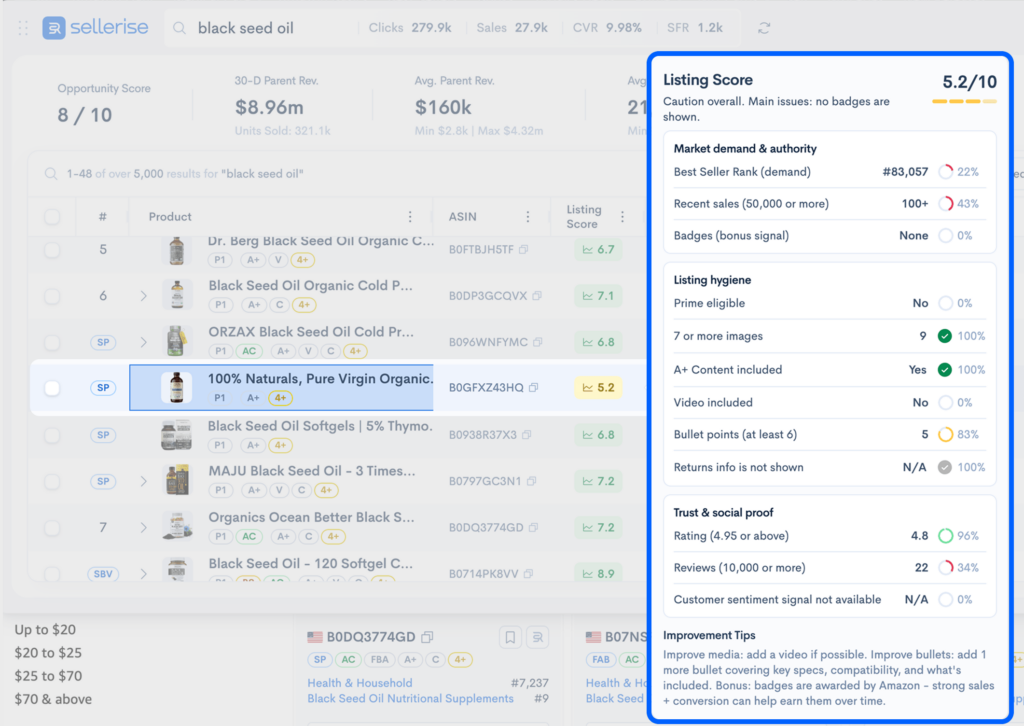
This is especially useful before scaling PPC because it helps answer a simple question:
Are we paying for more traffic to a listing that is ready to convert?
For example, if competitors have stronger images, better review quality, clearer titles, or a more complete listing, increasing PPC bids may only make you spend more without improving sales. But if the Listing Score shows clear gaps, sellers can fix the listing first and then scale ads with a better chance of turning clicks into orders.
In short: before raising PPC budgets, use Smart Alerts to make sure nothing is broken, and use the Sellerise Product Research Chrome Extension’s Listing Score to see what your listing still needs to compete.
6. Separate campaigns by funnel stage
Based on these updates, sellers should avoid putting everything into one simple PPC structure.
A stronger 2026 structure looks like this:
Bottom of funnel: Sponsored Products exact match for proven converting keywords.
Research: Auto, broad, and phrase campaigns to discover new search terms.
Product comparison: Product targeting campaigns against competitor ASINs.
Discovery: Sponsored Brands collections and Sponsored Products video.
Retargeting: Sponsored Display and AMC audiences where available.
Event support: Separate Prime Day, deal, and launch campaigns so performance is easier to read.
Each campaign should have a clear job.
Then measure it based on that job.
Final Thoughts
The biggest Amazon PPC change in 2026 is not just one new feature. PPC is becoming more full-funnel, more visual, more AI-assisted, and more attribution-aware.
And the strategy still needs to be grounded in profit.
Use Amazon Ads reports to understand the ad journey. Use Sellerise to connect that journey with TACoS, organic sales, keyword rank, listing health, and net profit.
That’s how sellers can build a smarter PPC strategy for 2026, not just more ad spend, but better decisions.