For Amazon sellers, tracking keyword performance is an important part of the job. Every click, every impression, and every conversion starts with a keyword. If you don’t know how and when to use these words to your advantage, you’ll end up spending more money on ineffective ads, and end up losing sales in the long run.
In this article, we’ll show Amazon sellers how to do a proper breakdown of keyword performance using the Sellerise SQP Insights tool. We’ll also offer advice on which metrics to look out for, and how to analyze the data to make better strategic decisions.
Why Keyword Performance Matters
Every buyer and seller on Amazon relies on keywords. When a customer types “wireless earbuds,” “running shoes,” or “protein powder,” Amazon’s algorithm decides which products appear based on relevance. Keywords can help determine:
When your product shows up in search results
How often your listing is clicked
How many visitors convert into buyers
How efficient your ad spend is
How your organic ranking grows over time
If your keywords are optimized, you can benefit from more cost-effective ads, higher visibility, and more organic sales. If there are gaps, or failure to add negative keywords, you can end up overpaying for clicks that don’t convert.
Understanding Amazon’s SQP Reports
To help brands see more success, Amazon offers sellers a comprehensive Search Query Performance (SQP) report. This includes a host of valuable data, including search query volumes, impressions, click-through-rates, cart additions, purchase rates, and more.
In theory, this should be a game-changer for sellers, but in practice, having access to this information is not enough. One of the major challenges is that the report presents raw datasets without any context. For example, you can track the performance for a given keyword, but can’t immediately tell how it stacks up against your competitors.
Similarly, it may show that a keyword is no longer performing as well as it did a few days ago, but won’t explain why. The result is that sellers fail to account for warning signs when coming up with new strategies, or spend hours manually pouring over spreadsheets, and cross-referencing data to find relevant insights.
Using SQP Insights to Track Keyword Performance
At Sellerise, we’ve created the perfect system to help decode these numbers.
SQP Insights is a keyword performance tool that’s designed to see what goes on behind the scenes. It uses the raw data from Amazon’s SQP reports to offer structured insights, market context, and real-time visualization of all your current and future keywords.
The tool shows you what’s lacking, how to improve it, and guides overall better decision making. Here are some of its most prominent features, and how to use them:
Visualize Key Data for Better Insights
Parsing through numbers can be overwhelming for even the most organized seller. With Sellerise SQP Insights, however, you no longer have to go through raw datasets to find hidden insights. Instead, all information is presented on an intuitive dashboard.
Performance Index
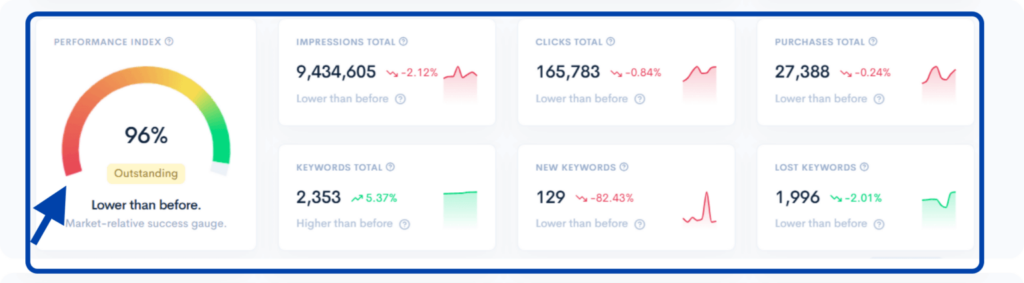
For example, the tool has a Performance Index section which provides an overview (in percentage) of how well your keywords are performing. This section also contains line charts that visualize performance data over time, allowing you to see trends and correlations in real-time.
You can, for example, use filters to track changes in impressions, click-through rates, pricing, and more. This helps you zero-in exactly on what’s responsible for that sudden drop in sales, or sharp rise in click-through rates.
Funnel Visualization
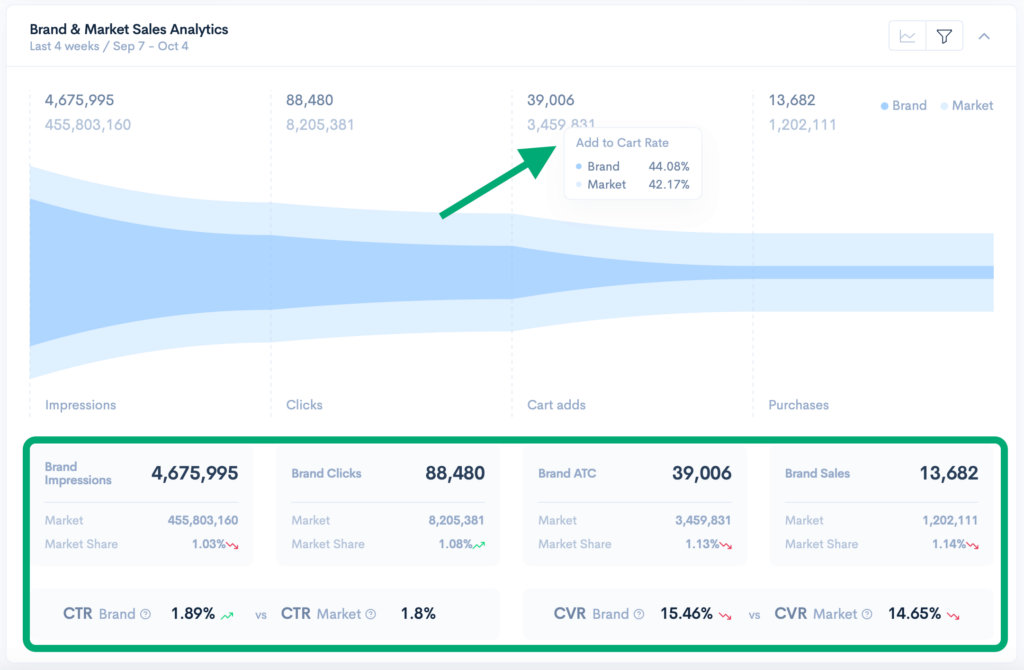
Elsewhere on the tool, you’ll find a bespoke funnel visualization. This unique chart uses data from Amazon to create a surprisingly easy-to-read visual representation of your customer journey.
It breaks down each step of the buying process from initial impressions all the way to the purchase, helping you identify where and why customers are dropping off.
For example, you notice that you’re getting a lot of impressions, but very few clicks. This could signal that there are potential issues with the images you’ve used, the pricing is off, or that your title isn’t catchy enough to convert impressions.
Similarly, if your add-to-cart rates don’t match the market averages for a keyword, it may signal descriptions need improving.
Understand Keyword Insights: Lost, New, and Maintained
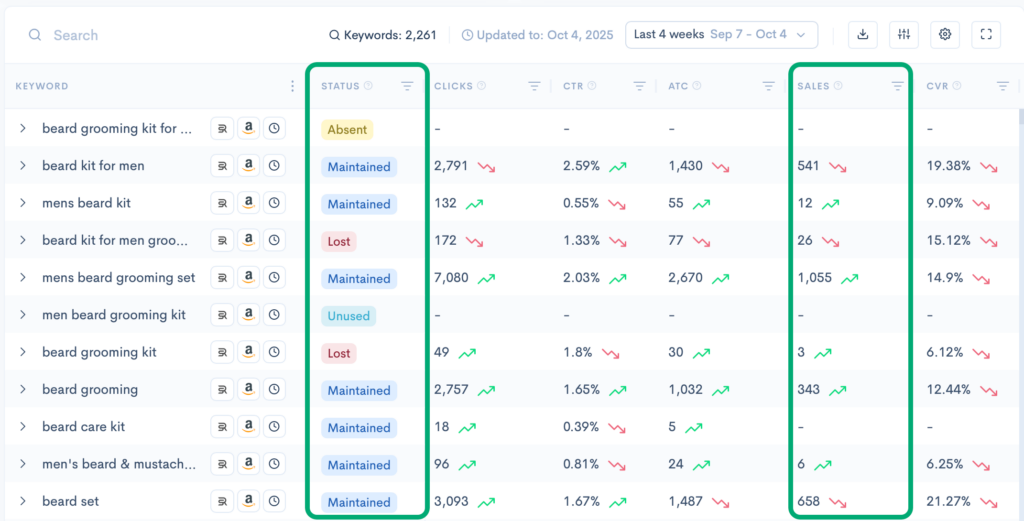
The Keyword Insights section of the SQP tool is an exceptionally useful feature for tracking performance. Here you’ll find a comprehensive list of every keyword used by your brand, flagged under one of several statuses – absent, lost, gained, or maintained.
Absent keywords are those that you have ranked for at least two weeks ago, but don’t anymore.
Lost keywords similarly show you keywords that you were ranking for the previous week, but have since dropped in popularity.
Gained keywords rank any newer additions to your roster.
Maintained keywords show you those that have remained steady over time.
So what can these statuses tell you? They essentially offer context that can guide broader investigations. For example, keywords marked as lost could indicate that you’ve made some recent changes to your description that have lowered your ranking for that particular term. It could also suggest that a competitor is using that keyword better.
Similarly, keywords marked as “gain” signal an emerging demand that’s worth monitoring and capitalizing on. Maintained keywords show you what areas don’t need improvement, while absent and unused keywords could be included into your product title, bullet points, and descriptions for better visibility.
Compare Top Search Terms
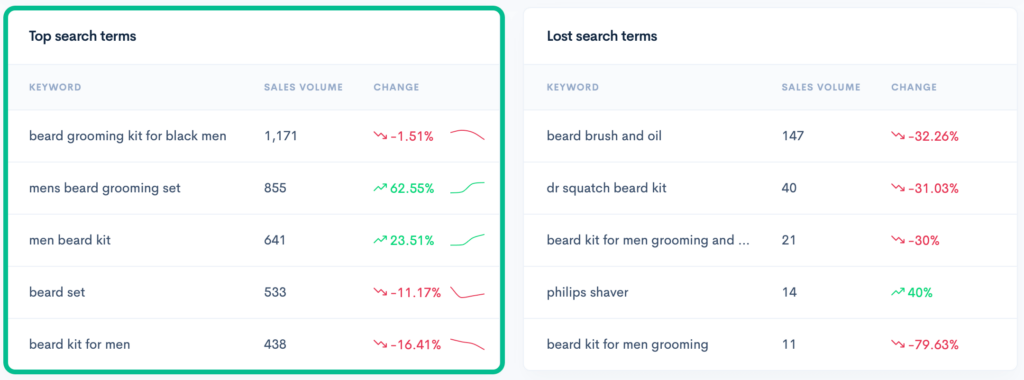
When using the SQP Insights tool, you’ll also find a table ranking the top search terms within your category.
It may sound simple, but this is incredibly valuable information. Not only does this table show you the top performing keywords driving revenue for your brand, it shows you which keywords are gaining momentum week-by-week.
Study Regional Breakdowns
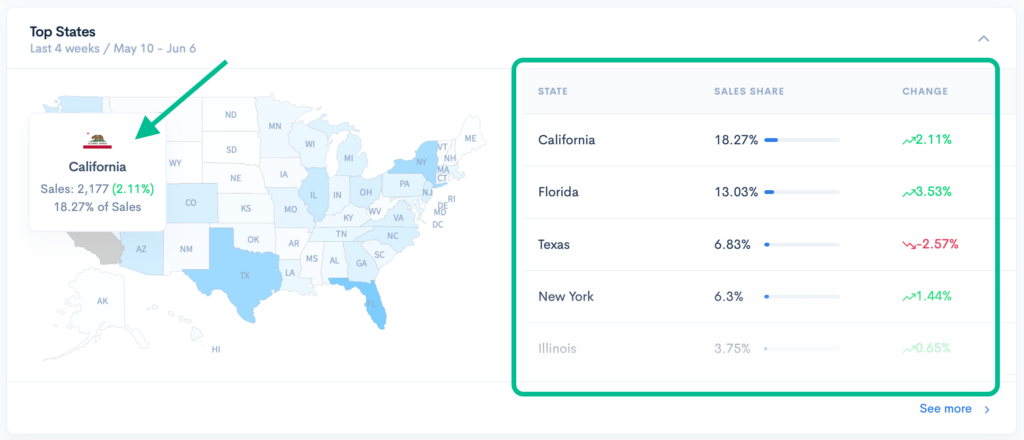
A product that resonates strongly with buyers in Texas may not always perform as well in Mississippi, and vice versa. That’s why Sellerise SQP Insights includes a color-coded sales map that shows which states are driving the most purchases.
This adds a new layer to keyword strategy that most sellers tend to ignore initially. Once you’ve identified your lowest-performing states, you can optimize your keywords to target those buyers, and highlight the features or use cases that resonate with them.
The Bottom Line
Keyword performance is the backbone of Amazon success. Without visibility into how these words and phrases behave, it can be tough to optimize ads, scale listings, or improve organic rankings. The Sellerise SQP Insights tool significantly simplifies this process by turning complex Amazon data into structured, actionable insights.
When used consistently, it takes away the guesswork from the science of keywords, enabling you to make smarter, more profitable decisions.
Professional in digital marketing and content creation, with 7 years of experience in the field. Keren has a strong background in e-commerce, helping businesses grow their online presence and achieve their goals.