Running an Amazon business means having access to a lot of data.
The problem is that getting a clear answer from that data often requires opening multiple dashboards, changing date ranges, exporting reports, cleaning spreadsheets, and comparing numbers manually.
You may only want to know why profit dropped yesterday. But before you can answer that question, you need to check sales, advertising costs, Amazon fees, refunds, inventory, and several other metrics.
It connects your Sellerise workspace to AI assistants such as Claude, allowing you to ask questions about your Amazon business and receive answers based on your Sellerise data.
Instead of searching through dashboards, you can simply ask:
“Why did profit decrease last week?”
“Which PPC campaigns are wasting money?”
“What products are at risk of going out of stock?”
“Summarize the most common complaints in my recent reviews.”
Sellerise provides the business data. Your AI assistant helps you understand it.
In simple terms, MCP allows an AI assistant to securely connect to external tools and use the information available inside them.
Without a connection, Claude does not automatically know what is happening in your Amazon account. It can explain Amazon strategy, help you build a report, or analyze information you manually provide, but it cannot see your current sales, profit, advertising, reviews, inventory, or reimbursement data.
Sellerise MCP creates a secure connection between your Sellerise workspace and a supported AI assistant.
Once connected, the assistant can retrieve the Sellerise data your account is authorized to access and use it to answer your questions. The connection uses Sellerise OAuth and provides read-only access to supported Amazon seller analytics.
That means the AI is no longer working only with generic information.
It can help you analyze what is actually happening inside your business.
Why Amazon sellers need a different way to work with data
Most Amazon sellers do not have a data problem.
They have an interpretation problem.
The numbers are available, but understanding what they mean can take time:
Sales increased, but did profit increase too?
Advertising generated more orders, but was the additional spend profitable?
A product’s rating dropped, but what complaints caused it?
Inventory is still available, but will it last until the next shipment arrives?
Revenue looks stable, but are refunds or fees reducing the final margin?
These questions usually require information from several parts of an Amazon business.
Sellerise already brings important financial, advertising, inventory, review, reimbursement, and search performance data together. MCP makes it possible to work with that data conversationally.
You ask a business question.
The AI assistant retrieves the relevant Sellerise information, analyzes it, and presents the answer in a format that is easier to understand.
What can you analyze with Sellerise MCP?
Sellerise MCP covers all important areas of your Amazon business.
1. Sales, profit, and payouts
Revenue alone does not tell you how well your business is performing.
To understand your actual results, you also need to consider Amazon fees, advertising costs, refunds, COGS, and other expenses.
With Sellerise connected, you can ask questions such as:
“How much net profit did we generate this month?”
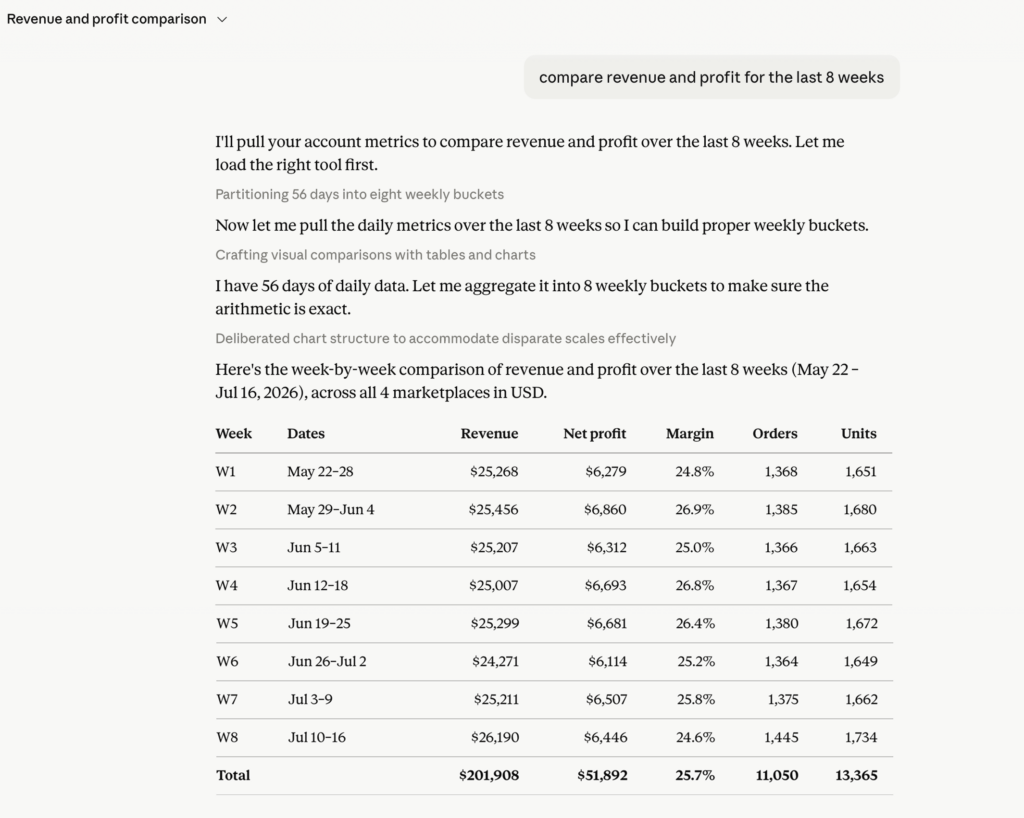
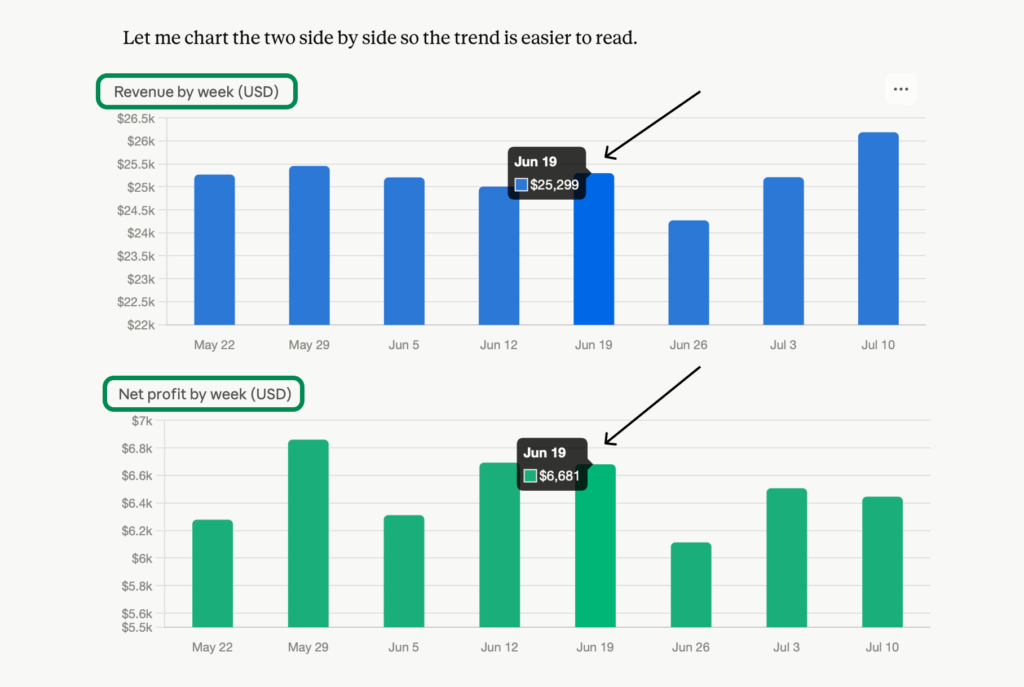
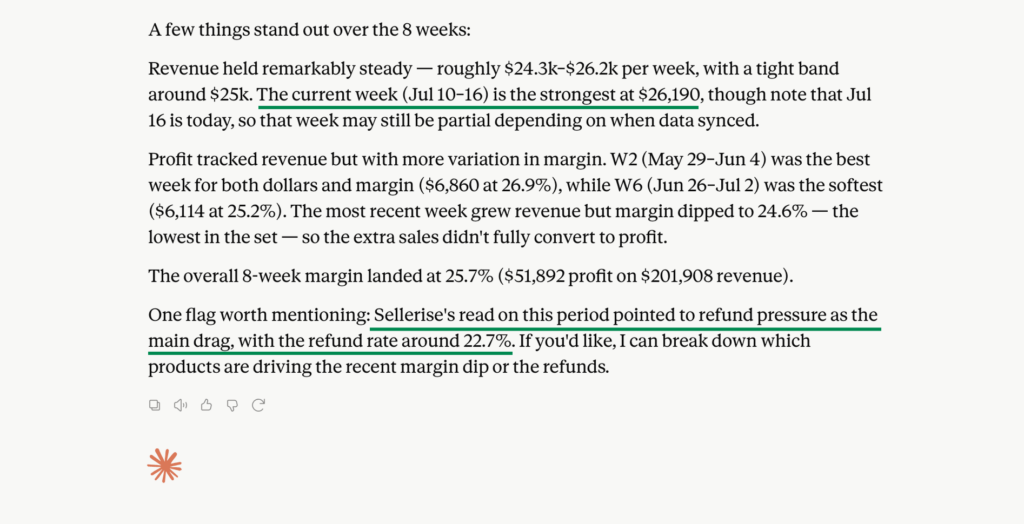
“Compare revenue and profit for the last 8 weeks.”
“Which products had the largest margin decrease?”
“Why did profit drop yesterday?”
You can also ask the assistant to organize the results by SKU, marketplace, account, or period when that information is available through your Sellerise workspace. Sellerise identifies profit and payout data as one of the core data domains available through the connection.
2. Amazon PPC performance
Advertising dashboards contain a large number of campaigns, keywords, placements, bids, and performance metrics.
The difficult part is deciding what deserves your attention first.
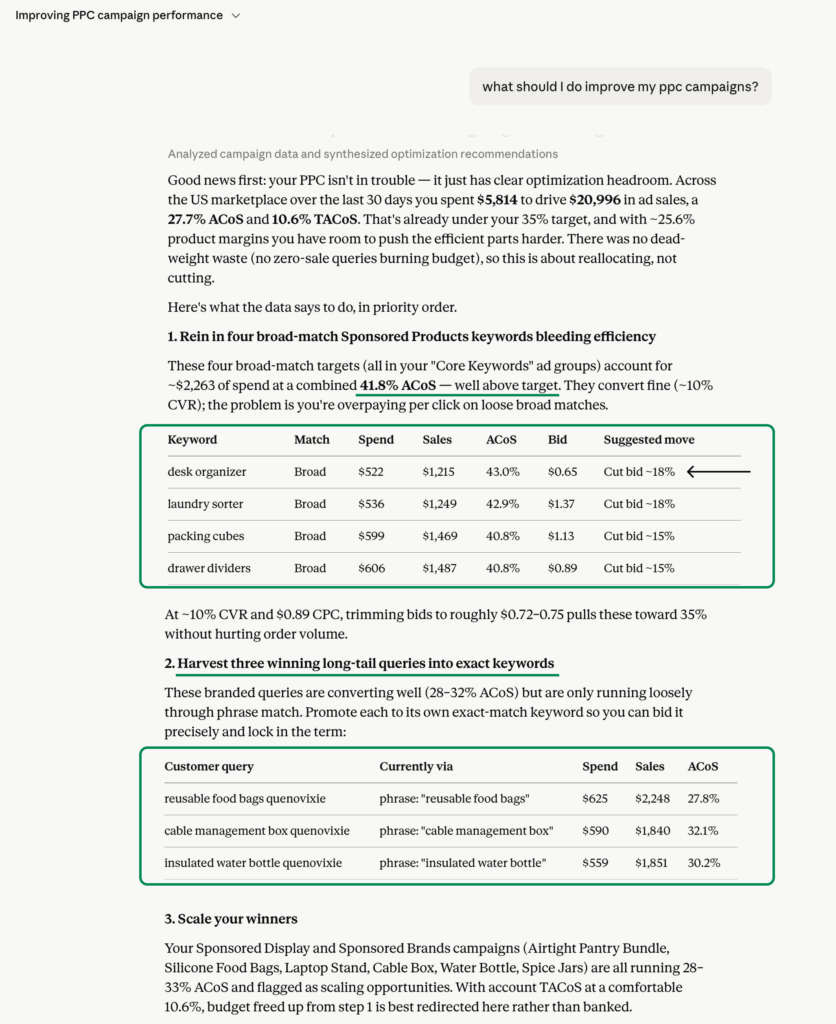
Sellerise MCP can help you ask more direct questions:
“Which campaigns spent money without generating sales?”
“Compare ad spend and attributed sales with last month.”
“Which products had the biggest ACoS increase?”
“Show me the campaigns I should review first.”
Instead of checking every campaign individually, you can begin with a summary and then continue asking more specific questions.
For example:
“Why did ACoS increase for this product?”
“Was it caused by higher CPC, lower conversion, or both?”
This creates a more natural analysis process. You can start with the overall result and continue investigating until you understand what caused it.
3. Reviews and customer feedback
Customer reviews contain valuable product information, but reading them one by one is rarely practical.
With Sellerise MCP, you can ask your AI assistant to summarize review data and identify patterns.
Try questions such as:
“Summarize this week’s product reviews.”
“What are customers mentioning most often in one- to three-star reviews?”
“Which complaints are becoming more common?”
“Compare customer feedback for our two main products.”
This can help you identify potential problems with product quality, packaging, instructions, sizing, functionality, or customer expectations.
It can also turn a large amount of feedback into a clear list of issues for your product, support, or listing team to investigate.
4. Inventory
Inventory decisions become more difficult when you manage multiple products, marketplaces, and shipment timelines.
Sellerise MCP can help surface the products that may require attention.
For example:
“Which products are at risk of going out of stock?”
“How many days of inventory do we have left?”
“Which SKUs appear to be overstocked?”
“What should I review before planning my next shipment?”
Sellerise can provide inventory signals based on available data such as stock levels, days of cover, restock timing, and sell-through performance.
The assistant can then help summarize that information and make it easier to prioritize products.
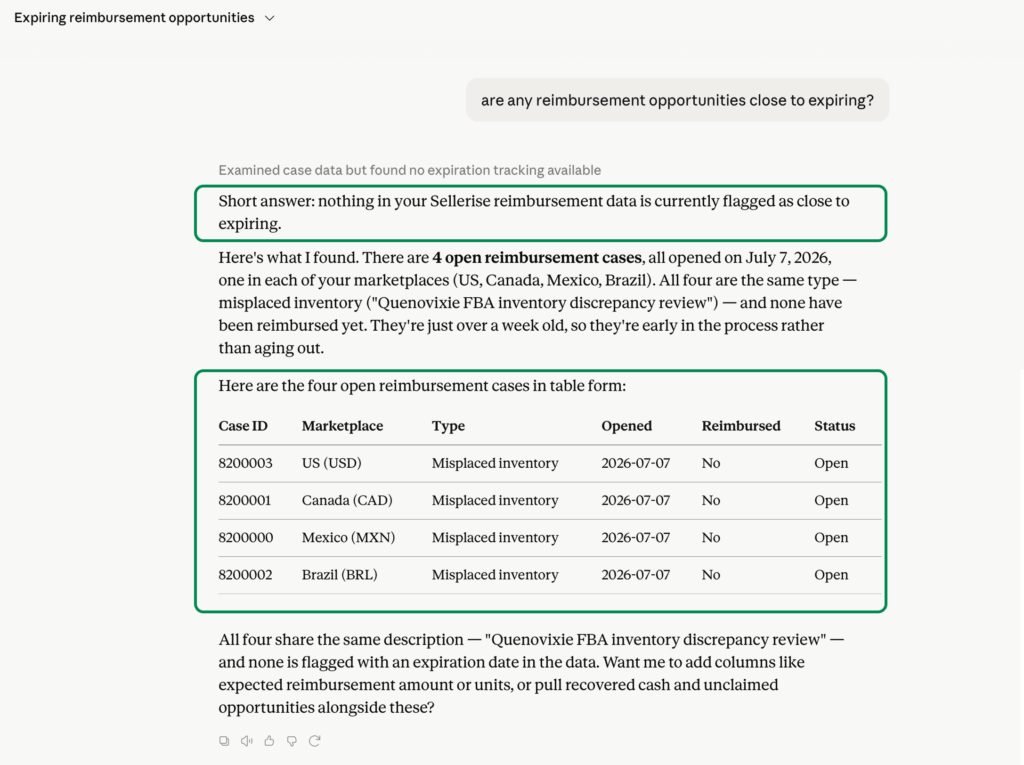
5. Amazon reimbursements
Amazon may owe sellers money for lost inventory, damaged units, fee errors, and other eligible cases.
But when you manage many cases, it can be difficult to see the total recoverable amount, current status, and approaching deadlines.
You can ask:
“How much money is currently recoverable?”
“What is the status of our open reimbursement cases?”
“Are any reimbursement opportunities close to expiring?”
“Summarize reimbursements by marketplace.”
This gives you a faster way to understand what may require action without manually reviewing each case.
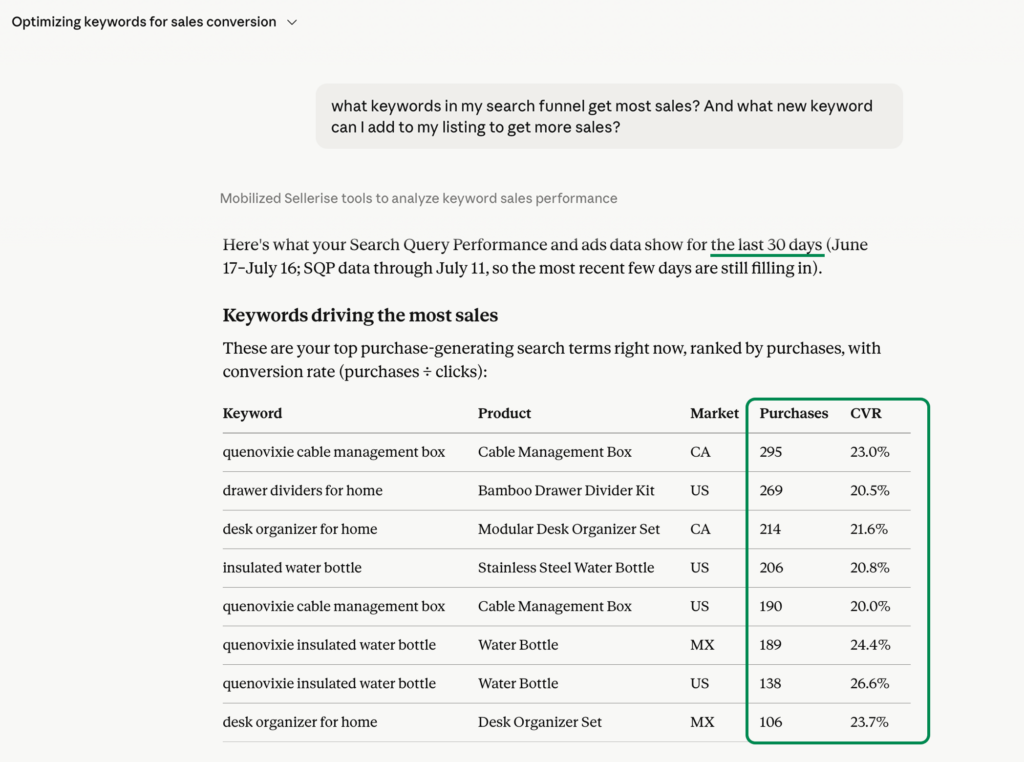
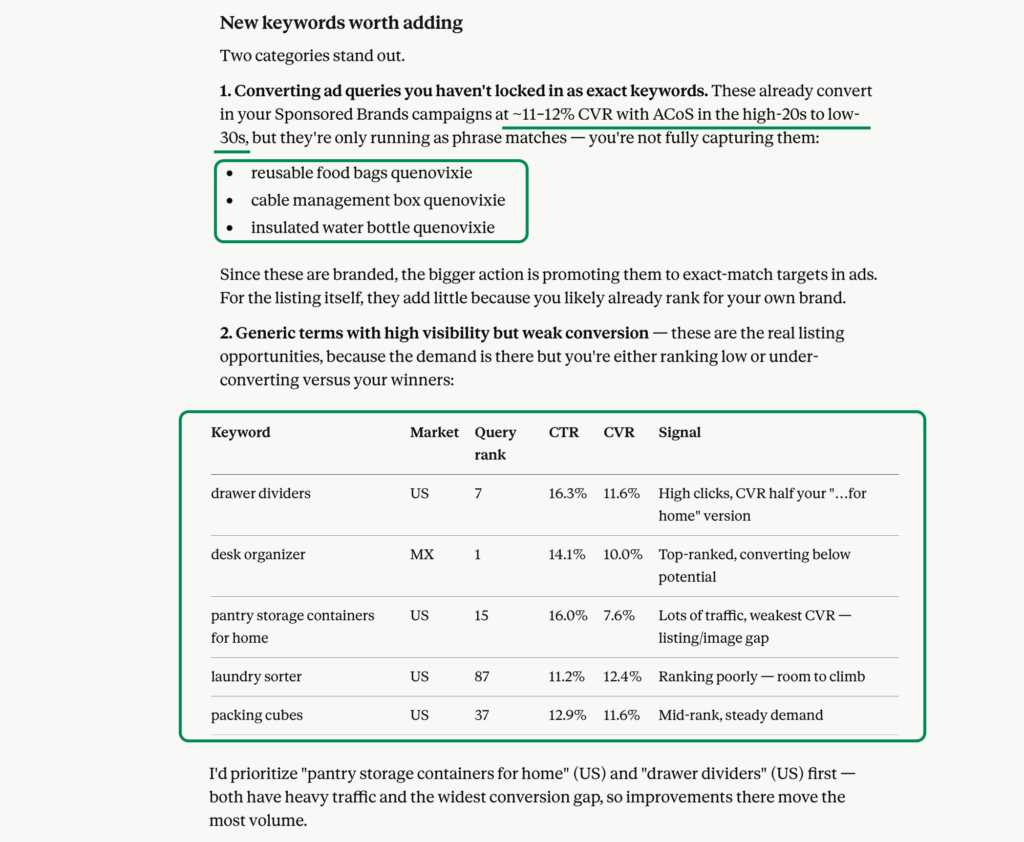
6. Search performance
Search performance data helps you understand what happens between a customer seeing your product and completing an order.
Sellerise MCP can help you analyze the full funnel from impressions to clicks, add-to-carts, and purchases.
Try asking:
“Where is our search funnel losing customers?”
“Which keywords receive impressions but not enough clicks?”
“Which products have strong click share but weak purchase share?”
“Compare search performance for this week and last week.”
This can help you identify whether the main problem is visibility, click-through rate, conversion, or another stage of the customer journey.
Go from a general question to a detailed analysis
One of the biggest advantages of working with an AI assistant is that you do not need to know the perfect report or filter before you begin.
You can start with a broad question:
“How did the business perform this week?”
Then continue based on the answer:
“Which products contributed most to the profit decrease?”
“Was advertising responsible for the change?”
“Which campaigns should we investigate?”
“Create a table comparing those campaigns.”
“Summarize the findings for my weekly team meeting.”
Each question adds context to the conversation.
This allows you to move from a high-level overview to a specific problem without restarting your analysis in a different dashboard every time.
Use Sellerise MCP for recurring business reports
Sellerise MCP is not limited to individual questions.
You can also use it to create structured reports.
For example, you could ask:
“Create a weekly Amazon business report covering sales, net profit, PPC performance, inventory risks, review trends, and reimbursements.”
You can then refine the format:
“Start with a 5-point executive summary.”
“Add a table comparing this week with last week.”
“Highlight only changes greater than 10%.”
“Finish with the 3 issues that need attention first.”
This can help business owners, agencies, and Amazon teams prepare information for meetings without spending as much time combining data from separate reports.
The final report can still be reviewed by a person before decisions are made. The difference is that the initial collection, comparison, and organization of the information becomes significantly easier.
Sellerise MCP is read-only
Giving an AI assistant access to business information naturally raises questions about security and control.
Sellerise MCP uses a read-only connection.
The AI assistant can retrieve the Sellerise information your account is authorized to access, but it cannot use the connection to modify your Amazon account or change your Sellerise configuration.
It cannot change your:
Listings
Product prices
Inventory
Advertising campaigns
Orders
Payments
Sellerise settings
The integration uses secure authorization through Sellerise OAuth. You can also review or remove active AI connections from the MCP section of your Sellerise settings.
Sellerise is officially approved by Amazonand 100% compliant with Amazon’s Terms of Service.
What do you need to use Sellerise MCP?
Before connecting, you need:
An active Sellerise account with AI Connector access
At least one Amazon seller account connected to Sellerise
A supported Claude, or MCP-compatible AI client
Demo Sellerise accounts cannot authorize the AI Connector. Access may also depend on the settings controlled by your Claude workspace administrator.
How to connect Sellerise to Claude
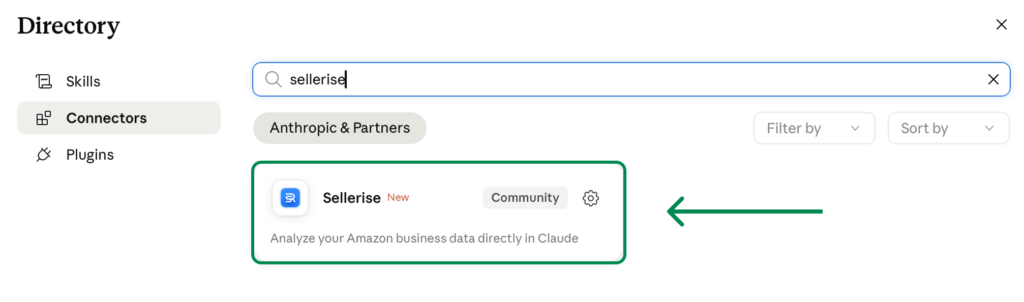
You do not need to create API keys or manually configure an MCP server when using the official Sellerise listing.
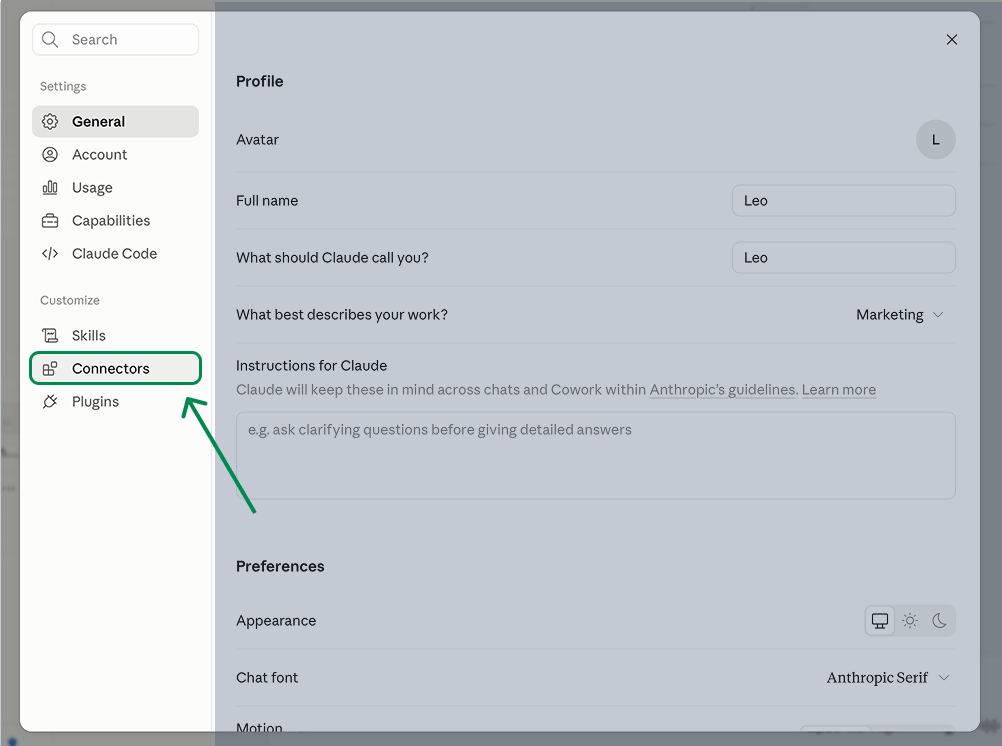
You can also find Sellerise directly through Claude:
Open Claude.
Go to Settings.
Select Connectors.
Find Sellerise.
Connect and authorize your Sellerise account.
Enable Sellerise in the conversation where you want to use it.
The technical MCP and OAuth setup is handled automatically when you connect through the official listing.
Prompts to try first
Not sure where to begin? Copy one of these prompts.
Business overview
“Summarize my Amazon business performance for the last 30 days. Include revenue, net profit, margin, advertising spend, refunds, and the most important changes.”
Profit analysis
“Review my PPC performance and show me which campaigns spent money without generating enough sales.”
PPC analysis
“Review my PPC performance and show me which campaigns spent money without generating enough sales.”
Weekly report
“Create a weekly report covering sales, profit, PPC, inventory, reviews, reimbursements, and search performance. Finish with the three actions I should prioritize.”
You no longer need to start every analysis by collecting and explaining the data yourself.
Connect Sellerise, ask a question, and continue the conversation until you have the answer you need.