Build a Winning Amazon PPC Keyword Strategy with Claude: Step-by-Step Guide

Sellerise Team, Contributor

6 min read -

Updated:

Building a new Amazon PPC campaign should not start with downloading thousands of keywords.

The real goal is much simpler:

Find the keywords most likely to generate sales, organize them correctly, and know which ones deserve Exact, Phrase, or Broad targeting.

With Sellerise connected to Claude through MCP, you can analyze your existing Amazon keyword data, discover new opportunities, compare your product with competitors, and turn everything into a structured PPC keyword plan.

Instead of jumping between reports and manually comparing spreadsheets, you can use one straightforward process.

By the end, you should have:

  • Strong keywords to launch with Exact Match
  • Growth keywords for Phrase Match
  • Discovery keywords for Broad Match
  • Negative or excluded keywords
  • Keywords grouped by shopper intent
  • A clear campaign structure

Here is the process.


Before You Start: Connect Sellerise to Claude

If you haven’t connected Sellerise yet:

  1. Open Claude.
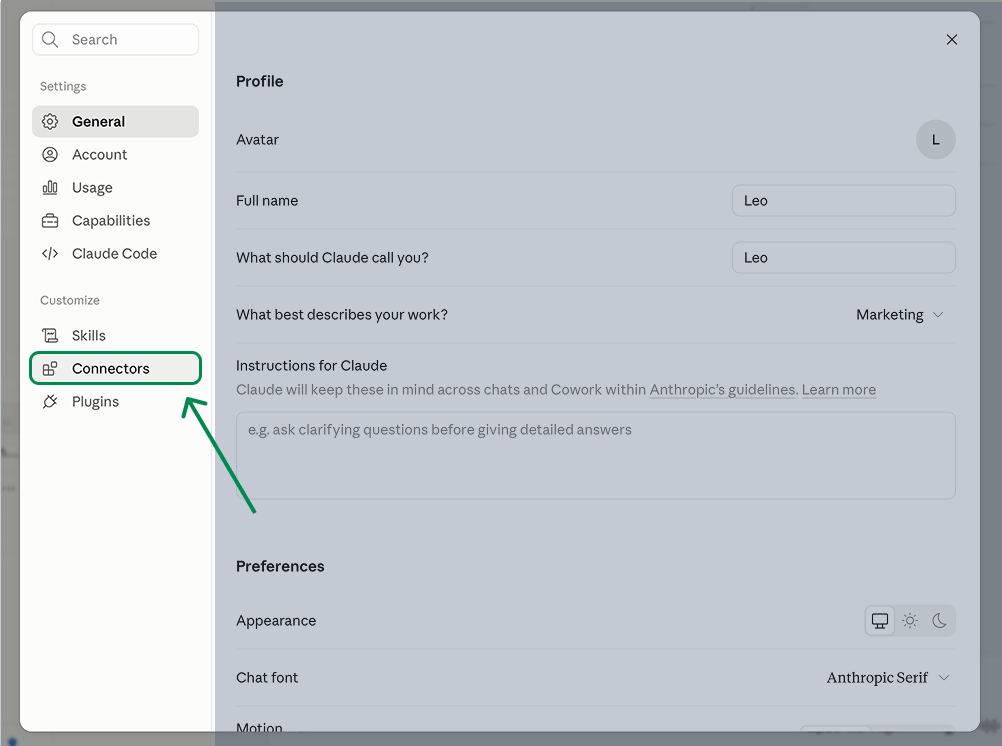
  2. Go to Settings -> Connectors.

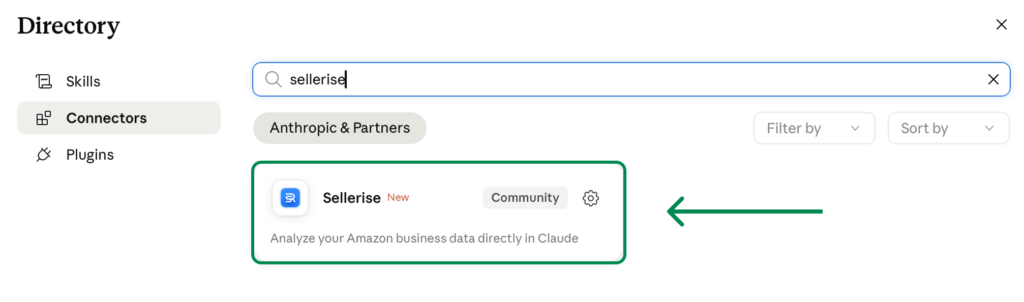
3. Find Sellerise.

4. Click Connect.
5. Authorize your Sellerise account.
6. Make sure Sellerise is enabled in your Claude conversation.

Once connected, you can start asking Claude questions about the Amazon accounts, marketplaces, products, PPC, and keyword data available to you.


Step 1: Analyze the Keywords Already Working for Your Product

Always start with your own product.

Your ASIN already has valuable data showing:

  • Which keywords you rank for
  • Which rankings are improving or declining
  • Which search queries bring impressions
  • Which queries generate clicks
  • Which queries lead to carts
  • Which queries lead to purchases

Sellerise combines this information across Keyword Tracker and SQP Insights.

Instead of analyzing these separately, ask Claude to look at the complete picture.

Use a prompt like:

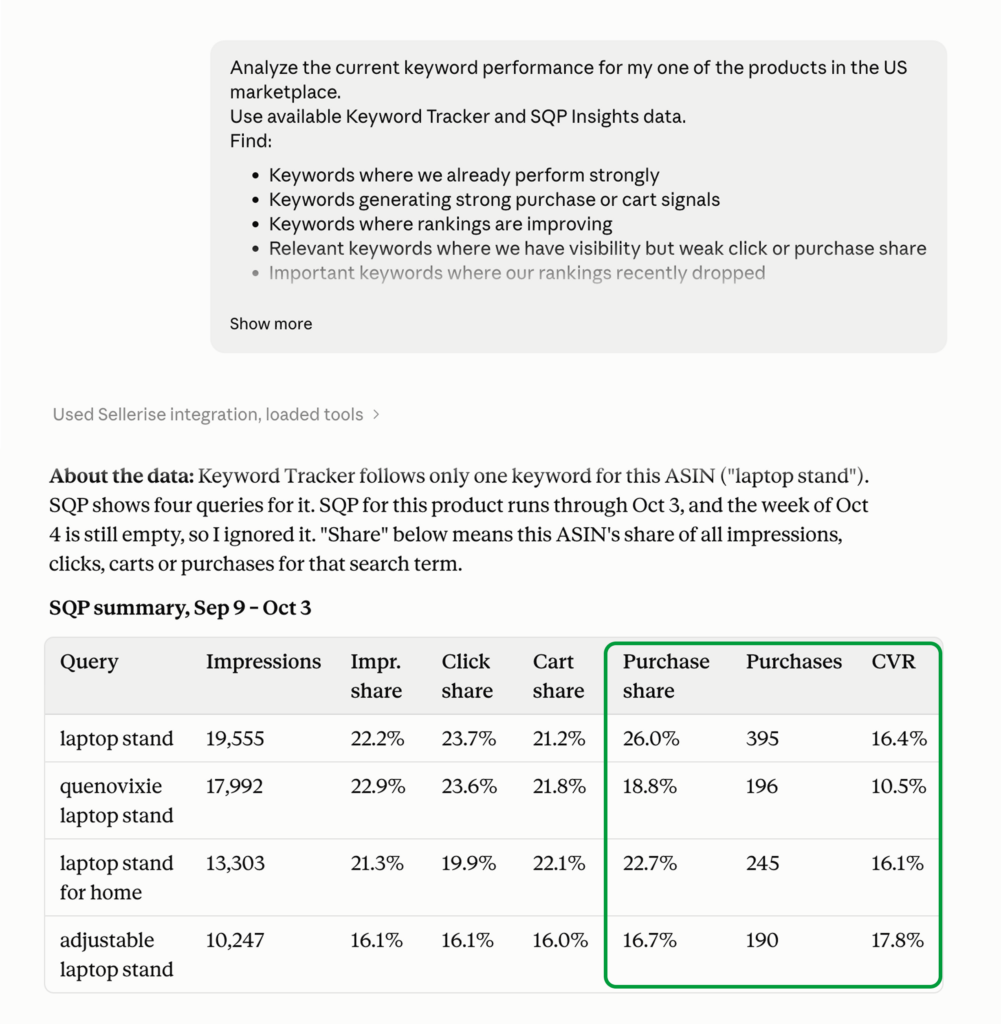
Analyze the current keyword performance for ASIN [ASIN] in the US marketplace.

Use available Keyword Tracker and SQP Insights data.

Find:

  • Keywords where we already perform strongly
  • Keywords generating strong purchase or cart signals
  • Keywords where rankings are improving
  • Relevant keywords where we have visibility but weak click or purchase share
  • Important keywords where our rankings recently dropped

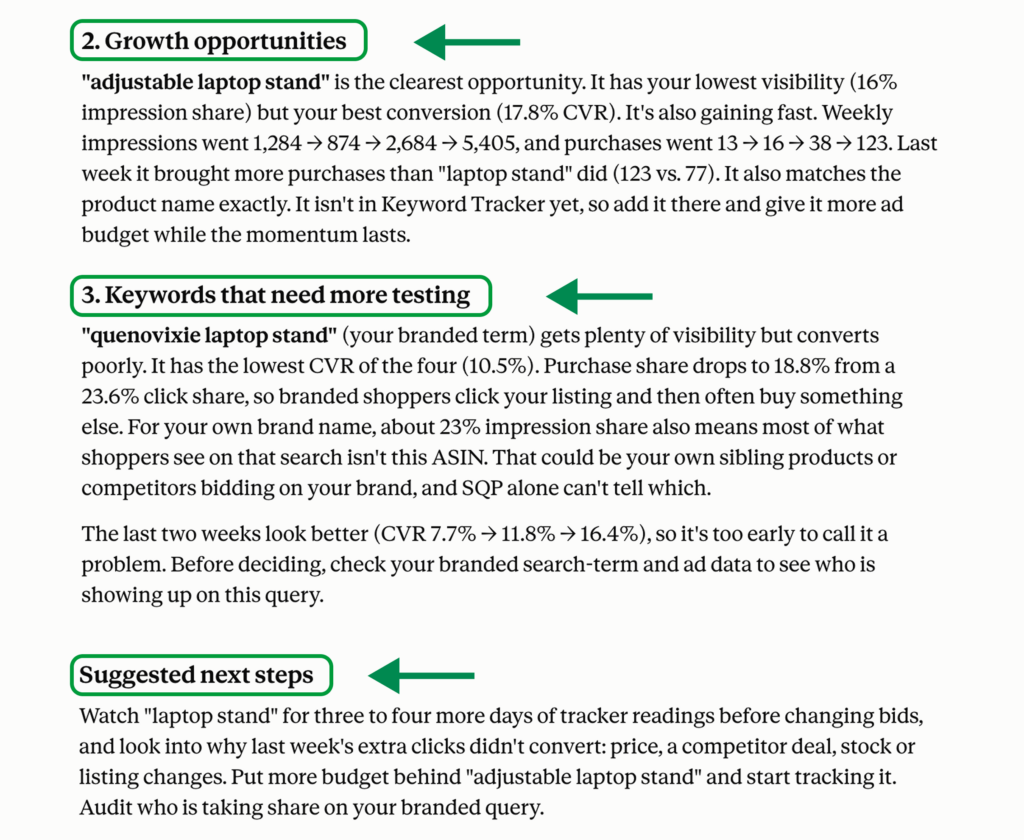
Group them into:

  1. Proven strong keywords
  2. Growth opportunities
  3. Keywords that need more testing
  4. Weak or low-priority keywords

Explain why each keyword belongs in its group.

This gives you the foundation for the new campaign.


What to Look For

The strongest keywords usually have several positive signals at the same time.

For example:

Strong organic position + strong purchase performance

This is a high-confidence keyword.

It may be a good Exact Match candidate.

Weak organic position + strong purchase signals

This may be an important growth opportunity.

PPC can help you increase visibility around a keyword that already shows strong buying intent.

High impressions + weak clicks

The keyword may be relevant, but customers are not choosing your product.

Before bidding aggressively, check your main image, title, price, reviews, and offer.

High clicks + weak purchases

Be careful.

The query may look relevant, but shoppers are not converting.

Do not treat search volume alone as proof that the keyword deserves more budget.

The first step should leave you with a clear list of keywords that already have real evidence behind them.


Step 2: Find New Keyword Opportunities

Once you understand your current performance, expand the keyword list.

This is where Keyword Hunter becomes useful.

The goal is not to collect every possible variation.

The goal is to find relevant keywords your product could realistically compete for.

Ask Claude:

Find additional keyword opportunities for [ASIN/product] using available Keyword Hunter data.

Prioritize keywords based on:

  • Product relevance
  • Commercial intent
  • Search demand
  • Conversion potential
  • Organic sales signals
  • Competition
  • Similarity to our proven keywords

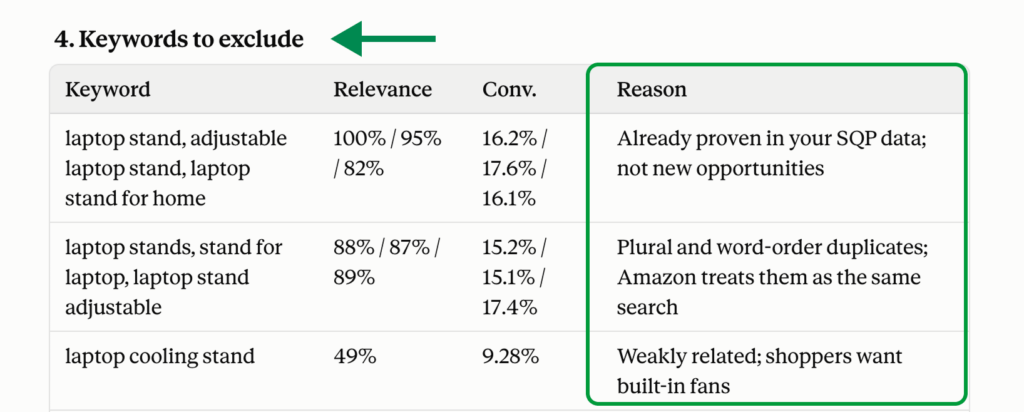
Remove weakly related and duplicate keywords.

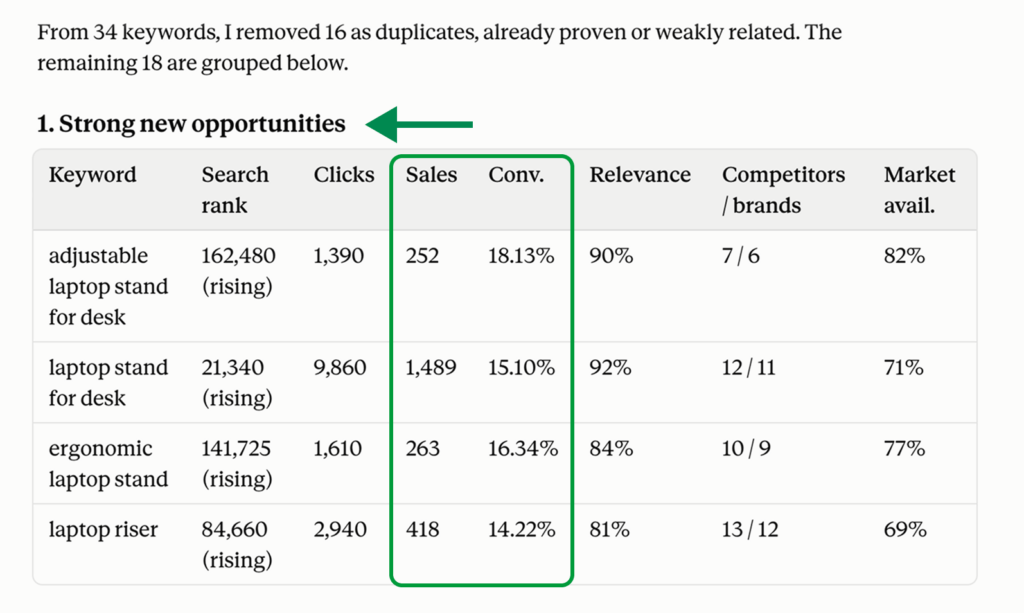
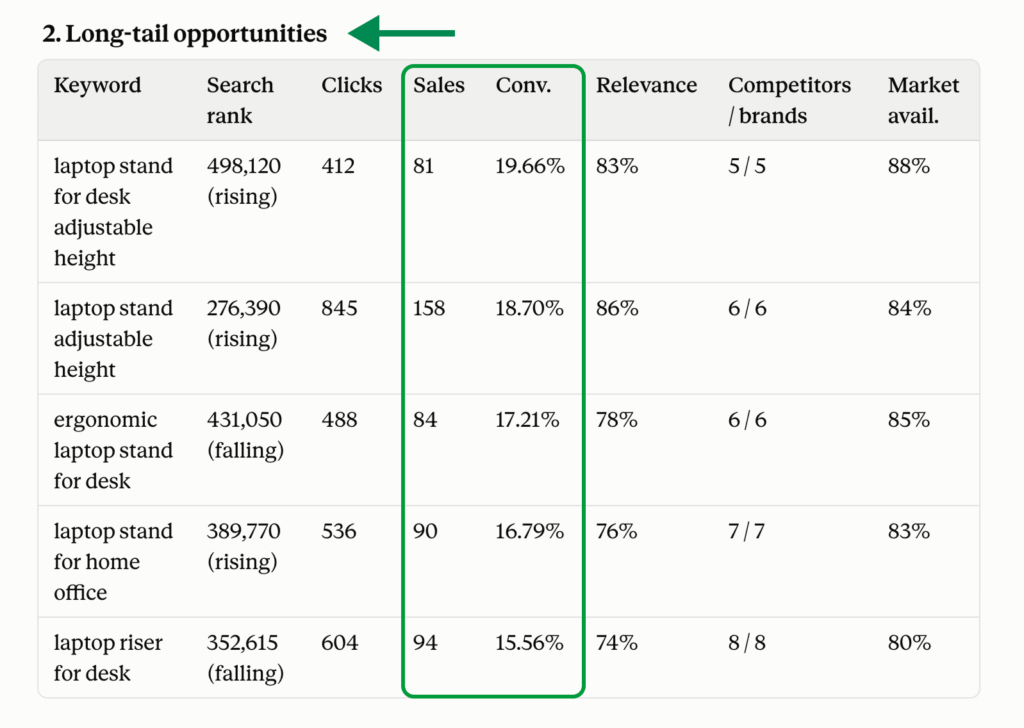
Separate the results into:

  1. Strong new opportunities
  2. Long-tail opportunities
  3. Discovery keywords
  4. Keywords that should be excluded

This is especially useful for finding variations you may not currently rank for.

For example, if one of your strongest existing keywords is:

adjustable laptop stand

Keyword Hunter may reveal related searches such as:

  • laptop stand for desk
  • laptop riser
  • laptop stand for home office

But not every variation deserves the same priority.

Claude can help identify which ones are closely connected to the keywords already performing well for your product.


Step 3: Find Keyword Gaps From Competitors

Now look outside your own ASIN.

Use Keyword Re-Ranker to see which keywords perform strongly for relevant competitors.

This can reveal important opportunities your product is currently missing.

Choose several competitors that are genuinely similar to your product.

Then ask Claude:

Analyze keyword opportunities from these competitor ASINs: [ASINs].

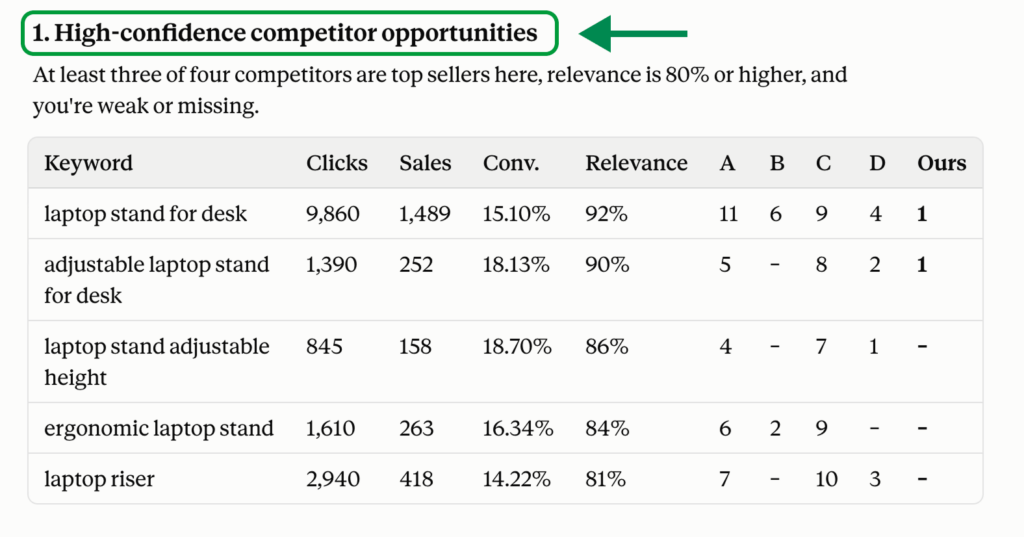
Use Keyword Re-Ranker data to find keywords where competitors perform strongly but our ASIN has weak or no visibility.

Prioritize keywords where:

  • Multiple competitors perform well
  • Competitors generate organic sales
  • The keyword is highly relevant to our product
  • Our current visibility is weak

Separate them into:

  1. High-confidence competitor opportunities
  2. Long-tail opportunities
  3. Experimental opportunities
  4. Irrelevant competitor keywords

This step helps answer:

What are competitors successfully ranking and selling for that I may be missing?

The key word here is relevant.

Do not add a keyword just because a competitor ranks for it.

Competitors may sell different sizes, materials, features, bundles, or use cases.

Claude should compare those keywords against your actual product before recommending them.


Step 4: Combine Everything Into One PPC Keyword Plan

Now you have three sources of evidence:

Your current performance

Keywords already connected to your ASIN through rankings and shopper behavior.

New keyword opportunities

Relevant searches discovered through Keyword Hunter.

Competitor opportunities

Keywords competitors perform well for that your product may be missing.

Now ask Claude to combine them.

This is the most important part of the process.

Use this prompt:

Combine all keyword findings for [ASIN] into one PPC keyword strategy.

Use:

  • Current product performance from Keyword Tracker and SQP Insights
  • New opportunities from Keyword Hunter
  • Competitor opportunities from Keyword Re-Ranker

Remove duplicates and weakly relevant keywords.

First, group keywords by shopper intent.

Possible clusters include:

  • Core product
  • Feature
  • Material
  • Size
  • Use case
  • Audience
  • Problem/solution
  • High-intent long-tail
  • Competitor/alternative

Then classify each keyword into:

  1. Exact Match
  2. Phrase Match
  3. Broad Match
  4. Negative or exclude

Prioritize relevance, purchase intent, current performance, conversion signals, competitor evidence, and search opportunity.

Do not prioritize a keyword simply because it has high search volume.

Return a table with:

Keyword | Cluster | Main Evidence | Match Type | Priority | Reason

Then give me:

  • Top Exact keywords to launch first
  • Phrase keywords to test
  • Broad keywords for discovery
  • Keywords to exclude
  • Recommended negative keywords
  • Recommended ad groups

This is the point where keyword research becomes an actual campaign plan.


How to Choose Exact, Phrase, and Broad Keywords

Keep the logic simple.


Exact Match: Proven Keywords

Use Exact for your highest-confidence keywords.

These may include keywords with:

  • Strong purchases
  • Strong conversion signals
  • Strong organic performance
  • Strong relevance
  • Consistent performance
  • Clear buyer intent

These are the keywords you want more control over.

If the keyword consistently performs well for your product, it may deserve its own Exact targeting.


Phrase Match: Growth Keywords

Use Phrase for relevant keyword families where you want Amazon to find additional variations.

Good Phrase candidates may include:

  • Strong new Keyword Hunter opportunities
  • Relevant long-tail keyword families
  • Growing search queries
  • Competitor opportunities with good evidence
  • Variations around your proven keywords

Phrase Match may also capture searches containing additional words around this phrase.

Phrase gives you more discovery than Exact while still keeping the targeting relatively focused.


Broad Match: Discovery Keywords

Broad Match should be used for relevant root terms where you want to discover new search behavior.

Good candidates include:

  • Strong category terms
  • Relevant root keywords
  • New keyword themes
  • Keywords without enough historical data

Broad targeting may uncover search terms you did not include directly in your research.

The purpose of Broad is not to stay Broad forever.

The goal is to find new search terms that can later be promoted into Phrase or Exact.


A Simple Campaign Structure

Your final structure does not need to be complicated.

A straightforward setup could be:


Campaign 1: Exact

Your proven and highest-confidence keywords.

Examples:

  • Existing purchase winners
  • Strong SQP queries
  • Strong organic keywords
  • High-intent long-tail keywords

These should usually receive the most attention.


Campaign 2: Phrase

Your growth and expansion keywords.

Examples:

  • Variations around proven terms
  • Strong Keyword Hunter opportunities
  • Growing search themes
  • Relevant competitor gaps

Use these to discover additional high-quality search terms.


Campaign 3: Broad

Your discovery keywords.

Examples:

  • Core category terms
  • New keyword themes
  • Relevant root keywords

Keep bids more controlled while gathering data.


What Your Final Keyword Summary Should Look Like

At the end of the process, Claude should give you something simple enough to use immediately.

For example:

KeywordSourceClusterMatch TypePriorityAction
Keyword ACurrent performanceCoreExactHighLaunch
Keyword BCurrent performanceFeatureExactHighLaunch
Keyword CKeyword HunterUse casePhraseMediumTest
Keyword DCompetitor gapLong-tailPhraseMediumTest
Keyword EKeyword HunterCoreBroadLowDiscover
Keyword FCompetitorIrrelevantNegativeHighExclude

The exact metrics behind the recommendation can still be available when needed.

But your final decision should be easy to understand:

Launch. Test. Discover. Exclude.


After the Campaign Launches

Keyword research does not stop when the campaign goes live.

Once you collect PPC data, ask Claude to analyze what actually happened.

Use:

Analyze the new PPC campaign for [ASIN].

Identify:

  • Broad and Phrase search terms generating sales
  • Keywords that should move into Exact
  • Strong Exact keywords that deserve more budget
  • High-spend keywords generating weak results
  • Search terms that should become negatives
  • Keywords where PPC growth is also improving organic visibility

Finish with the exact actions I should take.

This creates a simple optimization cycle:

Discover -> Test -> Prove -> Scale

Broad helps discover opportunities.

Phrase helps validate them.

Exact gives you more control over proven winners.

Negatives remove irrelevant traffic and wasted spend.


Final Takeaway

You don’t need to analyze every Sellerise keyword tools separately. Start with what already works for your product, find new opportunities, and check which keywords are driving results for competitors. The goal isn’t to find more keywords, it’s to know exactly what to do with them.

Sellerise Team, Contributor

Ready to scale your Amazon business?

Free 7 days trial. No Credit Card Required.