How to Optimize Amazon Keywords with Sellerise MCP (Claude)

Sellerise Team, Contributor
9 min read -
Updated:Amazon keyword research is not just about finding more keywords.
If your product is already selling, the more important question is:
Which keywords should you actually focus on to improve your organic visibility and rankings?
With Sellerise MCP connected to Claude, you can analyze real keyword and product data already available in Sellerise and turn it into a practical listing optimization strategy.
Instead of asking AI to guess which keywords might work, Claude can analyze actual Amazon performance, ranking, search-query, competitor, and keyword-research data from Sellerise.
By the end of the process, you should have 5 clear groups:
KEEP – keywords already working well
ADD – keywords you should target more strongly
DEPRIORITIZE – keywords that deserve less listing space
TEST – promising keywords that need more evidence
MONITOR – important keywords whose rankings are changing
Here’s the strategy.
Before You Start: Connect Sellerise to Claude
If you haven’t connected Sellerise yet:
1. Open Claude.
2. Go to Settings – Connectors.
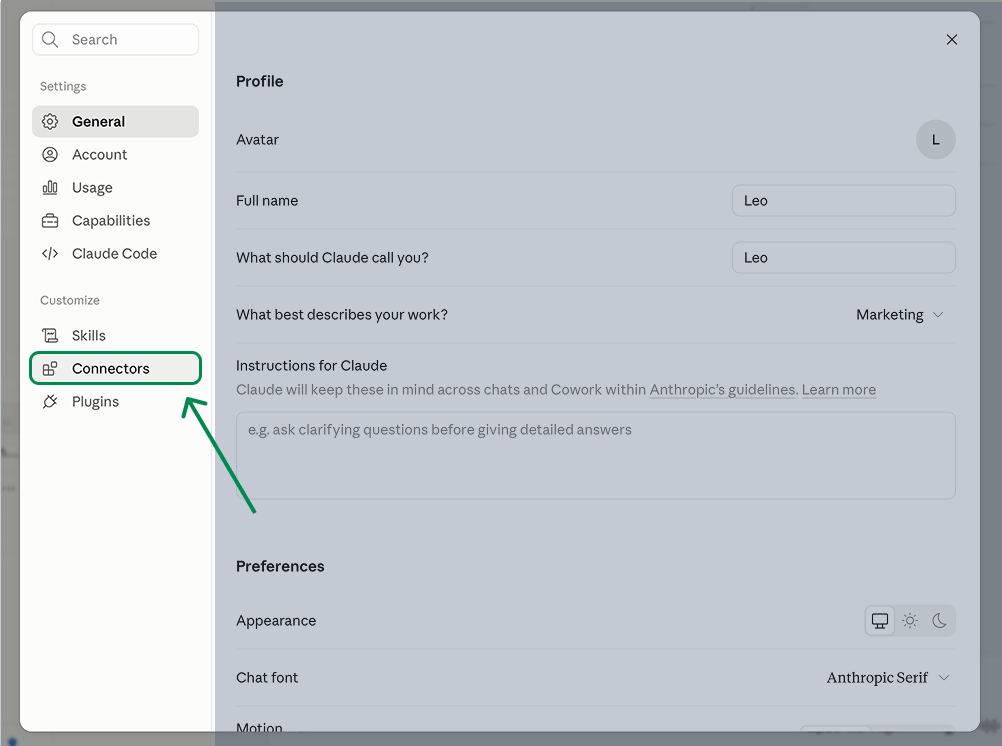
3. Find Sellerise.
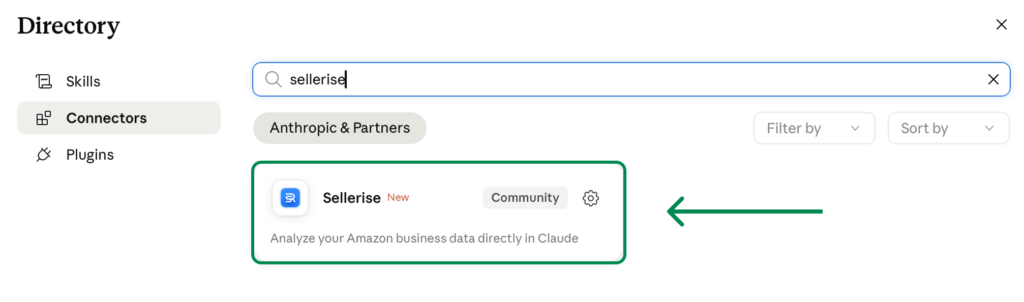
4. Click Connect.
5. Authorize your Sellerise account.
6. Make sure Sellerise is enabled in your Claude conversation.
Once connected, you can start asking Claude questions about the Amazon accounts, marketplaces, products, PPC, and keyword data available to you.
Step 1: Analyze the Keywords Already Working for Your Product
Start with one ASIN.
This analysis is based on your actual product performance data available through Sellerise SQP Insights (shows how customers interact with your product across the search funnel), Keyword Tracker (provides your tracked organic keyword rankings and ranking history).
Ask Claude:
“Analyze keyword performance for ASIN [ASIN] in the US marketplace.
My goal is to improve organic ranking and optimize the product listing.
Identify:
- keywords already performing well
- keywords with organic growth potential
- weak keywords that deserve less focus
- important ranking drops
- promising keywords that need more data”
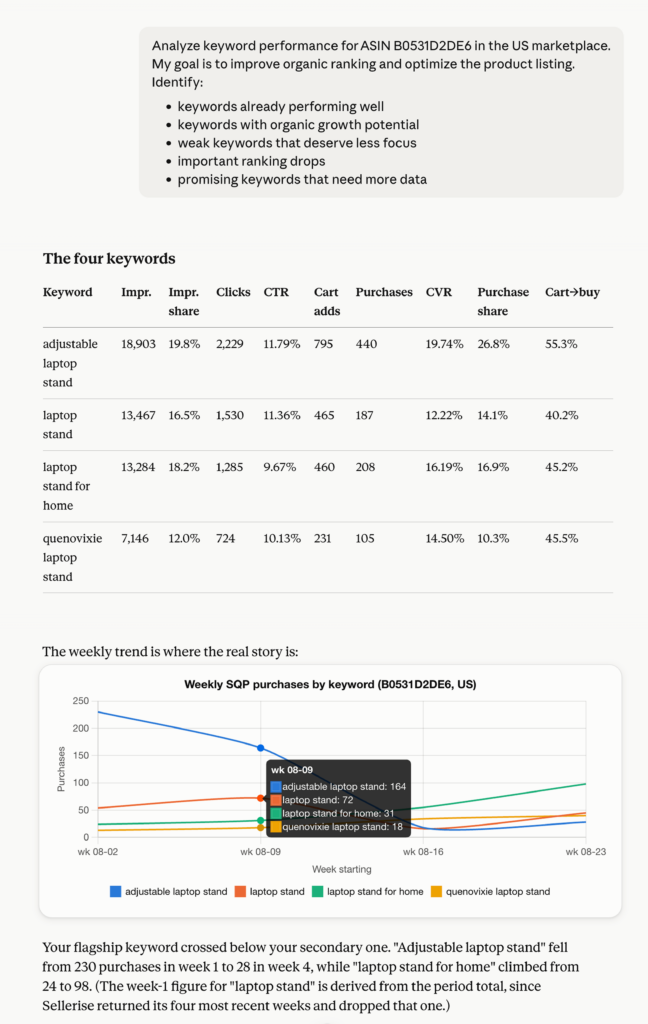
So Claude isn’t evaluating keywords based on generic assumptions. It can compare how your ASIN is actually performing for them.
Step 2: Find Your Strongest Keywords - KEEP
Start with the keywords that are already working.
You don’t want to optimize your listing by accidentally removing terms that are already generating visibility, purchases, or strong organic rankings.
Ask:
“Which keywords are currently strongest for this ASIN based on organic ranking, ranking trend, purchases, clicks, and overall search performance?
Identify the keywords I should protect and continue prioritizing in the listing.”
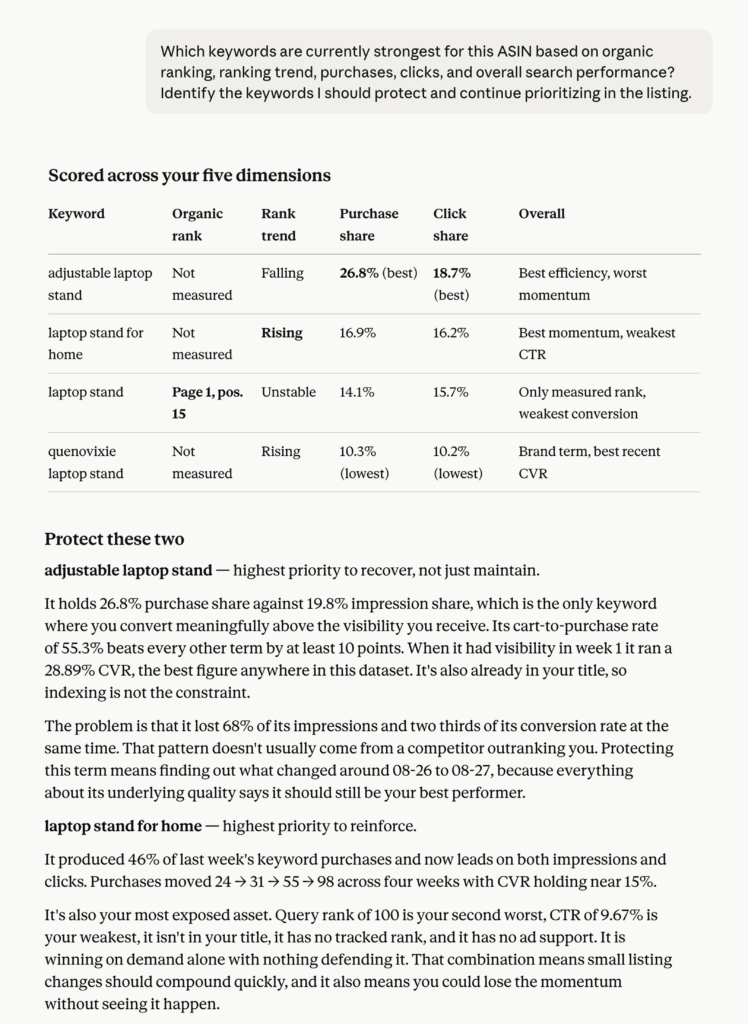
Claude can compare Keyword Tracker ranking data with real Search Query Performance data, so a keyword isn’t considered strong simply because it ranks well.
You can see whether shoppers are actually finding, clicking, and buying your product through that search query.
Look for keywords that:
- already rank well
- consistently generate purchases
- show strong click and conversion behavior
- maintain stable or improving rankings
- accurately describe the product
These are your core keywords.
They should generally remain prioritized across important areas of your listing.
Step 3: Find New Keyword Opportunities - ADD
Once you understand what is already working, look for keywords you’re currently missing.
This is where keyword research becomes especially valuable.
Instead of asking Claude to brainstorm random keyword ideas, you can use real keyword research data from Sellerise Keyword Hunter to identify relevant terms and search opportunities around your product.
Ask:
“Find relevant keyword opportunities for ASIN [ASIN] that I’m not currently targeting strongly.
Compare those opportunities with my existing keyword performance and identify the keywords with the strongest potential for organic growth.”
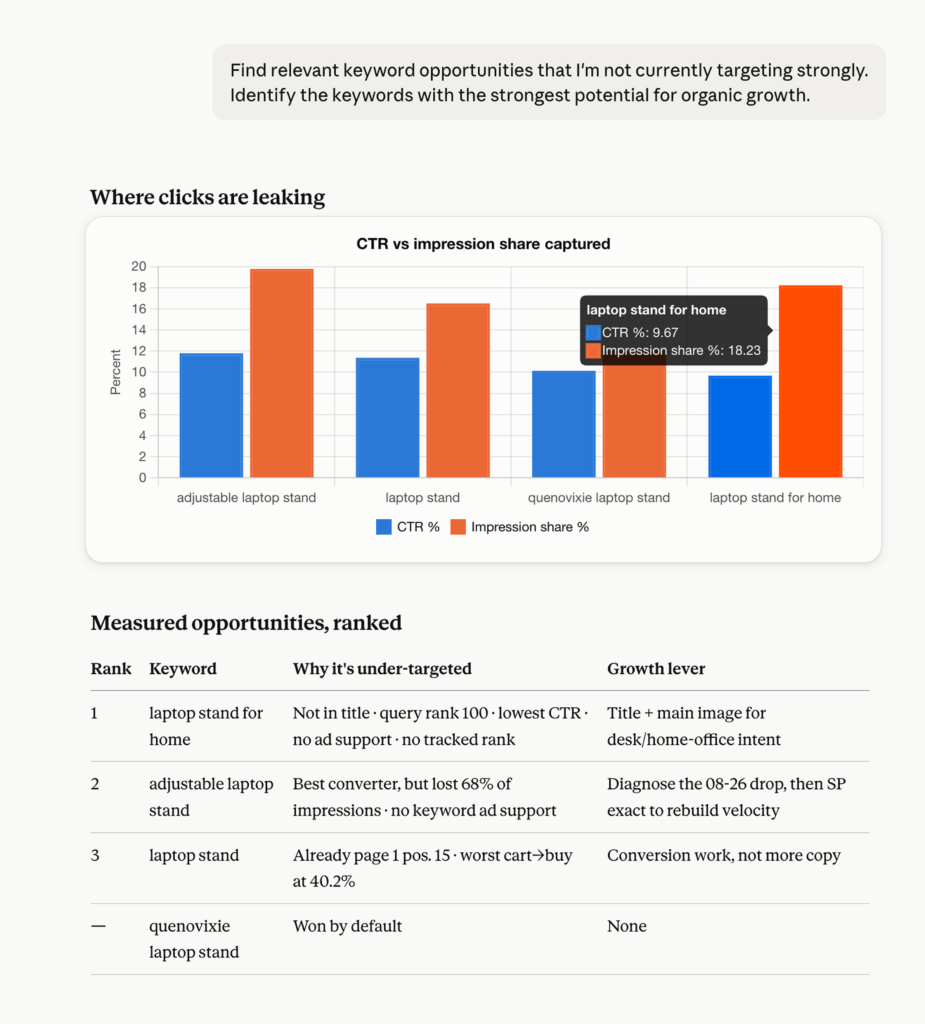
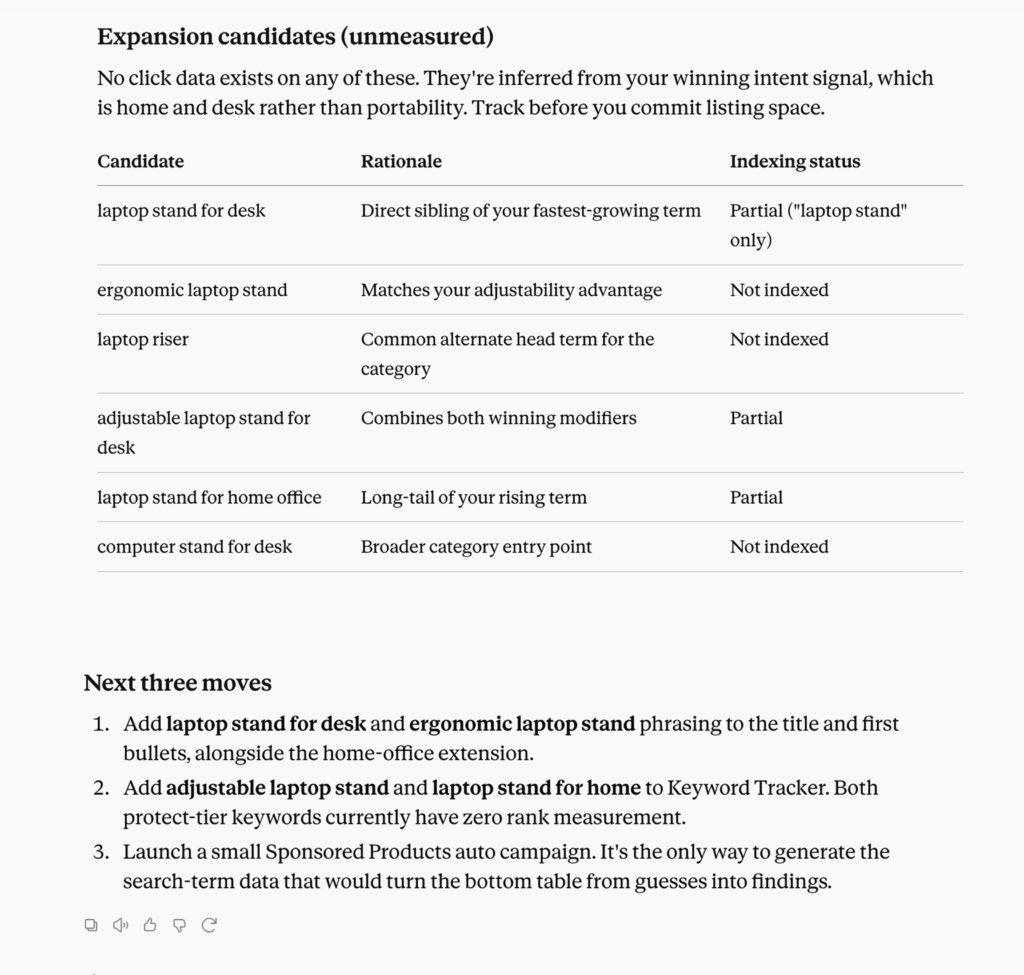
Claude can then evaluate new keyword opportunities against what is already happening with your ASIN.
For example, a new keyword may be attractive because:
- it is highly relevant to the product
- Keyword Hunter shows it as a meaningful search opportunity
- your listing does not currently target it well
- similar search terms already perform for your product
This is important:
The ADD list should not simply be “keywords with search volume.”
Claude should compare new opportunities with your existing listing and performance data to determine which ones actually make sense for your product.
Step 4: Find Competitor Keyword Gaps
Another source of new organic opportunities is your competitors.
Sellerise can provide competitor keyword insights through Keyword Re-Ranker, helping identify terms where competing products have stronger sales by a keyword or where your ASIN may have room to improve.
Ask:
“Identify important competitor keyword opportunities for this ASIN.
Which relevant keywords appear strong for competitors but are currently weak or missing from my organic strategy?”
Then ask Claude to filter those opportunities.
“Compare these competitor keywords with my Search Query Performance, current organic rankings, and product relevance.
Which ones are actually worth adding to my listing strategy?”
This step matters because a keyword working for a competitor does not automatically make it right for your product.
Claude should use the competitor data as another signal, then validate it against your own product.
Step 5: Find Underutilized Keywords - ADD or STRENGTHEN
Some of your best opportunities may not actually be new keywords.
You might already receive purchases for a search query while ranking poorly for it organically.
For example:
- customers already buy your product through the query
- your click or purchase performance is healthy
- the term is highly relevant
- but your organic rank is still weak
This information comes directly from combining SQP Insights with Keyword Tracker data.
Ask:
“Find search queries that show strong purchase intent or healthy performance but where my organic ranking is still weak.
Which keywords should I target more strongly in the listing?”
Example:
| Keyword | Data Signal | Decision |
|---|---|---|
| portable smoothie maker | Generates purchases, organic rank #42 | ADD |
| travel smoothie blender | Healthy conversion, limited organic visibility | ADD |
| compact personal blender | Good search performance, weak rank | ADD |
These can be some of the strongest opportunities because your own customer behavior already provides evidence that the keyword is relevant.
Step 6: Find Keywords to Deprioritize
Not every keyword deserves valuable listing space.
Some terms may receive visibility but consistently fail to produce meaningful customer actions.
Ask:
“Which keywords appear weak or low-value for this ASIN from an organic optimization perspective?
Identify terms I should consider deprioritizing because of weak relevance, poor purchase performance, or consistently weak search behavior.”
Here, Claude can use actual SQP funnel performance and ranking data rather than deciding that a keyword is “bad” based only on its wording.
Look for patterns such as:
- meaningful impressions but almost no clicks
- clicks without meaningful add-to-carts or purchases
- weak purchase performance over time
- low relevance to the actual product
- poor performance despite strong visibility
Example:
| Keyword | Data Signal | Decision |
|---|---|---|
| kitchen blender | High visibility, weak purchase behavior | DEPRIORITIZE |
| professional blender | Low relevance + weak conversion | DEPRIORITIZE |
| blender machine | Traffic without enough purchase activity | DEPRIORITIZE |
Deprioritize does not necessarily mean delete immediately.
A relevant keyword may still belong somewhere in the listing.
It simply should not take valuable space away from stronger terms.
Step 7: Find Keywords Worth Testing - TEST
Some keywords will look promising, but there may not be enough evidence yet.
These could come from:
- Keyword Hunter opportunities
- competitor keyword research
- newly appearing Search Query Performance queries
- early ranking improvements
- relevant PPC search terms that have started converting
Ask:
“Which relevant keywords show potential but don’t yet have enough data to justify making them a major organic priority?”
Example:
| Keyword | Data Signal | Decision |
|---|---|---|
| mini smoothie maker | New opportunity, limited performance history | TEST |
| compact travel blender | Early ranking improvement | TEST |
| blender for office | Relevant opportunity but little product-level data | TEST |
PPC can be useful here as an additional validation signal.
If a new keyword consistently generates sales through advertising, that provides more real-world evidence that shoppers searching that term are interested in your product.
But PPC is not the goal of this workflow.
It is simply another source of data for deciding:
Should this keyword become part of my organic strategy?
Step 8: Find Important Ranking Changes - MONITOR
Some keywords don’t require an immediate listing change.
But they do need attention.
Ranking trends come from Sellerise Keyword Tracker, giving Claude historical context instead of only a single current ranking position.
Ask:
“Which important keywords have experienced meaningful organic ranking changes recently?
Separate improving keywords from declining keywords and prioritize the changes that matter most.”
Example:
| Keyword | Ranking Change | Decision |
|---|---|---|
| portable smoothie blender | #8 → #17 | MONITOR |
| mini blender | #36 → #19 | MONITOR |
| personal blender for travel | Gradual decline | MONITOR |
Then combine ranking history with search-performance data:
“For the keywords losing rank, check their Search Query Performance.
Are purchases, clicks, or visibility declining too, or is the ranking movement happening while customer performance remains healthy?”
This gives you much more context than looking at rank alone.
For example:
Ranking drops + purchases remain strong
may indicate an important keyword worth defending.
While:
Ranking drops + poor purchase performance
may mean that the keyword deserves less attention.
Step 9: Understand Why a Keyword Is Underperforming
Organic rank is only one part of keyword performance.
Search Query Performance gives additional context across:
Impression → Click → Add to Cart → Purchase
This helps Claude distinguish an SEO problem from a listing or conversion problem.
| Pattern | What It May Mean |
|---|---|
| Low impressions | Weak search visibility |
| High impressions + low clicks | Weak search-result appeal |
| Good clicks + weak add-to-cart | Product/listing mismatch |
| Good carts + weak purchases | Conversion issue |
| Strong purchases + weak rank | Organic SEO opportunity |
| Strong keyword + falling rank | Important keyword to investigate |
Ask:
“Analyze the Search Query Performance funnel for my priority keywords.
Identify which terms mainly have:
- a visibility problem
- a click-through problem
- an add-to-cart problem
- a purchase conversion problem
Do not recommend keyword changes if the available data suggests the main problem is elsewhere.”
This prevents unnecessary listing changes.
For example, if your product already receives a lot of impressions for a keyword but very few clicks, repeating that keyword more often in the listing may not help.
The issue could be:
- main image
- price
- rating
- review count
- title
- competitive positioning
The data helps you understand what to investigate next.
Step 10: Create Your Final Keyword Strategy
This is where all of the Sellerise data comes together.
You should finish with one clear keyword decision table, not another long analytics report.
Ask Claude:
“Based on all available Sellerise keyword data for ASIN [ASIN], create my final organic keyword optimization strategy.
Use:
- Search Query Performance for actual search-funnel behavior
- Keyword Tracker for organic ranking and ranking history
- Keyword Hunter for new keyword opportunities
- Keyword Re-Ranker for competitor keyword opportunities
- PPC data only when it provides useful evidence about keyword conversion
Divide the keywords into:
KEEP – proven keywords I should continue prioritizing
ADD – relevant opportunities that deserve stronger organic targeting
DEPRIORITIZE – keywords that deserve less listing focus
TEST – promising opportunities without enough evidence yet
MONITOR – important keywords whose performance is changingFor each keyword include:
- keyword
- most important supporting data
- classification
- reason
- recommended listing action
- priority: High / Medium / Low”
Your final result should look like this:
| Keyword | Decision | Evidence | Recommended Action |
|---|---|---|---|
| portable blender | KEEP | Strong organic rank + purchases | Keep as primary listing keyword |
| personal smoothie blender | KEEP | Consistent search and purchase performance | Maintain strong placement |
| rechargeable portable blender | ADD | Keyword Hunter opportunity + relevant buyer behavior | Add naturally to listing |
| travel blender for smoothies | ADD | Purchases + weak organic rank | Strengthen listing coverage |
| compact smoothie blender | ADD | Competitor opportunity + high relevance | Add to secondary listing content |
| kitchen blender | DEPRIORITIZE | Visibility but weak purchase performance | Reduce prominence |
| blender for office | TEST | Keyword opportunity but limited product data | Test and monitor |
| mini blender | MONITOR | Organic rank improving quickly | Track future performance |
Now you have something you can actually use to optimize the listing.
Step 11: Decide Where the Keywords Should Go
Once you know which keywords to KEEP and ADD, turn them into a listing placement strategy.
Ask:
“Take all keywords classified as KEEP and ADD and create an organic listing keyword placement plan.
Divide them into:
- primary title keywords
- secondary bullet-point keywords
- supporting listing keywords
- backend search-term opportunities
Use the performance and keyword research data we’ve already analyzed to prioritize them.
Avoid keyword stuffing and unnecessary repetition.”
Your strongest, most relevant, and most proven terms should generally receive the most prominent placement.
Supporting opportunities can be used naturally elsewhere.
The goal isn’t to put every keyword into every part of the listing.
It’s to prioritize your listing around the search terms with the strongest evidence behind them.
Master Prompt: Organic Keyword Optimization With Sellerise MCP
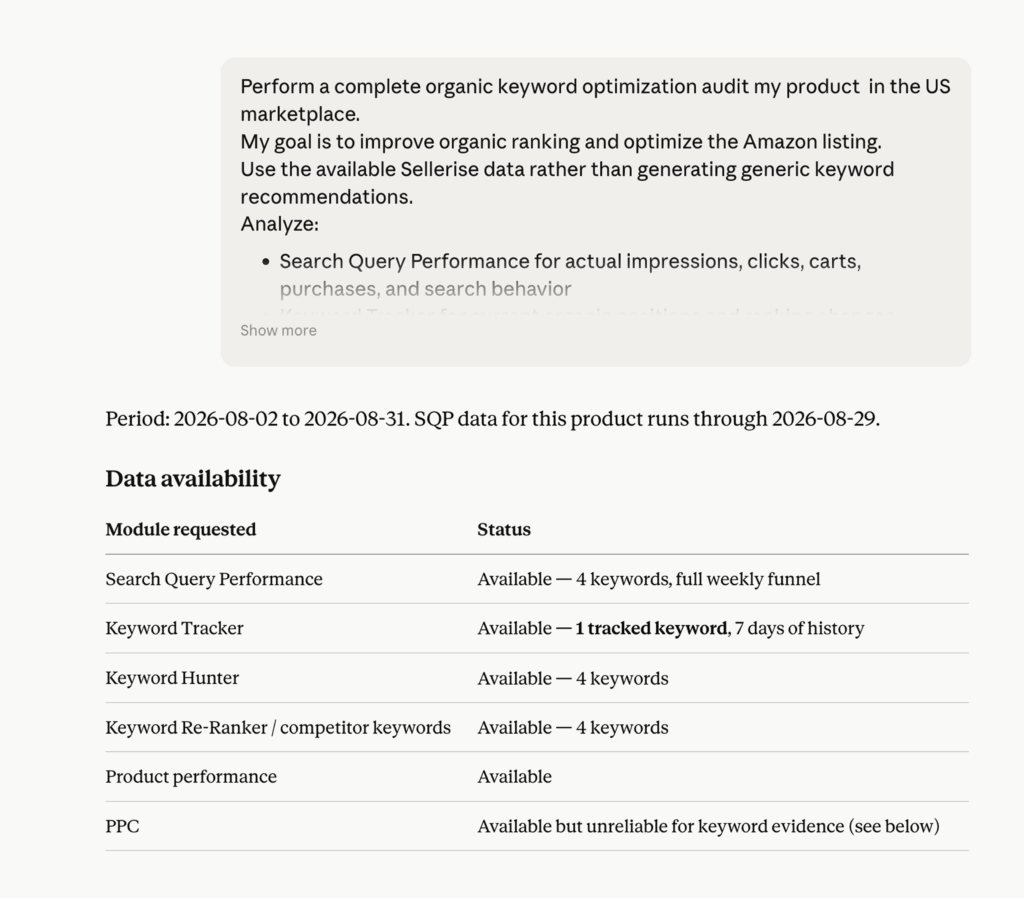
Perform a complete organic keyword optimization audit for ASIN [ASIN] in the [MARKETPLACE] marketplace.
My goal is to improve organic ranking and optimize the Amazon listing.
Use the available Sellerise data rather than generating generic keyword recommendations.
Analyze:
- Search Query Performance for actual impressions, clicks, carts, purchases, and search behavior
- Keyword Tracker for current organic positions and ranking changes
- Keyword Hunter for new keyword opportunities
- Keyword Re-Ranker for relevant competitor keyword opportunities
- product performance for additional context
- PPC only when it provides useful supporting evidence about whether a keyword converts
Evaluate keywords based on:
- product relevance
- organic ranking
- ranking trend
- visibility
- clicks
- add-to-carts
- purchases
- new keyword opportunity
- competitor opportunity
Then classify important keywords into:
KEEP – proven keywords I should continue prioritizing
ADD – relevant keywords that deserve stronger organic targeting
DEPRIORITIZE – weak keywords that deserve less listing space
TEST – promising keywords that need more evidence
MONITOR – important keywords whose organic performance is changingPresent the final results in a table with:
- keyword
- supporting data/signals
- classification
- reason
- recommended listing action
- priority
Then create a placement strategy for the KEEP and ADD keywords across:
- Title
- Bullet points
- Description / A+ Content
- Backend search terms
Finish with the five listing optimization actions I should take first.
Base conclusions on the available Sellerise data and clearly flag anything that cannot be confirmed from the data.
Your Keyword Strategy Should Come From Data
The biggest difference between asking AI for keyword ideas and using Sellerise MCP is the data behind the answer.
Claude isn’t limited to generating phrases that sound relevant.
Through Sellerise, it can analyze different types of real Amazon data:
Your existing performance
Search Query Performance shows how customers actually interact with your product for specific queries.
Your organic rankings
Keyword Tracker shows where your ASIN ranks and how those rankings change over time.
New keyword opportunities
Keyword Hunter provides keyword research data that can reveal relevant terms you’re not fully targeting.
Competitor opportunities
Keyword Re-Ranker helps surface additional keyword opportunities based on competitor data.
Those signals can then be analyzed together. It gives you a data-backed plan for improving your Amazon listing and organic rankings.