Black Friday Preparation: How to Audit Amazon PPC Keywords with AI

Sellerise Team, Contributor

6 min read -

Updated:

Holiday traffic can make a good keyword more valuable, and a bad one more expensive. Before increasing your PPC budget, check which search terms are already bringing you sales, how much visibility you have, and where shoppers drop off.

This guide follows the exact Q4 cleanup workflow and how to make an efficient analysis using your AI integration, such as ChatGPT and Claude.


1. Open your keywords in SQP Insights

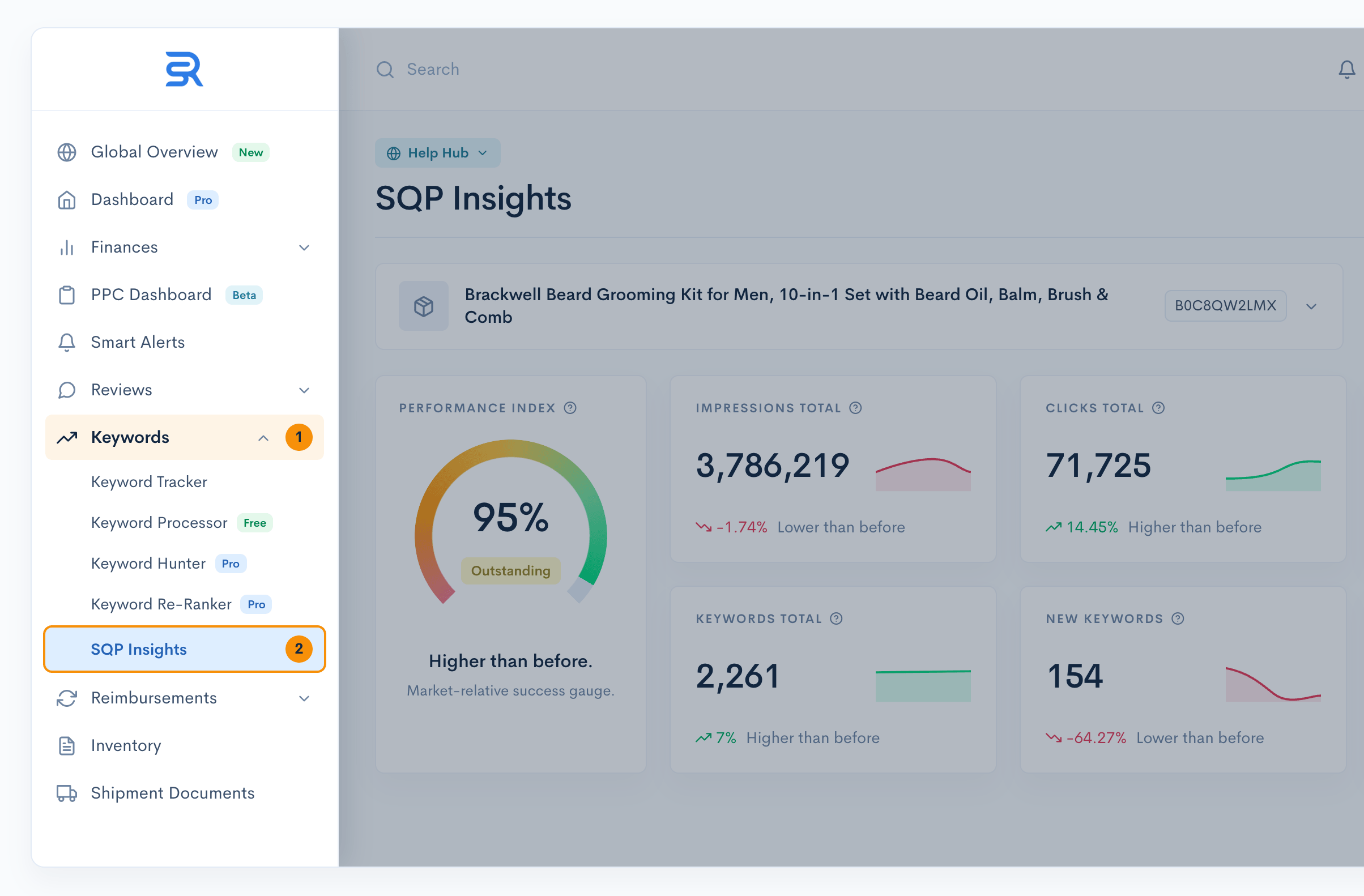
In Sellerise, go to Keywords -> SQP Insights.

Select the product/ASIN and marketplace you want to analyze. Start with the last 4 weeks, then compare with an earlier period if you need more context.

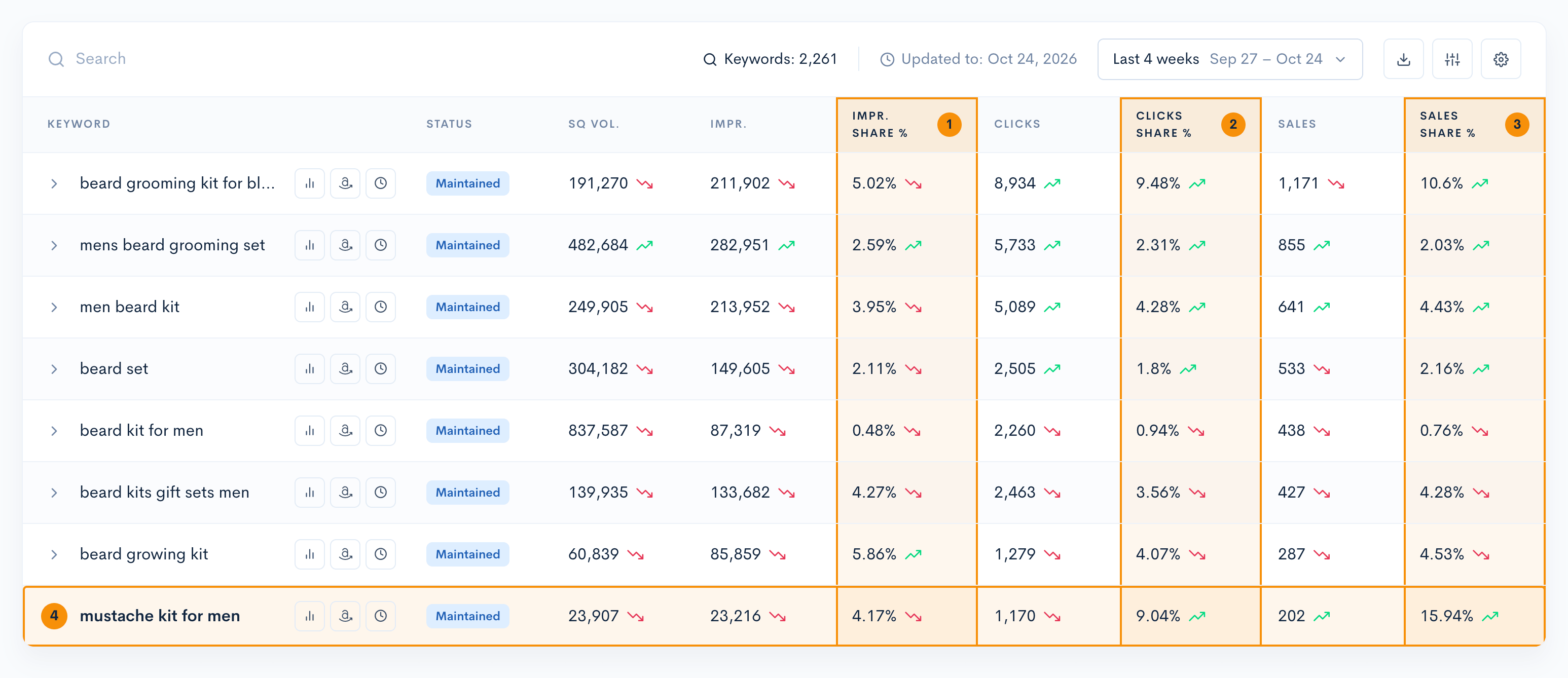
Open the keyword table. You will use impression share, click share, sales share, search query volume, CTR, CVR, and keyword status.

Sellerise dashboard showing how to open SQP Insights and select an Amazon product for keyword analysis

2. Find keywords that sell more than their visibility suggests

Look at three numbers for each relevant keyword:

  • Impression share: the share of market search-result impressions your product captures for that query.
  • Click share: the share of clicks your product receives for that query.
  • Sales share (purchase share): the share of sales attributed to your product for that query in the report.

Example: “mustache kit for men” shows 4.17% impression share, 9.04% click share, and 15.94% sales share. Sales share is substantially higher than impression share. That is a signal worth investigating: the keyword may bring disproportionate sales relative to your current visibility.

What to do: Check relevance, margin, and existing ad performance. If it is already converting profitably, consider a controlled PPC test to win more impressions and clicks. Don’t raise bids based on sales share alone.

3. Spot keywords with low CTR but strong CVR

Here is a second opportunity: your CTR is lower than the market average, but your CVR is higher. That can mean shoppers who reach your listing are willing to buy, but not enough people click your search result.

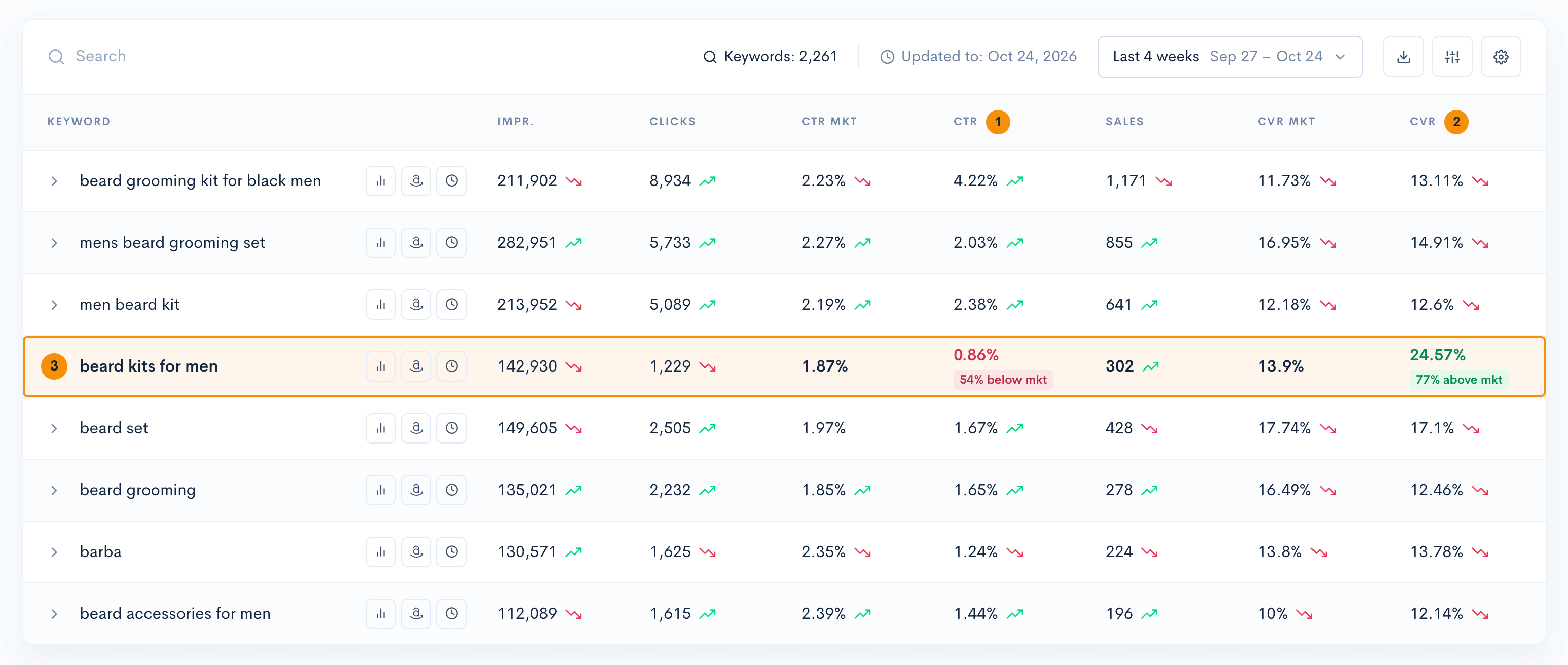
Example: For “beard kits for men,” CTR is 0.86% vs. 1.87% market CTR, while CVR is 24.57% vs. 13.9% market CVR. The listing converts well among shoppers who click, but it attracts fewer clicks than the market benchmark.

What to do: First review what shoppers see on the search results page: main image, title, price, reviews, coupons, and promotions. Then test more PPC exposure if the keyword is relevant and profitable. More traffic alone will not fix weak click appeal.

4. Use search queries to find traffic you are missing

A keyword can look small in your own results but still have substantial demand.

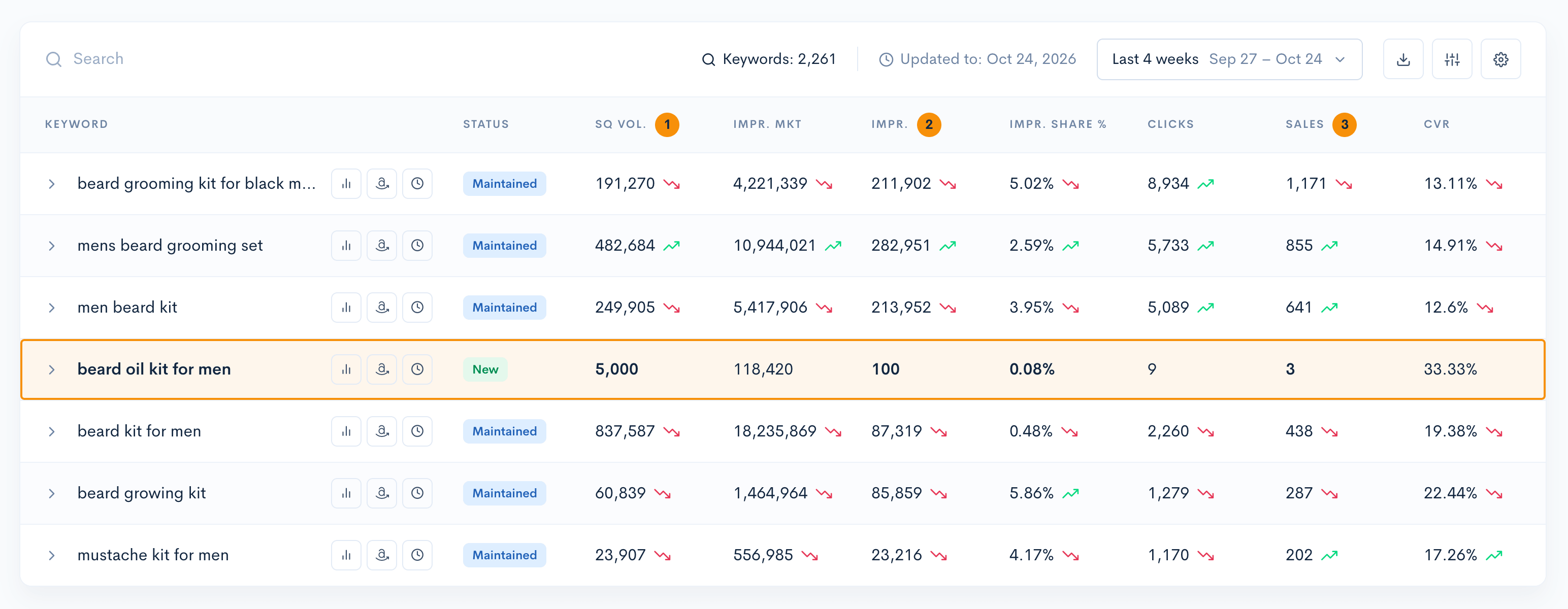
Example: “beard oil kit for men” has 5,000 search queries, 100 product impressions, 9 clicks, and 3 sales in the selected period. Its impression share is only 0.08%, while its displayed CVR is 33.33%.

The opportunity: you are getting some sales with very little visibility. If the keyword matches your product, try a small, budget-capped PPC test and watch whether extra exposure creates profitable sales.

The caution: three sales are a small sample. Check more weeks, profitability, and ad results before scaling. Also, search query volume and impressions are different metrics; 100 impressions should not be divided by 5,000 searches to calculate impression share.

5. Recover "Lost" keywords without bringing back waste

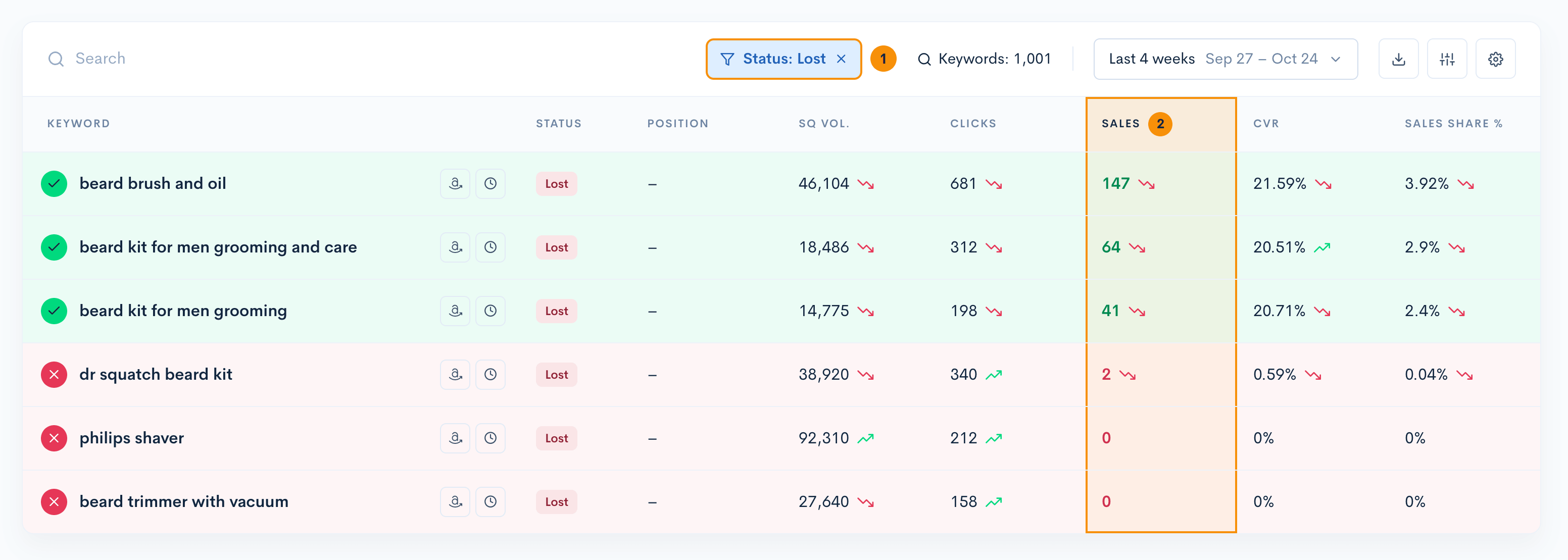
Before the holiday rush, open the keyword status filter and select Lost. Then sort or review the Sales column. Do not assume every lost keyword is unprofitable, or that every keyword deserves to be recovered.

In the example, the Lost list includes keywords with 147, 64, and 41 sales in the selected period, as well as terms with just 2 or 0 sales. Those are very different candidates for your next move.

  • For relevant terms with a history of profitable sales: check prior-period keyword performance, organic rankings, campaign coverage, and PPC search term results. Consider bringing them back or testing higher exposure where the numbers support it.
  • For terms getting clicks and spend without sales: inspect relevance and the amount of data first. Lower bids or use carefully targeted negatives for truly poor or irrelevant search terms; do not automatically negate valuable terms after a few clicks.
  • For competitor-branded or mismatched terms: prioritize relevance and intent before spending more, even if the search volume looks large.

6. Turn the audit into a PPC action list

Every keyword should finish in one of four groups:

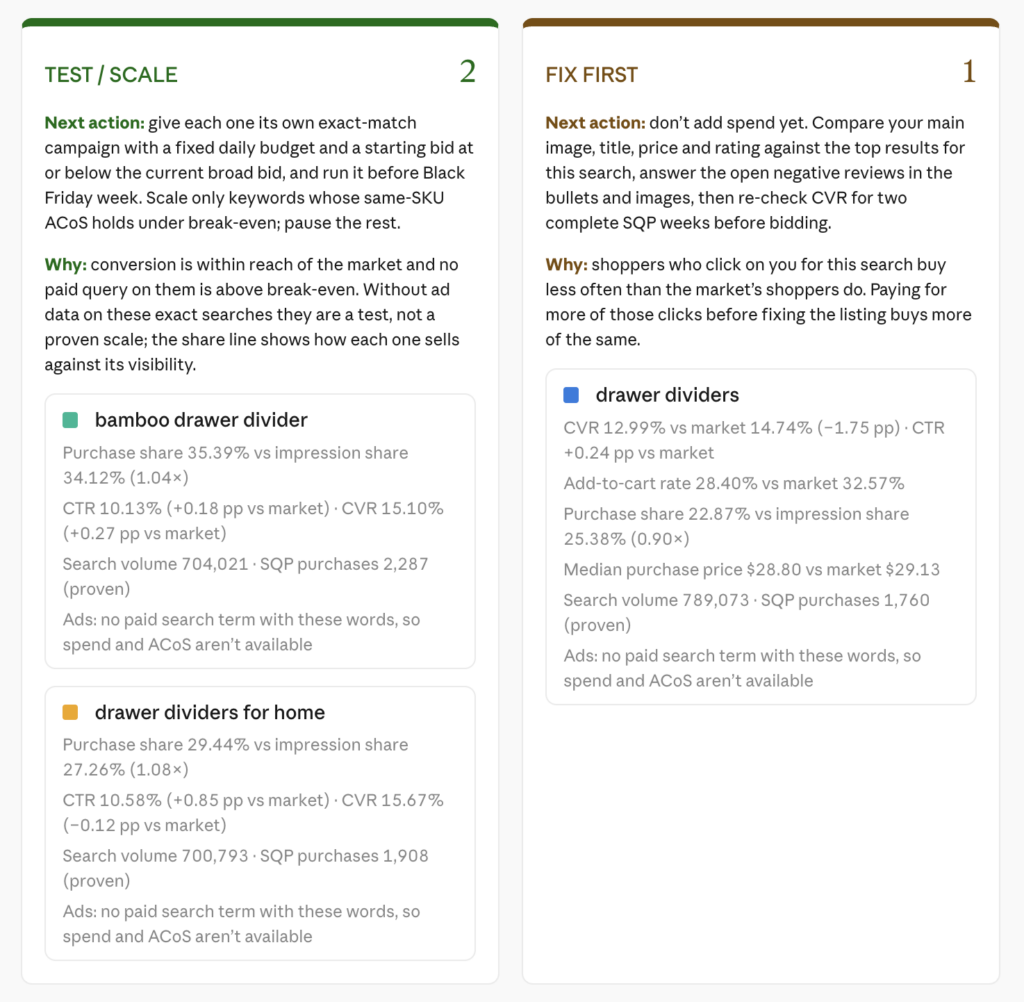
  • TEST / SCALE: relevant keyword, convincing sales or conversion evidence, limited impression or click share, and acceptable PPC economics.
  • FIX FIRST: below-market CTR despite strong conversion. Improve search-result appeal before paying for more clicks.
  • RECOVER: Lost keyword with proven sales and a defensible path back through ranking work or PPC coverage.
  • REDUCE / EXCLUDE: high spend with weak or no sales, after checking relevance, conversion lag, sample size, and whether negatives would block good traffic.

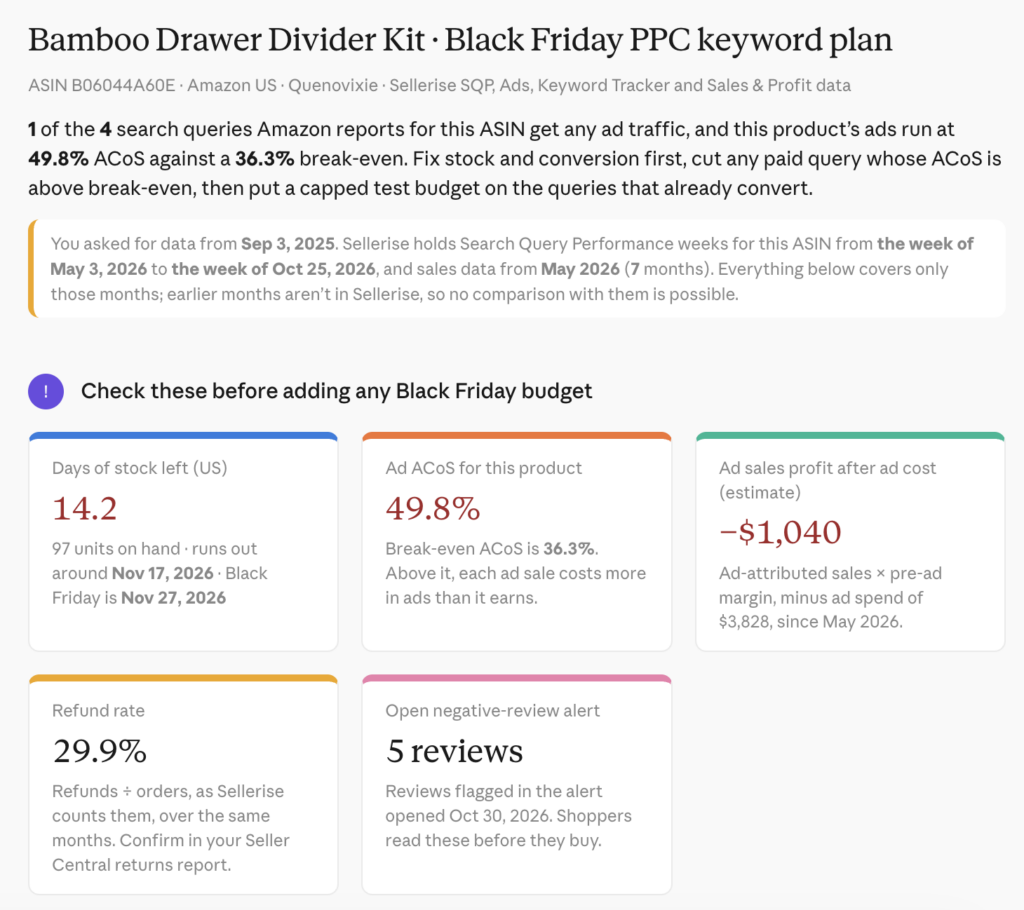
Important: SQP Insights covers search performance; it is not a substitute for your PPC search term report. Check actual ad spend, attributed ad sales, ACoS/ROAS, and margin before moving budgets.


7. Pull this analysis into ChatGPT or Claude with Sellerise MCP

You can run the same audit by asking your AI assistant to analyze the Sellerise data connected to your account.

Connect once

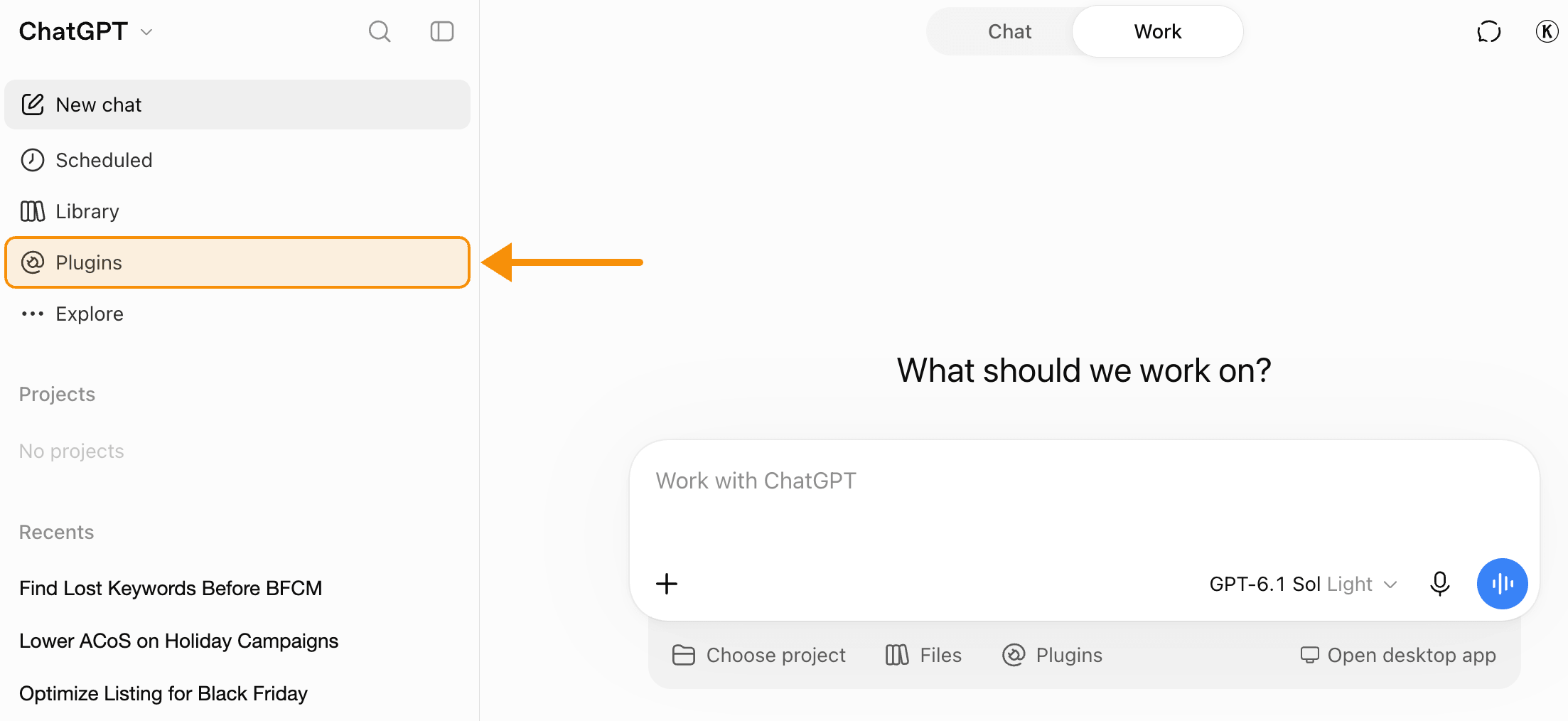
For ChatGPT: open Plugins, search for Sellerise, select Add, and authorize your Sellerise account.

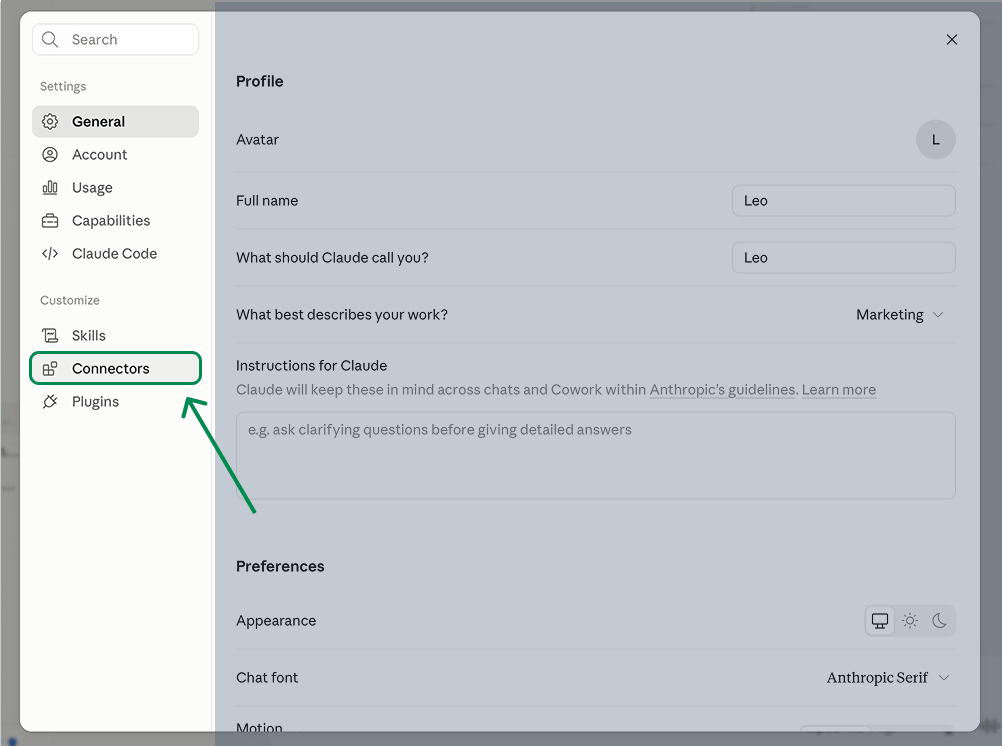
For Claude: open Settings -> Connectors, search for Sellerise, select Connect, and authorize your account. Enable Sellerise in your conversation if needed.

Copy and paste this prompt

[Using my connected Sellerise data, analyze ASIN [INSERT ASIN] in marketplace [INSERT MARKETPLACE] for [DATE RANGE]. I’m preparing for Black Friday and want to avoid wasted PPC spend.

1) From SQP Insights, compare impression share, click share, and sales/purchase share for relevant keywords. Find terms with strong sales share relative to their visibility.

2) Compare CTR with market CTR and CVR with market CVR where available. Identify keywords with low CTR but strong conversion, and explain what should be fixed before scaling ads.

3) Find terms with meaningful search volume, low impression share, and existing sales. Flag small samples as unproven.

4) Review Lost keywords and compare previous sales, current status, and PPC search term data where available.

5) Group recommendations into TEST/SCALE, FIX FIRST, RECOVER, and REDUCE/EXCLUDE. For each keyword, show the data, the specific next action, and the reason.

Use my actual numbers only. If spend, margin, ACoS, previous-period data, or a metric is unavailable, say so rather than guessing.

Generate it all in colorful graphs so it’s easy to understand.]

Sellerise Team, Contributor

Ready to scale your Amazon business?

Free 7 days trial. No Credit Card Required.