Listing Quality Audit with AI: Find Where Your Amazon Listing Is Losing Sales

Sellerise Team, Contributor

7 min read -

Updated:

Getting traffic but not enough sales? Learn how to use ChatGPT or Claude with your actual Amazon performance data to find conversion problems and decide what to fix first.

Your Amazon impressions are growing, your advertising is running, and shoppers are finding your products.

But sales aren’t increasing the way you expected.

The problem isn’t always your advertising. Sometimes, shoppers see your product but don’t click. Other times, they visit your listing but leave without buying.

Before you increase your PPC budget or redesign your entire listing, you need to understand where you’re losing potential buyers.

The good news? You can find these weak spots using Sellerise SQP Insights. And with Sellerise connected to ChatGPT or Claude, you can ask AI to analyze the data and recommend what to investigate first.

Here’s how.


1. Understand Where Your Amazon Listing Is Losing Sales

There are 4 main stages:

Impressions -> Clicks -> Add-to-Carts -> Purchases

Each stage tells you something different:

  • Impressions: How often your product appears in Amazon search results.
  • Clicks: How often shoppers click on your product.
  • Add-to-Carts: How often shoppers add your product to their cart.
  • Purchases: How often shoppers complete a purchase attributed to that search query.

But looking at these numbers alone isn’t enough.

You also need to compare your product’s performance with the broader market for the same search queries.

For example, your product might be getting plenty of impressions but capturing a much smaller share of clicks than expected.

That’s a signal worth investigating.

Sellerise SQP Insights brings these metrics together and helps you compare your performance with the market.

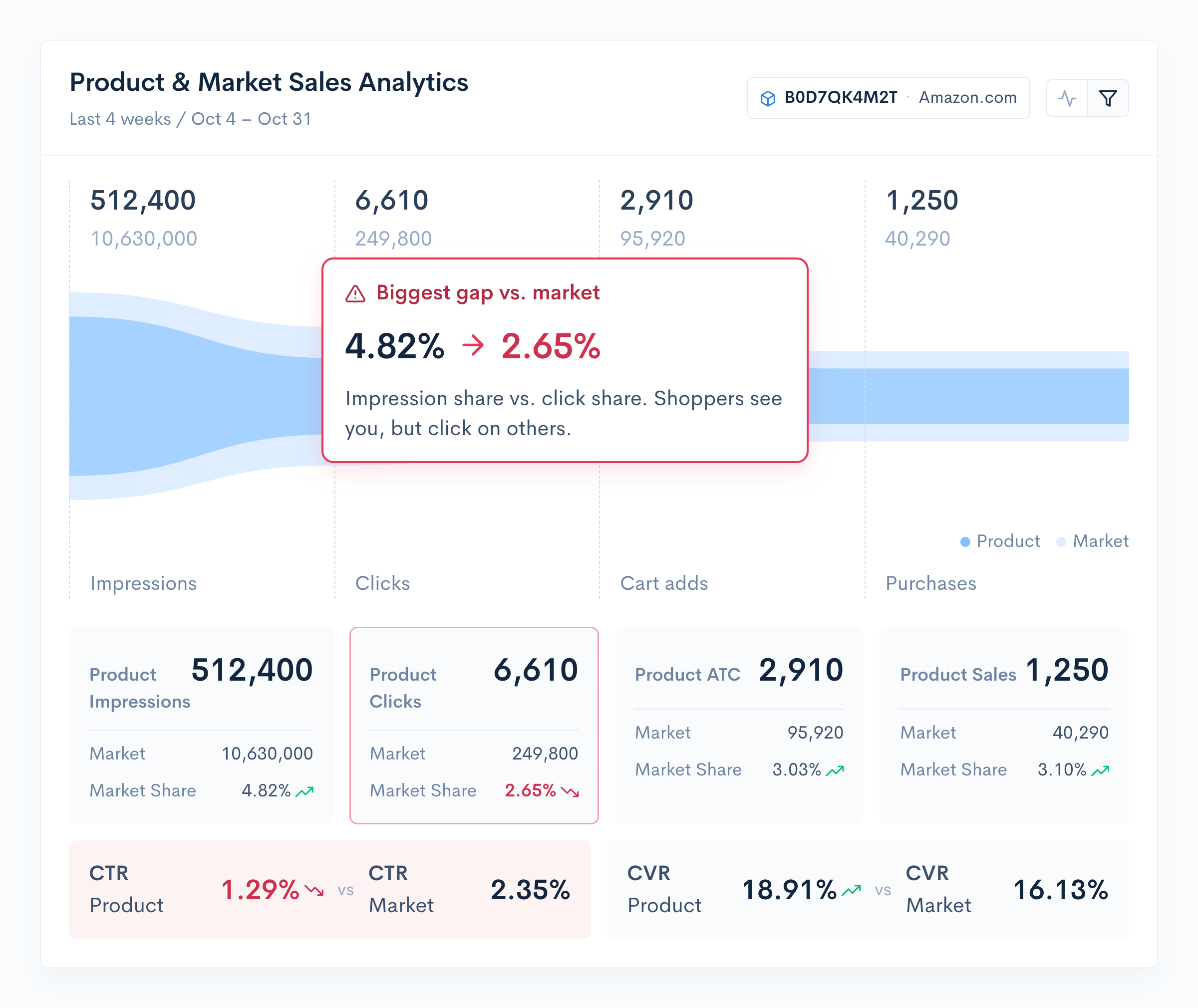
Sellerise SQP Insights dashboard comparing Amazon product and market performance, highlighting 4.82% impression share versus 2.65% click share.

The goal isn’t just to find where the numbers drop. It’s to identify which stage is underperforming relative to the market.


2. Connect Sellerise to ChatGPT or Claude

You don’t have to analyze every keyword or funnel metric manually.

With Sellerise MCP, you can connect your Amazon performance data to ChatGPT or Claude and ask AI to analyze it for you.

Sellerise provides the data. AI helps you interpret the numbers, identify potential problems, and decide what deserves attention.


How to connect Sellerise

  1. Open ChatGPT or Claude.

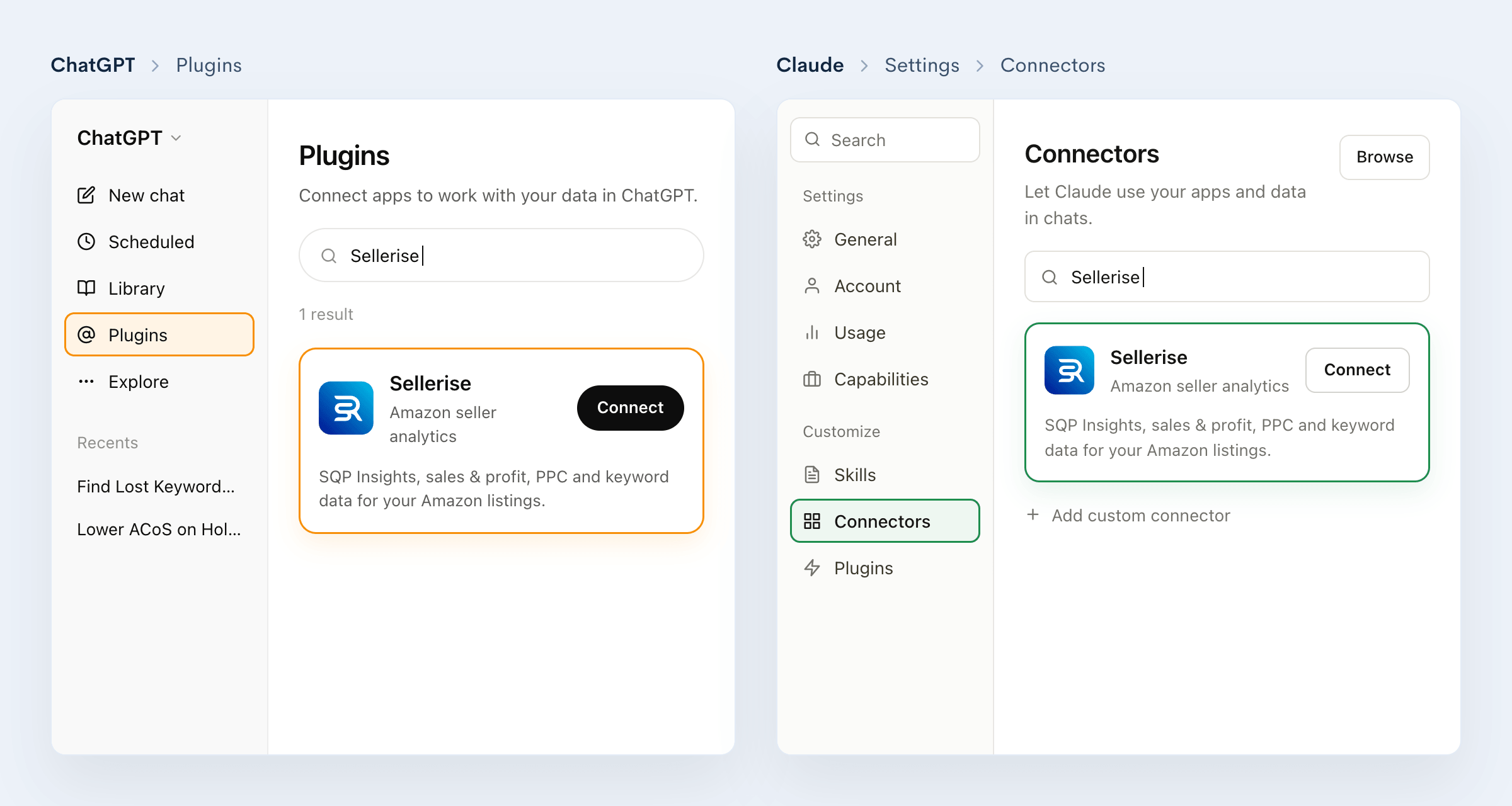
  2. Find Sellerise in ChatGPT’s Apps or Claude’s Connectors.

  3. Click Connect or Add.

  4. Sign in to your Sellerise account and authorize the connection.

  5. Start a conversation using your connected Sellerise data.

That’s it. No manual spreadsheets or data exports required for supported reports.

Connect Sellerise to ChatGPT or Claude.

3. Copy This Prompt to Audit Your Listing with AI

Once you’ve connected Sellerise, open ChatGPT or Claude and paste this prompt.

Replace the placeholders with your product’s ASIN and marketplace.


Amazon Listing Conversion Audit Prompt

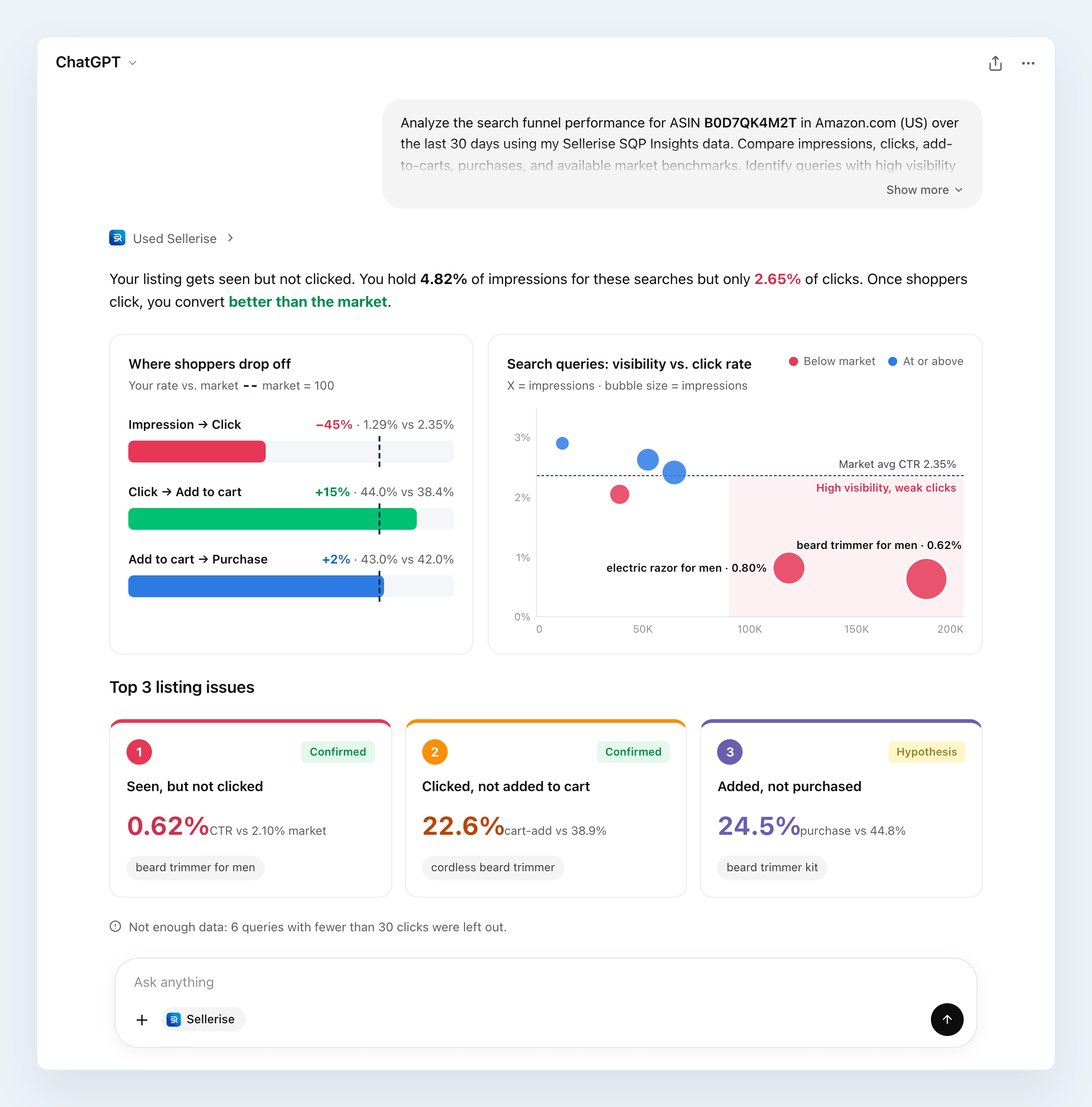
Analyze the search funnel performance for ASIN [ASIN] in [marketplace] over the last 30 days using my Sellerise SQP Insights data.

Compare impressions, clicks, add-to-carts, purchases, and available market benchmarks.

Identify:

  1. Search queries with high visibility but weak click performance.

  2. Queries with strong click performance but weak add-to-cart or purchase conversion.

  3. Where the biggest customer drop-offs occur.

Give me the top 3 potential listing issues, supporting metrics, possible causes, and specific actions to investigate or test first. Separate confirmed findings from hypotheses. Flag insufficient data. Present everything in colorful graphs so it’s easy to understand.

What you’ll get from this analysis:

  • A breakdown of your product’s search funnel performance.
  • Comparisons with available market data.
  • Search queries where your product is underperforming.
  • 3 potential problems worth investigating.
  • Recommended next actions, prioritized by the available evidence.

The results depend on the data available for your selected ASIN and marketplace. SQP reporting isn’t instantaneous, so the latest 30 days may not be fully available. In that case, ask AI to use the latest four complete reporting weeks and specify the dates analyzed.

If your AI assistant can’t generate graphs, ask it to organize the same findings in a clear table.

Now, here’s how to understand the report and actually use it.


4. 3 Common Amazon Listing Problems & How to Fix Them

Problem #1: High Impressions, Low Clicks

What it means: Shoppers are seeing your product in search results, but relatively few are clicking.

Your listing may be appearing for relevant keywords, but something about your search result isn’t convincing shoppers to choose your product.

What to check:

  • Main image: Does it stand out from competing products? Is the product immediately recognizable
  • Price: Is your product significantly more expensive than similar options without a clear reason?
  • Ratings and reviews: Are competitors offering stronger ratings or more social proof?
  • Title: Does it clearly communicate what you’re selling and match the search query?
  • Coupons: Are competing products offering discounts that make their prices more attractive?
  • Keyword relevance: Is your product appearing for searches that don’t closely match what you sell?

What to do next:

Find the search queries with high impression counts but weak click performance compared with the market.

Check how your listing appears for those searches and compare it with competitors.

Start by testing the most likely issues, such as your main image or offer.

Important: Low click performance doesn’t automatically prove your image is the problem. Search placement and keyword relevance can also influence clicks.


Problem #2: Plenty of Clicks, Few Add-to-Carts

What it means: Shoppers are interested enough to open your product listing, but relatively few take the next step.

Your main image or search result may be doing its job. Now you need to investigate what happens after shoppers arrive.

What to check:

  • Images 2-6: Do they clearly explain product features, benefits, size, and use cases?
  • Videos: Can shoppers easily understand how the product works?
  • Description and A+ Content: Are you answering the questions buyers commonly have?
  • Reviews: Are customers reporting issues that could discourage potential buyers
  • Competitor pricing: Are similar products offering better value?
  • Product expectations: Does the listing deliver what shoppers expected when they clicked?

What to do next:

Identify queries where your product captures a healthy share of clicks but struggles to generate add-to-carts compared with the market.

Review your listing from a customer’s perspective.

For example, if you’re selling a kitchen appliance, does your listing clearly show its dimensions, capabilities, and what comes in the box?

If shoppers can’t find important information quickly, they may leave and choose a competitor.

Start by improving the information that’s missing or unclear.


Problem #3: Lots of Add-to-Carts, Few Purchases

What it means: Shoppers show purchase intent, but relatively few purchases are recorded.

Your product may be appealing enough to get added to the cart, yet something could still be discouraging the final purchase.

What to check:

  • Delivery times: Can competitors deliver the same product faster?
  • Final price: Are shipping charges or other costs making your offer less attractive?
  • Availability: Is your product consistently in stock
  • Competitive offers: Are shoppers finding a better price, delivery option, or overall deal elsewhere?

What to do next:

Check queries where add-to-cart performance is strong but purchase performance falls behind the market.

Review your final offer, delivery promise, pricing, and stock availability.

If your product takes a week to arrive while competitors offer next-day delivery, that may be worth investigating before spending more on advertising.

Remember that SQP shows search-attributed performance, not an exact record of individual shoppers abandoning checkout. Treat this stage as a signal to investigate, not proof of a specific checkout problem.


5. What Should You Fix First?

Finding problems is useful. Knowing which one to prioritize is even more important.

Your AI report should help you narrow your analysis to three issues instead of giving you a long list of random recommendations.

Here’s a simple framework:

What the data showsWhat to investigate first
Strong visibility, weak clicksSearch-result appeal: main image, price, ratings, title
Strong clicks, weak add-to-cartsListing content, product value, competitor offers
Strong add-to-carts, weak purchasesDelivery, availability, final price

When prioritizing changes, consider 3 things:

1. How big is the opportunity?

A weak conversion rate on a high-volume, highly relevant search query may matter more than the same problem on a keyword receiving only a few clicks.

2. How reliable is the data?

Don’t redesign your listing because of 2 clicks and 0 sales. Look for meaningful volume and consistent patterns across reporting periods.

3. How easy is the issue to investigate or test?

Some problems are relatively easy to address, such as missing product information. Others, such as pricing or delivery speed, may require broader business decisions.

Make one meaningful change at a time when possible, and monitor the relevant performance metrics afterward.

Ask AI to prioritize your fixes

If your first report identifies several issues, follow up with:

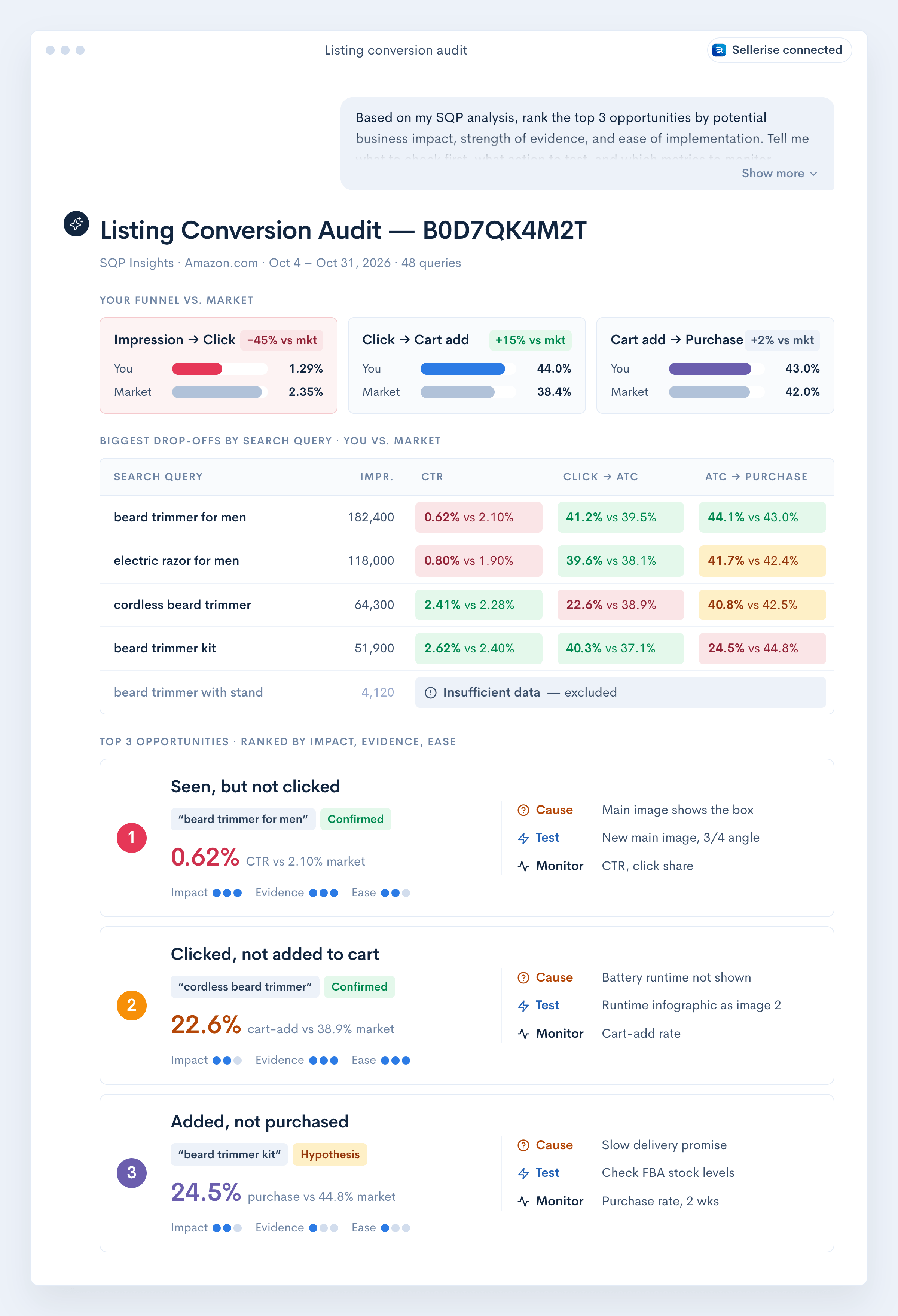
Based on my SQP analysis, rank the top 3 opportunities by potential business impact, strength of evidence, and ease of implementation. Tell me what to check first, what action to test, and which metrics to monitor afterward.

This turns your initial analysis into a practical action plan.

Final Takeaway

More impressions don’t automatically mean more sales.

Your Amazon listing can lose opportunities at several stages, and each one requires a different approach.

Instead of guessing, use Sellerise SQP Insights to understand your search funnel and compare your performance with the market.

Then connect Sellerise to ChatGPT or Claude to turn those numbers into a prioritized list of things to investigate and test.

Sellerise Team, Contributor

Ready to scale your Amazon business?

Free 7 days trial. No Credit Card Required.