Free Amazon Product Research Guide

Sellerise Team, Contributor

8 min read -

Updated:

Good product research no longer has to begin with paid tools. Today, sellers can do meaningful first-stage research for free directly on Amazon with the Sellerise Chrome extension. This gives you a practical way to evaluate a product idea before spending more time or money on it.

You can quickly look at the niche, study competing listings, review what customers like and dislike, and identify areas where a product could be improved. That alone can help you avoid many weak opportunities early.

Then, once a product looks promising, you can decide whether it is worth deeper validation. In this guide, we will walk through that process step by step.


1. Start With a Simple Keyword

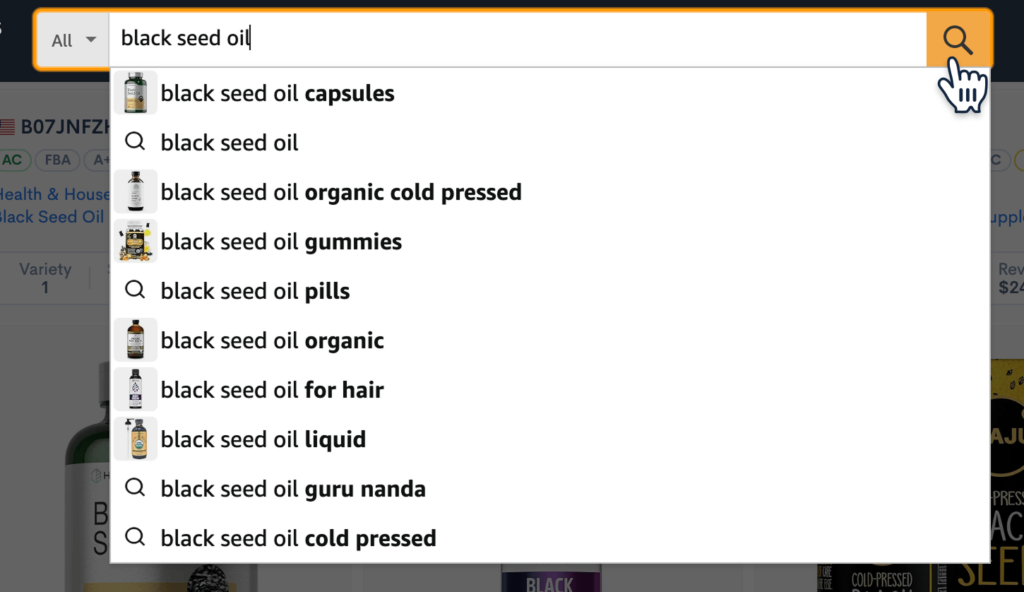
Every free product research process starts with a search term. It does not need to be perfect. Just use a product phrase a real shopper would type into Amazon, like “cat nail cutter,” “kitchen blender,” or “shower steamers.” This keyword is your entry point into the niche.

Amazon search bar with the keyword and autocomplete suggestions for product research.

At this stage, your goal is not to prove the product is great. You just want to open the market and see whether it looks worth exploring.


2. Scan the Search Results First

Before clicking any listing, look at the results page as a whole. This gives you a quick feel for the market.

Ask yourself:

  • Do the products all look similar?
  • Are there obvious bestsellers?
  • Is one brand dominating?
  • Are sellers competing on price, design, or features?
  • Does the niche look crowded or still open?

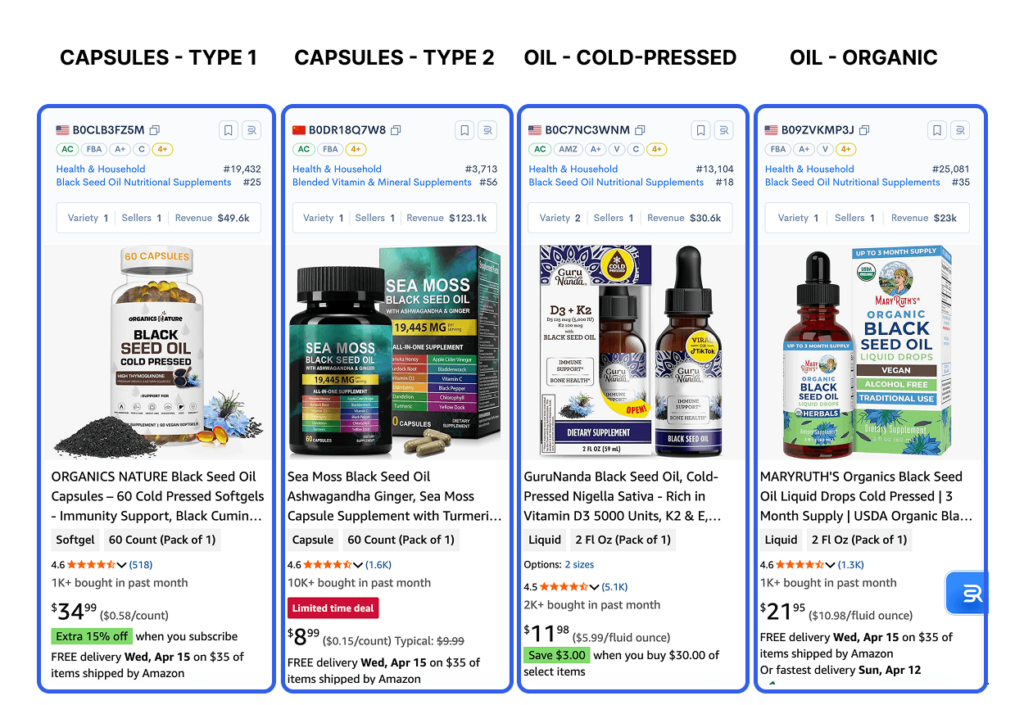
Sometimes you can tell in under a minute that a niche is overloaded with near-identical offers. Other times, you will notice that the market has demand, but the listings are visually weak or poorly differentiated. That is often where opportunity begins.


3. Check If the Niche Has Real Demand

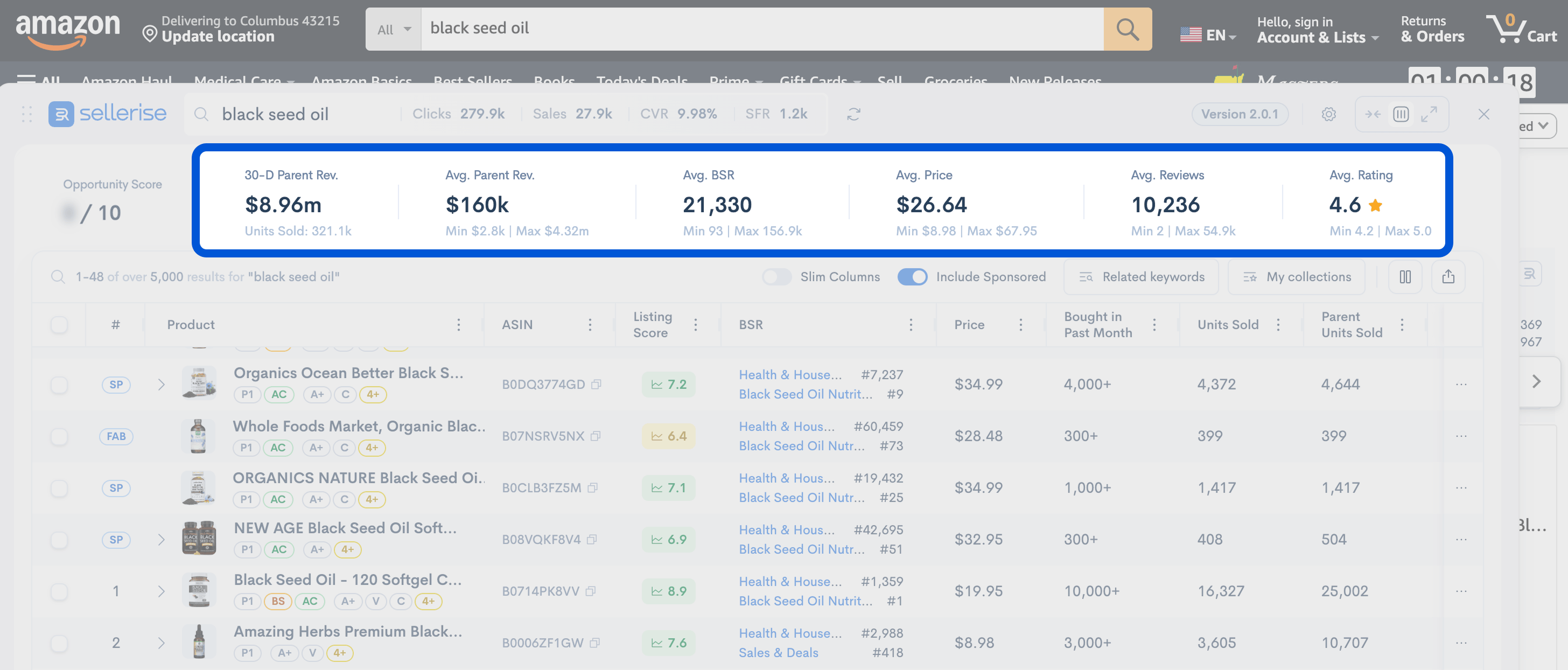
A niche is only interesting if buyers are actually buying. With free Sellerise product research Chrome extension, you can review the niche directly on Amazon and look for signs of real demand.

Look for:

  • several listings with meaningful sales activity
  • more than one seller getting traction
  • products selling at a workable price range
  • demand spread across the niche, not just one hero product

The key here is not to look for one hero product.

You want to see whether the niche has enough buying activity across several listings. That usually signals a healthier market than one where all the attention is concentrated in a single dominant offer.

If demand appears distributed, the niche becomes more worth studying. If only one listing seems to carry the category, the opportunity may be much weaker than it first appears.


4. Check Market Trends

Amazon shows you what is happening inside the marketplace. Google Trends helps you zoom out and see whether broader interest in the product is stable.

This is an important step because a niche can look attractive on Amazon at first glance while broader demand is fading, seasonal, or driven by temporary hype.

Search your main keyword in Google Trends and look at:

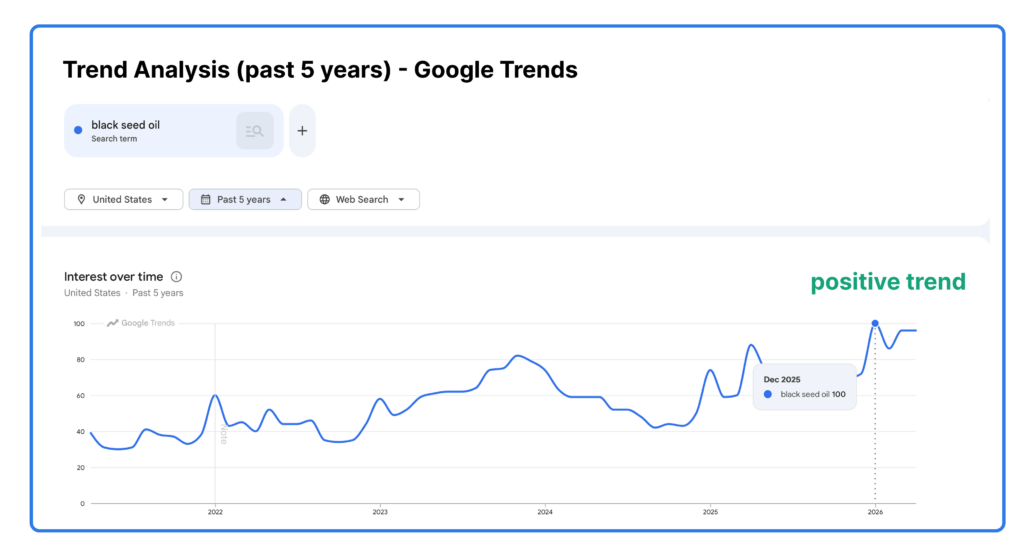
  • long-term interest (5-year period)
  • steady growth or decline
Google Trends five-year demand chart for a keyword.
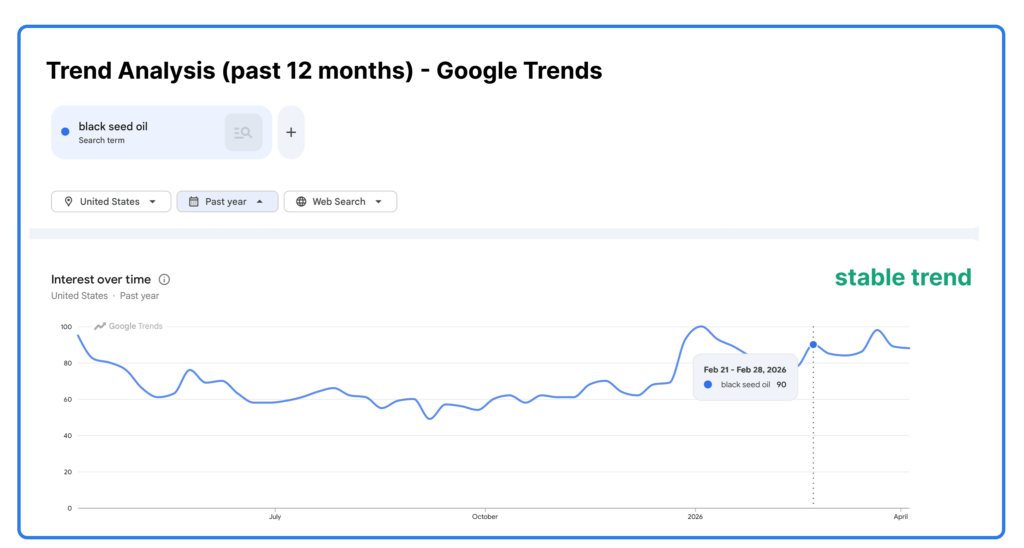
  • how the niche performs during the last 12 months
  • clear seasonality

It helps you understand whether the product lives in a stable market or whether you may be looking at temporary noise.


5. Look at Smaller/New Sellers Too

One of the best ways to judge whether a niche is still open is to look beyond the biggest listings.

If page one is filled only with products that have thousands of reviews and years of momentum, entering that market may be much harder.

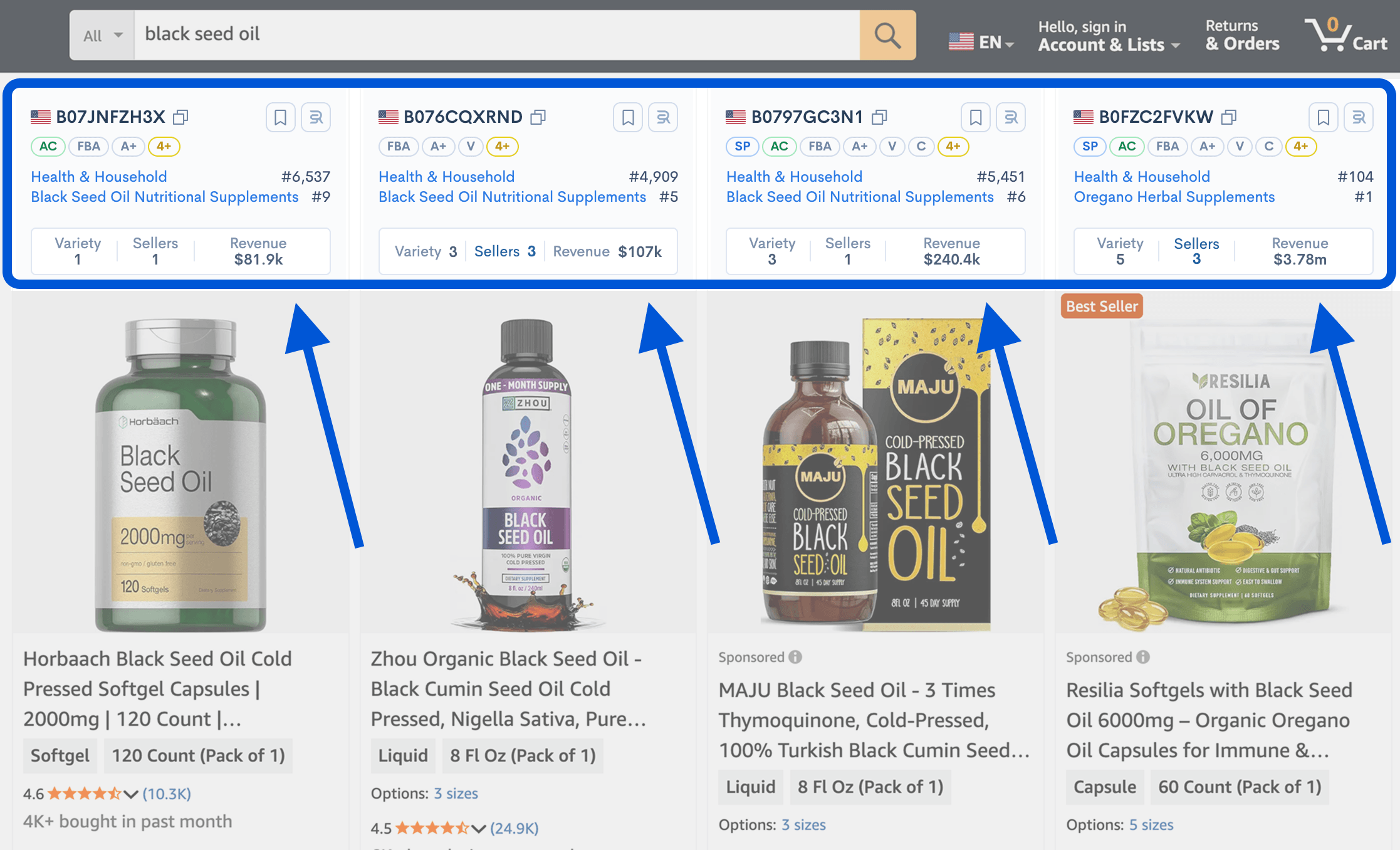
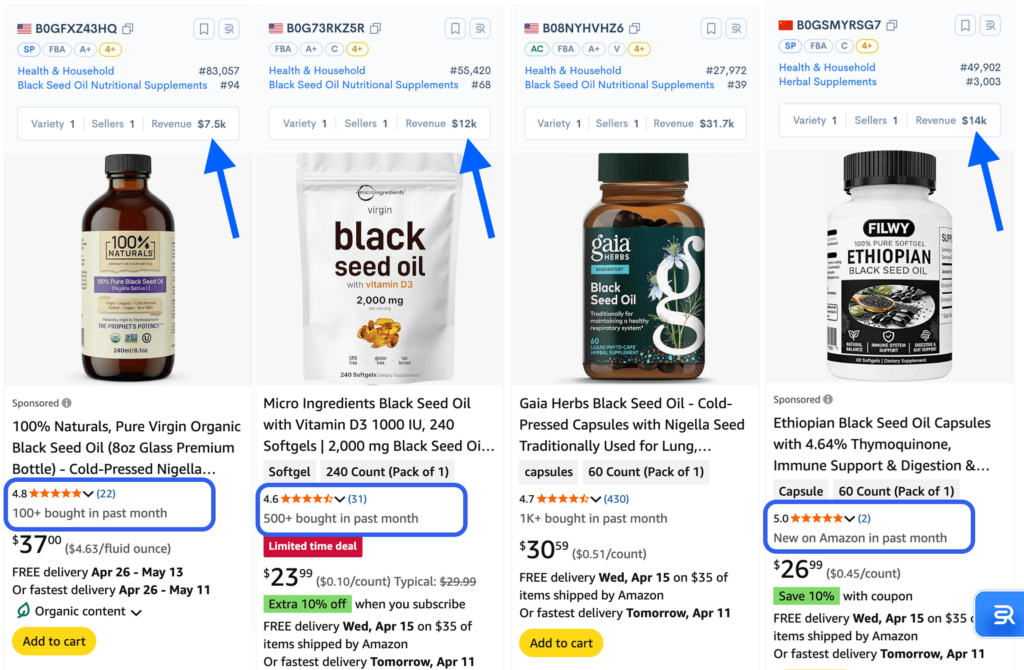
But when you notice sellers with relatively low review counts still getting traction, that tells you something important: buyers are still willing to consider newer or less established offers.

Look for products with:

  • fewer reviews than the top sellers
  • visible traction despite lower social proof
  • signs that newer offers can still compete
Amazon listings compared by revenue, star rating, review count, and bought in past month data.

This does not guarantee an easy entry. But it does suggest that the niche may still allow movement.

A market where smaller or newer sellers can still gain visibility is usually much more interesting than one where only entrenched players win.


6. Check Listing Quality to Spot Weaknesses

Strong demand becomes much more attractive when the current listings are not especially strong.

That is why reviewing listing quality is such an important step.

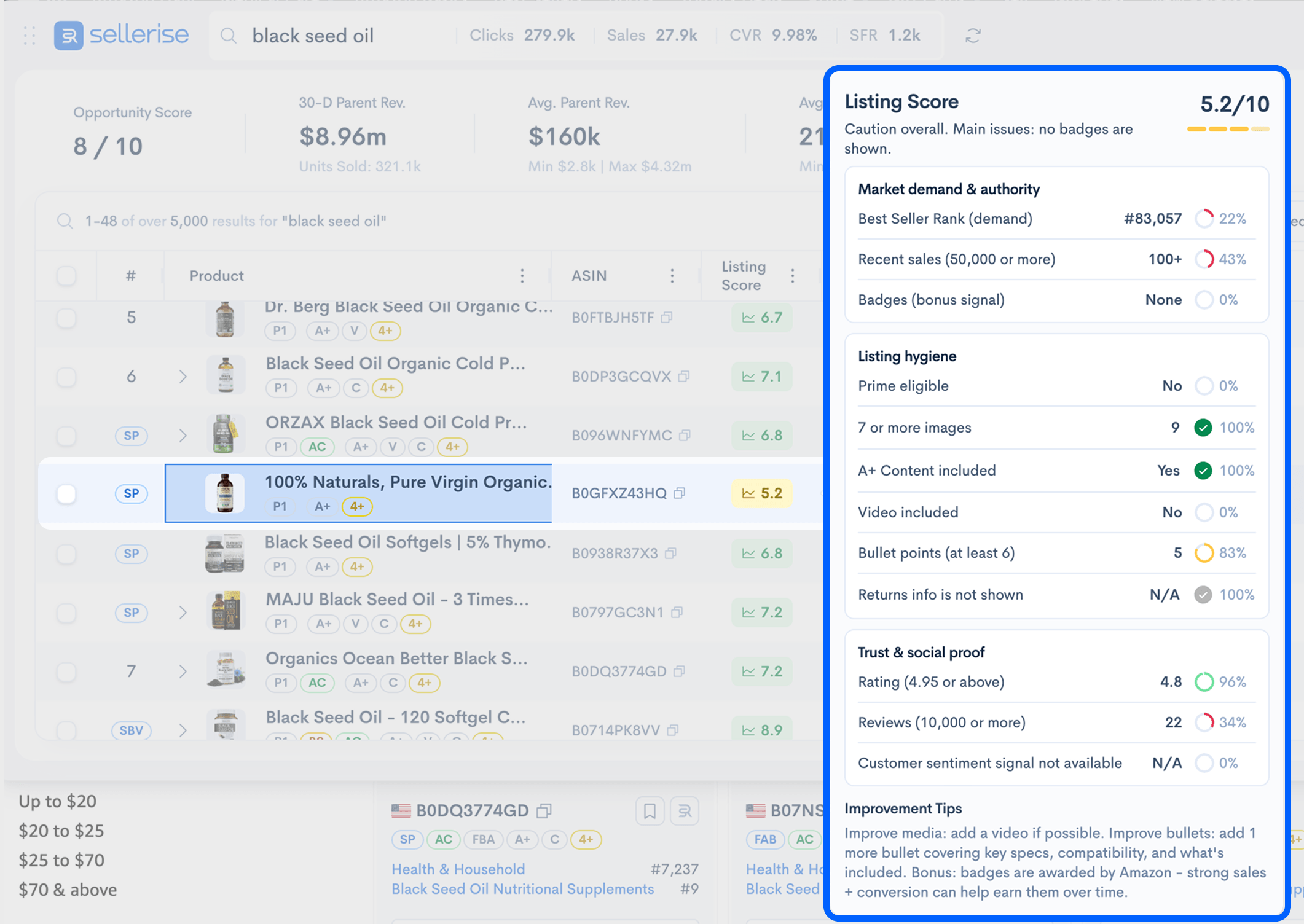
Instead of manually judging every listing from scratch, the free Sellerise extension helps you evaluate listing score and quickly identify weak points in the offer presentation.

Look for issues such as:

  • weak title structure
  • low-quality or repetitive images
  • unclear benefit communication
  • poor bullet organization
  • no video
  • weak A+ content
  • lack of trust-building elements

This is valuable because if a product sells well despite weak execution, that can be a real opportunity.


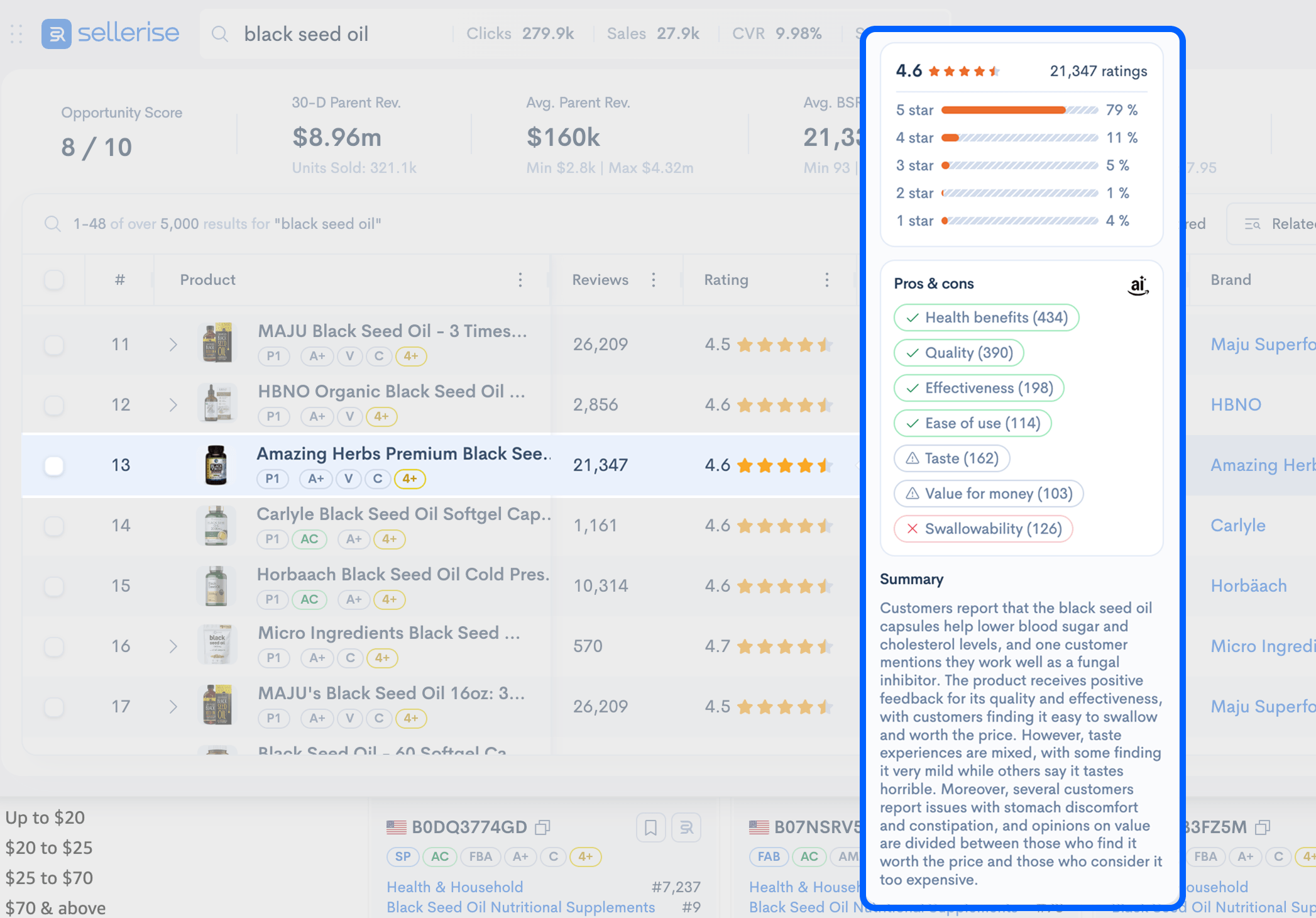
7. Read Reviews for Product Ideas

Revenue tells you that people buy.

Reviews tell you why.

This is where free product research becomes much more strategic.

When you open product listings, study the reviews to understand what buyers consistently value and what keeps disappointing them. Sellerise Chrome extension helps speed up this step by making review analysis easier directly on the listing and free.

Look for repeated patterns in:

  • what customers praise
  • what they complain about
  • what feels missing
  • what seems fixable

This is one of the most useful parts of the entire process because repeated complaints often point directly to product opportunity.

For example, buyers may like the product but complain about size, durability, packaging, or ease of use. 

That kind of information is much more useful than generic guessing. It helps you understand not only whether the niche is active, but also what a better version of the product might need to solve.


8. Identify the Baseline Expectations

As you read listings and reviews, you will notice certain features appearing again and again. These are often not differentiators. They are simply what buyers expect.

Depending on the niche, that may include things like:

  • BPA-free
  • leakproof
  • stainless steel
  • travel-friendly
  • rechargeable

These are not always differentiators. In many cases, they are simply the baseline.

This is an important distinction because a lot of sellers think they found a unique angle when they really just found the minimum standard of the market.

Before you think about how to stand out, first define what your product would likely need just to be considered competitive.

That helps you avoid weak positioning and gives you a much clearer view of where real differentiation could begin.


9. Define Exactly Where Your Offer Could Win

Now ask the key question: where could your offer be better?

Could you improve:

  • design
  • packaging
  • size or format
  • branding
  • convenience
  • trust signals
  • audience positioning

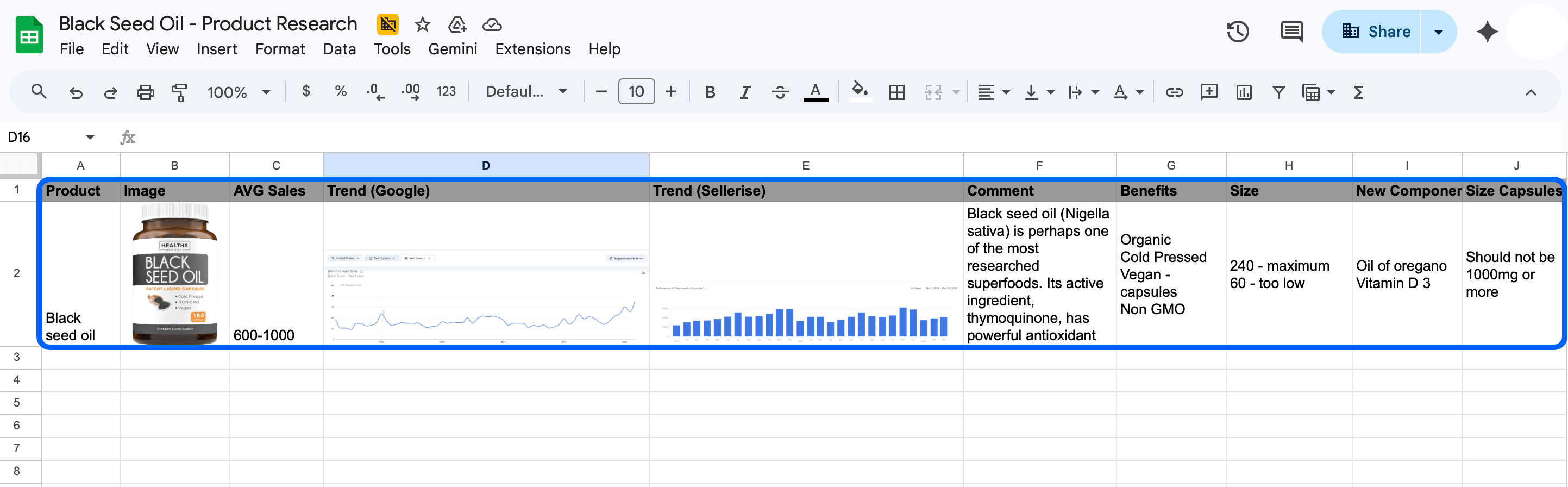
To make the process easier, keep notes on what you discover and where you see room for improvement.

But a niche where buyers are clearly telling you what is missing, where listings are still weak, or where the market feels repetitive can be much more promising.

This is where you stop thinking like someone browsing Amazon and start thinking like someone building a better offer.


10. Check Suppliers Early

A product idea is not useful if it does not make sense financially.

Once a niche looks promising, do a basic sourcing sanity check before getting too attached to it.

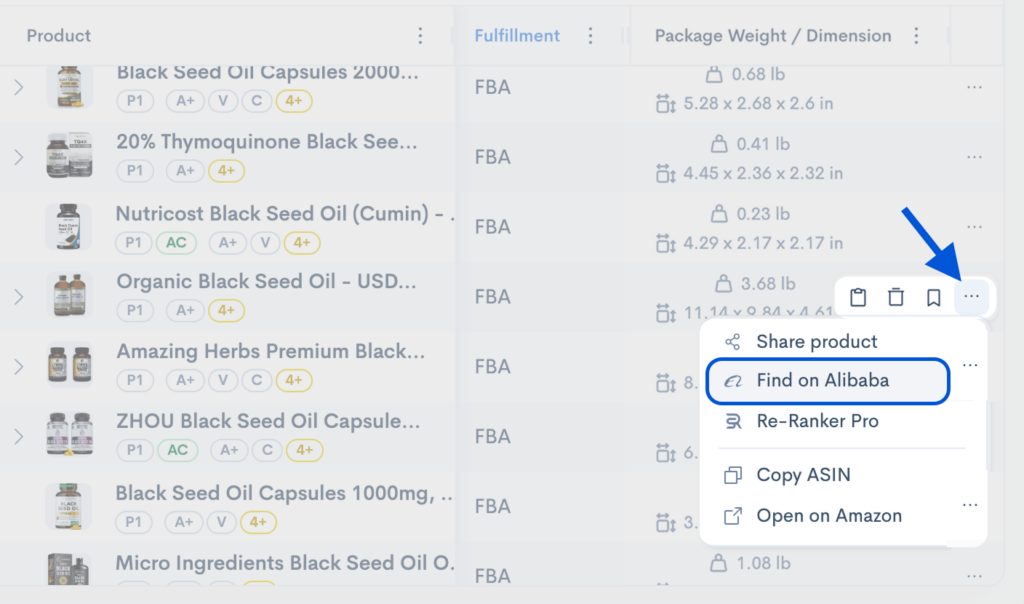
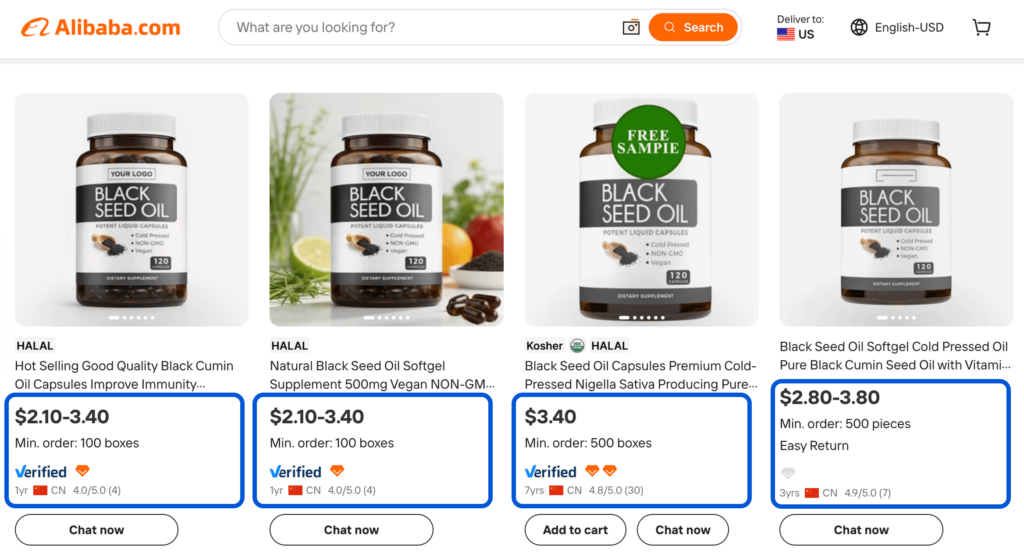
With the Sellerise extension, you can use the free supplier match feature to quickly move from Amazon research to early supplier exploration. This gives you a fast way to gauge whether the product seems realistically sourceable and whether the cost range might support the market price you are seeing on Amazon.

At this stage, you are not trying to build a full sourcing model.

You are simply asking:

  • Does this product seem simple enough to source?
  • Does it look too expensive or complicated to produce?
Supplier search results for black seed oil showing prices and minimum order quantities.
  • Does the price on Amazon leave room for profit?
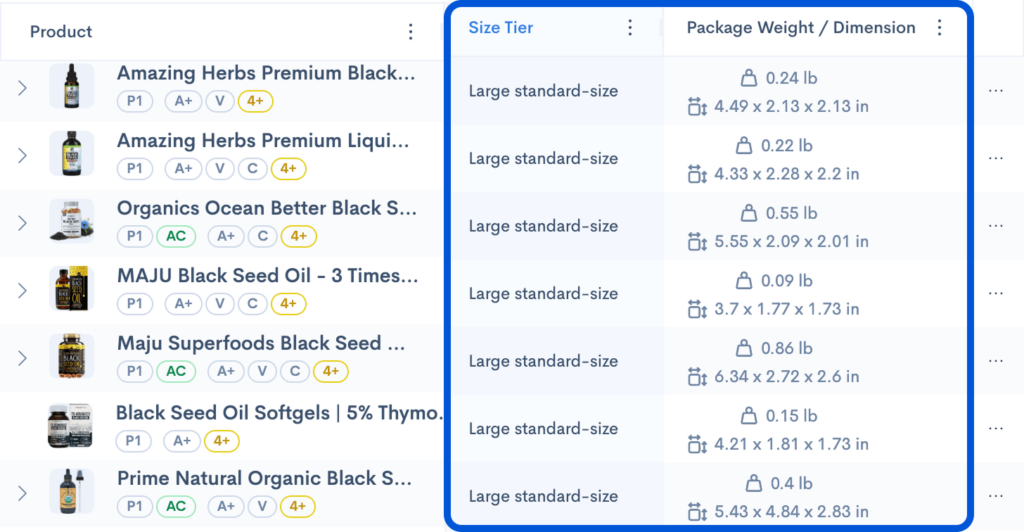
  • Would packaging, size, or quality requirements likely increase cost too much? You can check the size of the product you consider to sell on Amazon in Sellerise Chrome extension for free. This will help you communicate with suppliers efficiently and make decision making faster.
  • Is the product still attractive once sourcing enters the conversation?

This step keeps your free research grounded. A product may look appealing from the front end, but once you start thinking about supplier cost and execution, the opportunity may feel much less attractive.


11. Decide Whether to Go Deeper

By this point, you should be able to make a smart first-pass decision.

You do not need to know everything yet. But you should know enough to decide whether the product belongs on your shortlist or whether it should be rejected.

Move forward if you see:

  • real demand
  • stable outside interest
  • smaller sellers getting traction
  • weak points in current listings
  • customer complaints you could solve
  • workable sourcing

Move on if you see:

  • weak demand
  • unstable interest
  • a niche dominated by major sellers only
  • highly optimized listings
  • no clear way to improve the offer
  • sourcing concerns that hurt margins

And this is also the natural point where deeper analysis can start to make sense.

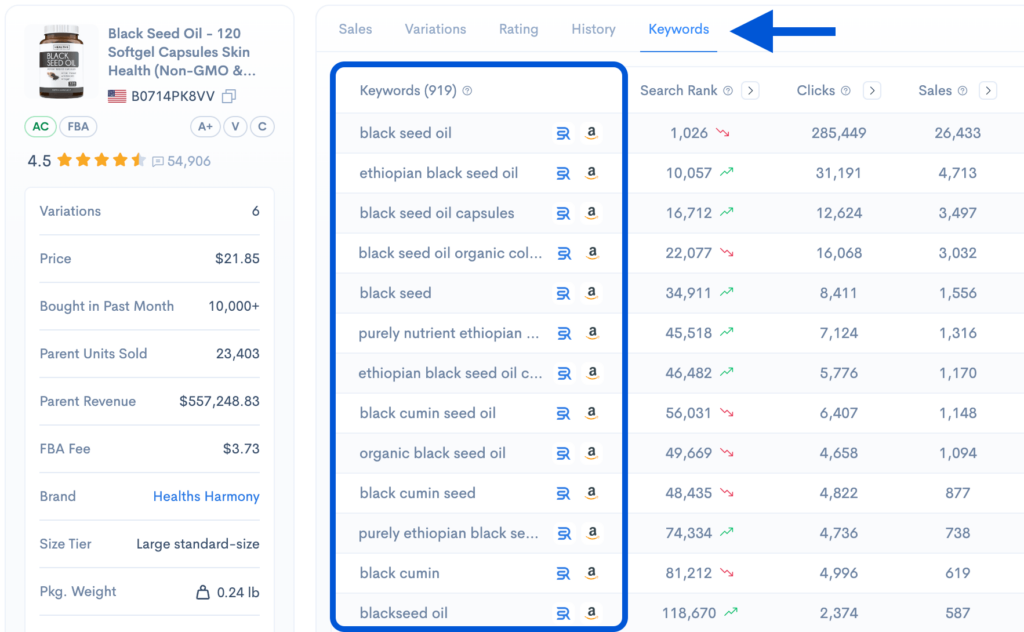
If a product passes your free validation workflow, that is when the extension’s more advanced paid features can help you go further. For example, this is where you may want to look at:

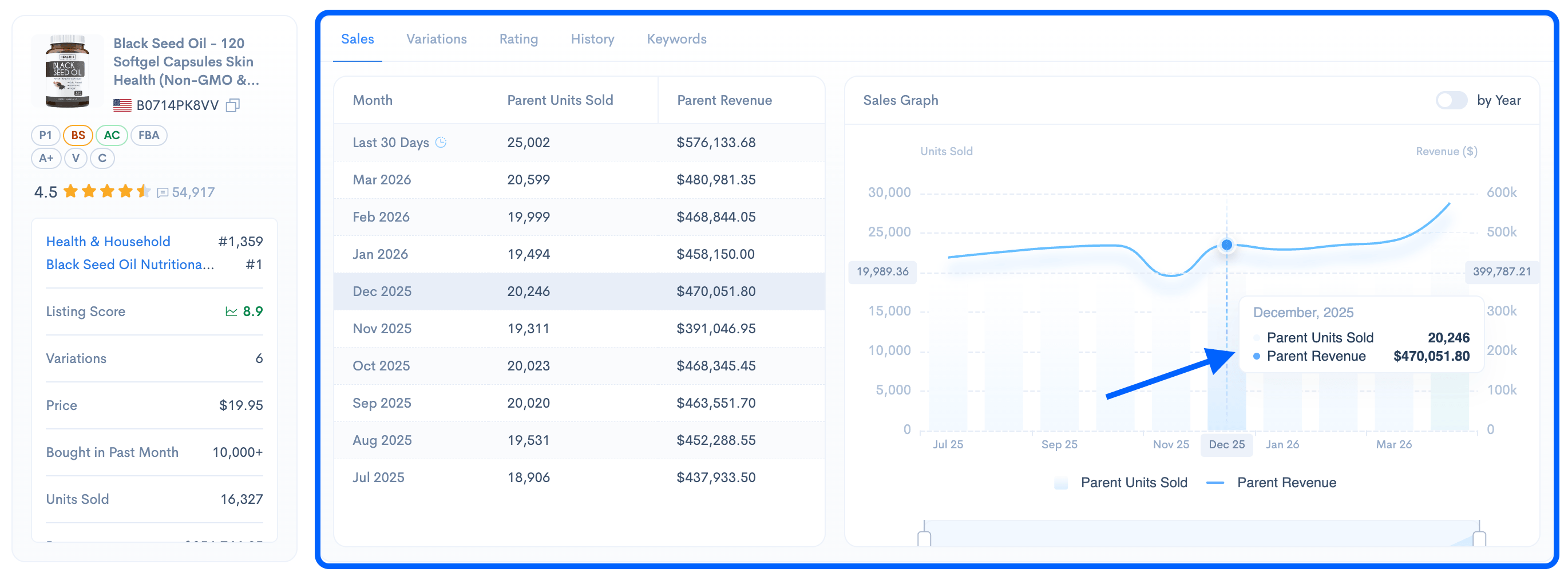
  • sales history
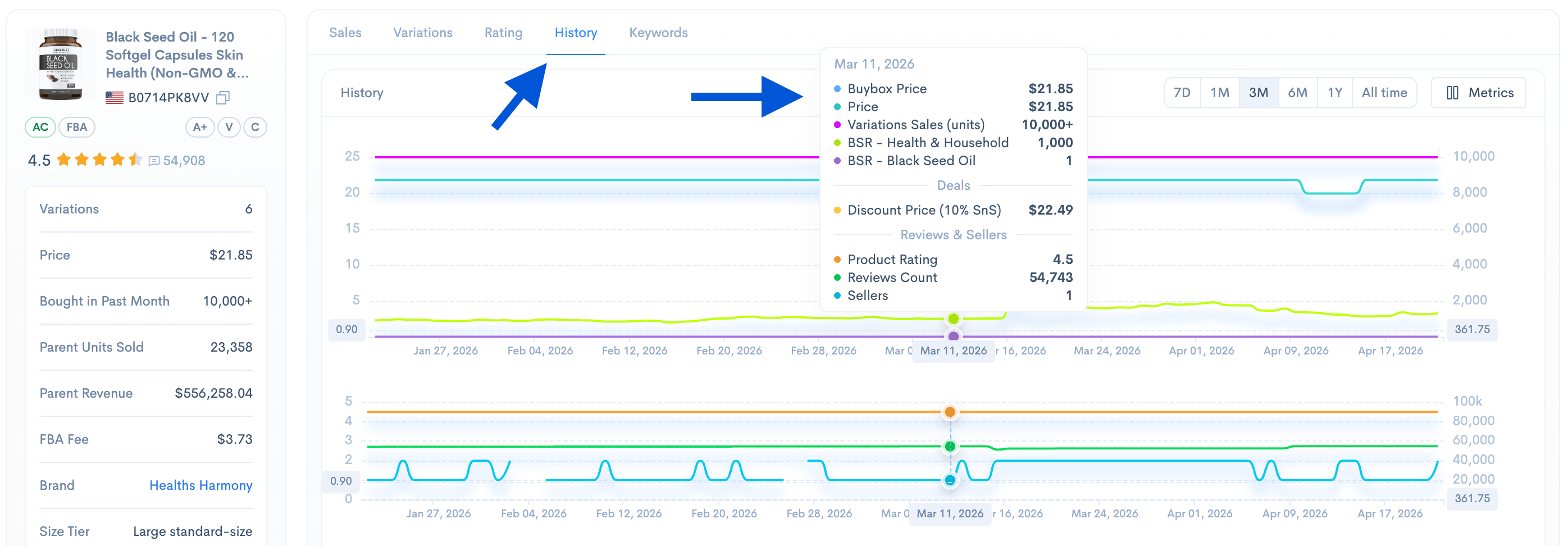
  • price and Buy Box history
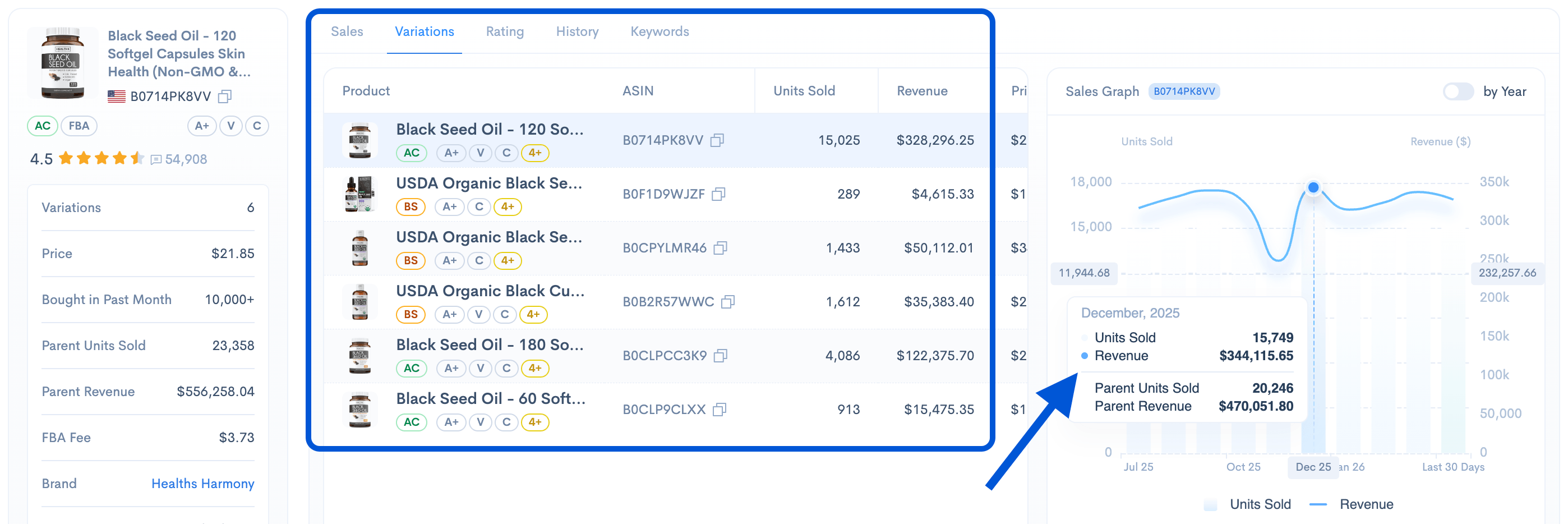
  • variation-level analytics history
  • product’s top-performing keyword list and their performance
Sellerise keyword analysis table showing top Amazon product keywords, clicks, sales, conversion rate, and search rank.

Those features are not necessary for the first screening. But they become extremely useful when a niche already looks promising and you want more confidence before moving into sourcing, launch planning, or a more serious competitive analysis.

Need a deeper workflow? Read our complete guide to Amazon product research.

Remember that it’s always better to research a product thoroughly before launching, because uncompleted research can lead to much bigger losses later. Spending more time validating an idea upfront is far less costly than investing money into a product that was never strong enough to begin with.


Final Thoughts

Free Amazon product research should not feel random.

It should help you eliminate weak ideas quickly and focus your energy on products that actually deserve more attention.

That is what makes the free Sellerise Chrome Extension useful in the early stage. It allows you to do the research directly on Amazon, where the niche, the listings, the buyer feedback, and the first sourcing clues all come together in one workflow.

That is how better product research starts.

Sellerise Team, Contributor

Ready to scale your Amazon business?

Free 7 days trial. No Credit Card Required.